Nature Photographers Network
This is the preserved archive of the original Nature Photographers Network. The community continues at naturephotographers.network.
Great Blue Heron
‹ PreviousAvian GalleryNext ›

Great Blue Heron

by Carlette Bragg

Gallery: AvianPosted November 17, 200991 views5 comments
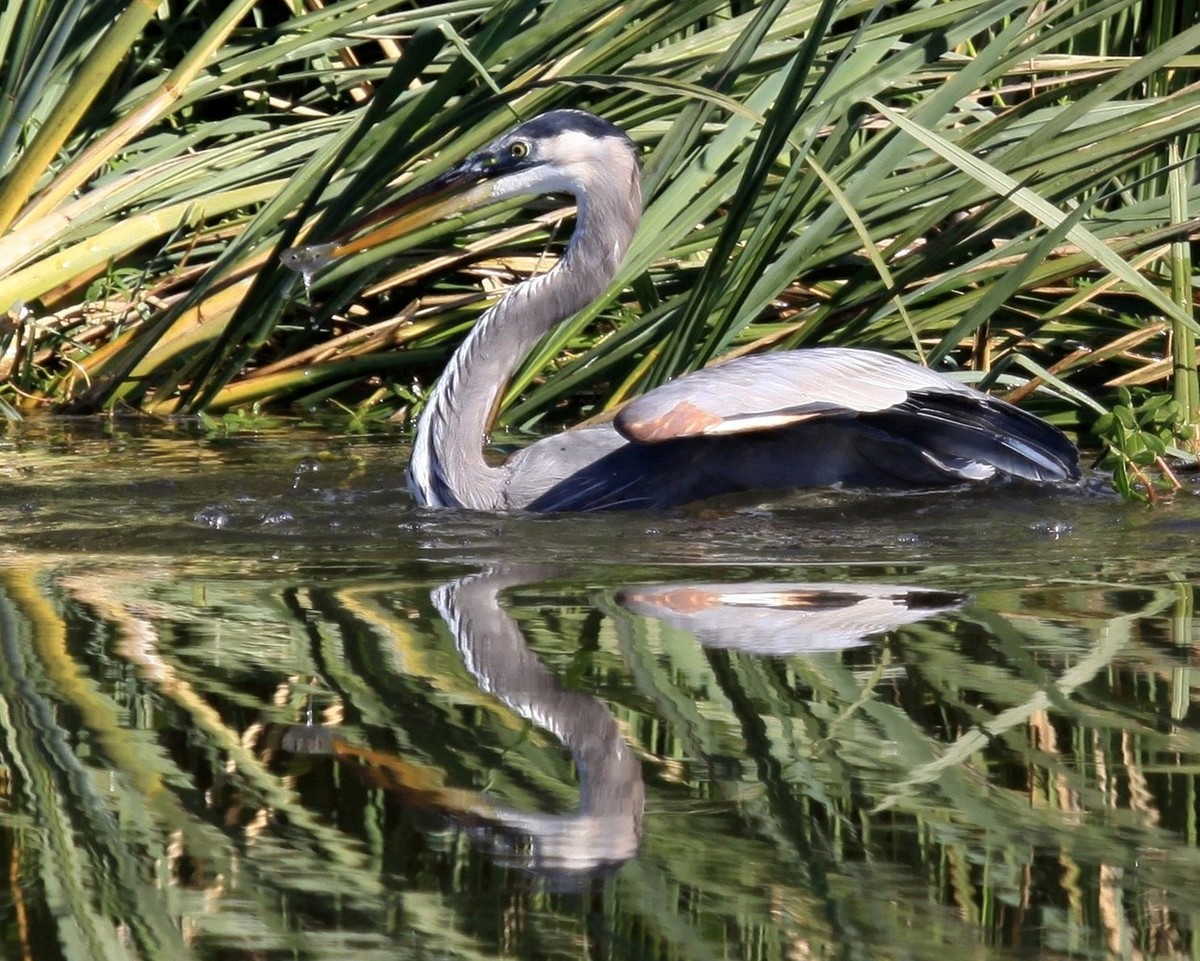
This was taken this weekend at a refuge close to home. All I have done to the photo is to crop by 45% and have darkened it a little. It was a nice sunny day. Before I do any other adjustments I would like to hear from all you which I consider experts. What suggestions would you have to make this photo stand out. I really like the photo, but ever time I try to enhance it, it does not look right. By the way, I use Paint Shop Pro Ultimate for my adjustments. Cant get Photo Shop to work. Thanks in advance for your C & C's.
I have included a larger version.
Canon 50d, HH, Shutter speed at 1/1250sec, focal length 275mm, F/5.6, ISO400, metering mode was pattern, exposure program normal, exposure compensation 0.67.

Carlette Bragg :rolleyes:

Comments

5 comments
Comment posted by Luke Ormand on November 17, 2009 at 7:46 PM
Looks like it's doing an impression of a swan. The photo is beautiful as presented, but it looks like the light was a bit harsh and it may be a bit contrasty... what's confusing is the shadow that the wing throws on the body. Because of the colors, shapes and reflection, it makes it look like part of the body, not like the wing extending toward the camera which is a bit confusing.

- Luke
Registered on February 4, 2009, 1093 Posts, 7035 Comments
Comment posted by Mia McPherson on November 17, 2009 at 9:31 PM
Carlette,

I can see why you like this image, I know I like how low the heron is in the water and the prey in the bill.

Some of the whites look a bit hot, I might try toning down the exposure of the whole image just slightly, reducing the contrast slightly.

Registered on June 25, 2007, 491 Posts, 12566 Comments
Comment posted by Michael Twaddell on November 17, 2009 at 10:47 PM
Hi Carlette. This is a tough one. It looks like this was taken later in the day, under bright sun. There really isn't a way around the harsh light. (I hope that I am not insulting your intelligence) I am not familiar with Paint Shop, but in Photoshop you can select different parts of the photo in different layers. If this were mine, I would select different parts of the photo, and make different adjustments to each part, until they were matched up to your satisfaction. This photo is unique, IMO, in that I have never seen a Heron in the water all the way up to its body as this one is. That's cool.
Registered on August 16, 2007, 199 Posts, 2132 Comments
Comment posted by Jim DeWitt on November 18, 2009 at 12:01 AM
This photo has a lot of promise. You should be very pleased with it. As others have noted, you have some post-processing challenges. You've got some good suggestions about that already.

I'm not sure what you mean by "Can't get Photoshop to work." If it won't install, contact Adobe. If you can't get it to do what you want, try Anon and Anon, Photoshop CS4 for Nature Photographers. I've found it to be a very useful introduction to PS.
Registered on August 28, 2006, 1240 Posts, 8506 Comments
Comment posted by Steve Balke on November 18, 2009 at 9:11 AM
This heron is sure a strange looking duck, Carlette. Really interesting image. Also, nice and sharp, well composed and well worth enhancing. I can't add much to what others have said except that I tend to use plug-ins in CS4 and found them to be much easier and faster than the equivalent CS4 procedures. :toast:
Registered on June 18, 2009, 229 Posts, 2915 Comments