Nature Photographers Network
This is the preserved archive of the original Nature Photographers Network. The community continues at naturephotographers.network.
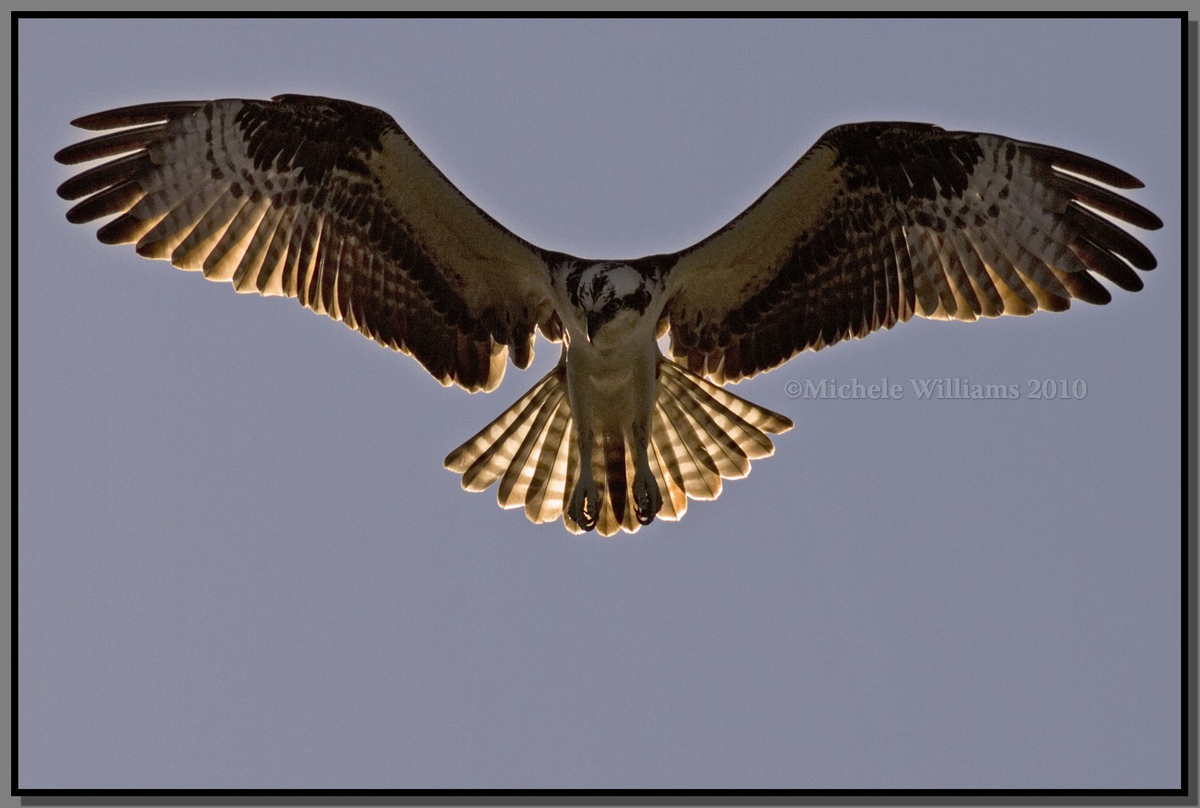
Osprey in the Sun and re-post
‹ PreviousAvian GalleryNext ›

Osprey in the Sun and re-post

by Michele Williams

Gallery: AvianPosted April 9, 2010152 views13 comments
I increased the exposure a bit in raw processing because the osprey was backlit and his body was very dark. I was trying to strike a balance between seeing the osprey details and avoiding clipping on the highlights. Any advice on proper exposure of backlit subjects would be much appreciated.

Canon 7D , 400 f5.6L, Av mode, ISO 400, 1/4000s at f/7.1
The image is cropped about 50%.

Comments

13 comments
Comment posted by Philip Hodgkins on April 9, 2010 at 6:26 AM
Welcome to NPN, Michelle! Excellent first post. I really like the backlit feathers. I think you have struck the right exposure balance on the bird. Backlit images are the most difficult to set up for.

The sky is more problematic with a global exposure change, causing a slight ghosting of the leading edge of the wings. An adjustment layer and a layer mask to selectively work exposure on the bird alone might work. Or you might try a little judicious cloning of the sky above the wings. This is really a very minor nit; the image as is works for me.

What were your technicals (camera, lens, settings, etc.) and your post processes (cropping, sharpening, etc)? Citing those helps to make a more accurate critique. Thank you for posting large; that helps as well.
Registered on July 24, 2006, 2741 Posts, 12349 Comments
Comment posted by Sharon Hallowell on April 9, 2010 at 9:19 AM
This is a wonderful flight pose and I would like to see the bird a little brighter, especially in the eye/head. The backlighting is really good and if you just select the bird, you may be able to brighten him up a little, without causing that halo between the bird/sky, especially evident in the wing tips here. I really like the light coming through the tail area, and think this photo is worth some work to process. As Phil said, if you tell us a little about the techs on the photo, it helps everyone give a better critique. Hopefully Ron will chime in on this one...he's the Osprey King!
Welcome and nice first post! Sharon
Registered on November 1, 2003, 392 Posts, 4810 Comments
Comment posted by Monica Siri on April 9, 2010 at 11:51 AM
Michele,
welcome to NPN and very nice first post! I like the splayed tail, the backlit effect and the flight pose. As Phil and Sharon said, you could selectively work on the exposure to bring out the detail in the dark area. I'd also like to see the techs to understand how the photo was taken. I look forward to seeing more of your work. :wavey:
Registered on September 20, 2009, 132 Posts, 3764 Comments
Comment posted by Avi Hirschfield on April 9, 2010 at 2:27 PM
The others have said it all
But I WOULD also like to WELCOME YOU to NPN
:wavey: AVI
Registered on November 1, 2003, 518 Posts, 2114 Comments
Comment posted by Doug Gilham on April 9, 2010 at 5:17 PM
Welcome to NPN Michele, nice 1st post. The others have given what advice I'd have offered. You're in the right place to learn and look forward to seeing more from you. :wavey:
Registered on September 20, 2009, 77 Posts, 489 Comments
Comment posted by Michele Williams on April 9, 2010 at 6:15 PM
Wow, this is such a great group ... what a relief from the "great shot" comments on Flickr! Thanks for the wonderful comments and suggestions, and for the warm welcome. I will definitely go back and lighten the osprey only using a mask, and repost.
Registered on April 3, 2010, 28 Posts, 146 Comments
Comment posted by Dennis Plank on April 9, 2010 at 7:23 PM
This looks like a pretty good compromise to me, Michele. Since you're working in RAW, you can also use the fill light slider to add some to the darker area without increasing the highlights-sometimes it helps. I think I'd bring the highlights right up to the edge in this case. I really like the pose in this one. :toast:
Registered on January 28, 2008, 1767 Posts, 23192 Comments
Comment posted by Michele Williams on April 9, 2010 at 9:14 PM
Okay, I got completely frustrated with trying to recreate this from raw, but with greater exposure on the bird. So I started from the existing psd (CS2) and did some dodging around his face and body. Then I created another layer from the color between his wingtips and used a cooling filter to reduce the halo there. I like greater exposure on his face but it seems that I've lost some of the impact from contrast. Comments?
Registered on April 3, 2010, 28 Posts, 146 Comments
Comment posted by Brian Gatlin on April 9, 2010 at 10:13 PM
Hi Michelle, welcome to NPN! This is a great place to learn. Another particularly useful tool for bringing out details in lights or darks is the Shadow/Highlight tool in Photoshop. It's under the Image menu, under Adjustments. I'm just learning how to really use it well, and find it extremely (but not always) helpful. If you're having frustration with getting your selections right for applying adjustments, I find that I mostly use the Quick Selection with a small radius.

This is obviously a very tough exposure, and I think your repost is looking good (though the halo is still apparent).
Registered on March 21, 2009, 202 Posts, 4187 Comments
Comment posted by Michele Williams on April 10, 2010 at 8:10 AM
Brian, I used the Shadow/Highlight globally in the first version and obviously didn't do a good job because that's how I got the halo. I have now crreated a layer from the halo using the magic wand, as you suggested. Then I darkened the layer and added a cooling filter. Last time I did this to some degree, but only on the wingtip area. This time I tried to capture the entire halo. Is this any better?

One thing I have learned from this exercise is to use the notes tool in Photoshop. I really wanted to start from raw again but I couldn't get back the features I liked such as the glow of the tailfeathers.
Registered on April 3, 2010, 28 Posts, 146 Comments
Comment posted by Sharon Hallowell on April 10, 2010 at 8:32 PM
I like what you did with the 3rd version, and with each time you re-do it, you'll learn something new! Looking forward to you next post! Sharon
Registered on November 1, 2003, 392 Posts, 4810 Comments
Comment posted by Nate Chappell on April 10, 2010 at 8:39 PM
Welcome Michelle, the repost is looking pretty good. In terms of how to handle this exposure in camera you want to push your histogram as far to the right as possible without blowing any highlights. If you haven't already done so you want to set your highlight alert for the review of your images on your lcd. That way you can quickly check to see if you are blowing things out. With backlit birds you are almost always going to want to add positive exposure compensation, especially so ones that are overhead against a bright sky like this. I look forward to seeing more of your work. :toast:
Registered on February 1, 2006, 1158 Posts, 19528 Comments
Comment posted by Michele Williams on April 11, 2010 at 6:11 PM
Thanks everyone for the great suggestions. I'm looking forward to learning more on my next post!
Registered on April 3, 2010, 28 Posts, 146 Comments