Nature Photographers Network
This is the preserved archive of the original Nature Photographers Network. The community continues at naturephotographers.network.
Paintbrush up Close
‹ PreviousFlora GalleryNext ›

Paintbrush up Close

by Rodney Johnson

Gallery: FloraPosted September 7, 201065 views13 comments
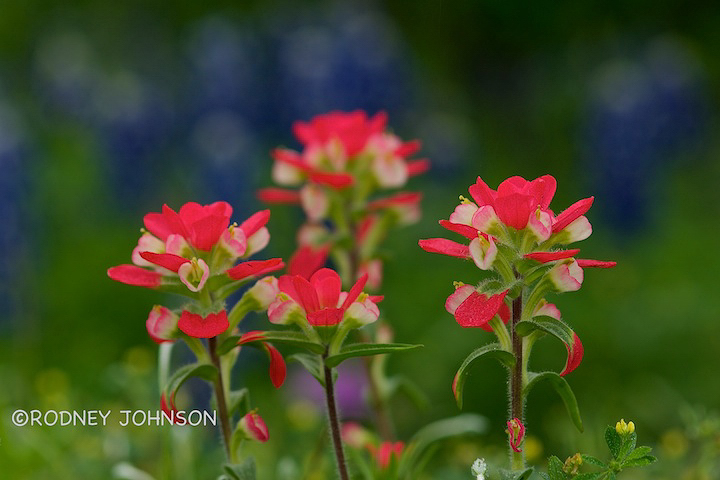
I have been awol recently but while gone from posting I have been trying to learn to use Aperture. This photo was processed in aperture and I am curious what you all think of the photo and the processing. I am a little unhappy with the lack of sharpness in the small jpegs exported from aperture. I bumped the sharpness just a little using nx2. The paintbrush on the far right is very sharp on the processed raw file but this jpeg is not doing justice. Is anyone else using aperture and experiencing this problem?

This photo was taken here in Central Texas back in spring. It was a very wet morning and the colors really were outstanding.

D300S,Nikkor 105mm,1/60 sec @ f4, SB600 @ -1 ev

Thanks for commenting
RJ

Comments

13 comments
Comment posted by jamie pringle on September 7, 2010 at 7:34 PM
I like the point of focus on the paintbrush and the painterly blue background. Might just be my monitor of maybe the resolution you posted, but I see some jagged edges to the petals of the paintbrush. Possibly its an effect of over sharpening. Maybe someone else could comment on that? I do like the photo. Its very light and colorful :toast:
Registered on August 10, 2005, 323 Posts, 1216 Comments
Comment posted by Rodney Johnson on September 7, 2010 at 8:36 PM
This is the photo without going through nx2. Maybe it was oversharpened?
Registered on October 5, 2006, 25 Posts, 152 Comments
Comment posted by Pat Sampson on September 7, 2010 at 9:15 PM
Good to see you posting again Rodney. I like the color palette and composition of this very much. Great pov and dof as well. I do see some jags on the viewer's leftmost paintbrush in both images. I have to zoom to max on my screen to see it so it's not a big deal but it doesn't look right. Do you have Photoshop? If so, you might want to create your JPEG from there and see if the artifact goes away. First though, try to determine if you see the artifact yourself or if it's just me and Jamie? (smile) If you see it on your JPEG, you might want to see, if you see it in Aperture as well.

Pat

Pat
Registered on May 19, 2007, 953 Posts, 15989 Comments
Comment posted by Philip Southard on September 7, 2010 at 9:48 PM
Hi Rodney. Overall, a very nice image. The colors are superb. Perhaps a bit more DOF (or different camera angle) to sharpen up the two left front flowers, although I wouldn't want to mess up that gorgeous BG. I'm seeing the same jagged edges that the others mentioned. :cool:
Registered on July 15, 2007, 258 Posts, 3892 Comments
Comment posted by Ramamohan Pai on September 7, 2010 at 9:49 PM
Rodney, I think the reason for the jaggedness is the low quality of the file. Really love this photo. Never seen Paintbrushes in this coloration before. A very pleasing shade of red. The blues in the background certainly more color-power to the photo.
Registered on November 1, 2003, 550 Posts, 9037 Comments
Comment posted by Ken Smith on September 7, 2010 at 9:58 PM
Great comp and cool to see this Paintbrush variety. Your floor level pov served it up nicely! THe jagged edges...I thinking something happened compression, or perhaps DPI which might be below 150 per inch.
Registered on September 5, 2008, 449 Posts, 2444 Comments
Comment posted by Rodney Johnson on September 7, 2010 at 10:14 PM
Ken,

You might have saved some of my sanity. In the export pane I had the jpeg set to 72 dpi. This version is set at 150. I am trying to learn this software. One step closer
Registered on October 5, 2006, 25 Posts, 152 Comments
Comment posted by Pat Sampson on September 7, 2010 at 10:20 PM
This one looks good Rodney. No jaggies.

Pat
Registered on May 19, 2007, 953 Posts, 15989 Comments
Comment posted by Ramamohan Pai on September 7, 2010 at 10:48 PM
Looks great now. Now if you compare the file sizes (Kilobytes) you will see that the last one is perhaps 2 or more times bigger than your original.
Registered on November 1, 2003, 550 Posts, 9037 Comments
Comment posted by Catherine Reilly on September 8, 2010 at 2:48 AM
Sensational color and a fine comp.

The nits have to do with the bottom edge, Rodney. There are some extraneous things along there that catch the eye: leaf tips, a couple of bright spots- one oof on the left, the other at right of center, not so much the yellow flower.

Having the bg be a complementary color to the paintbrush sure helps to emphasize the subject even though not all the paintbrush are in focus.
Registered on August 16, 2006, 603 Posts, 9192 Comments
Comment posted by Richard Teller on September 8, 2010 at 7:14 PM
I like the comp and color very much
Registered on August 23, 2010, 1162 Posts, 6692 Comments
Comment posted by Bill Fach on September 8, 2010 at 11:17 PM
Rodney: Texas paintbrush always get extra credit around here. Thanks for reminding me what a great spring we had. The final version looks pretty darn good to me. Nice capture and keep at the processing. >=))>
Registered on November 1, 2003, 1805 Posts, 26981 Comments
Comment posted by Morris McClung on September 11, 2010 at 10:45 AM
Excellent comp, color, and dof. Beauty of a shot!
Registered on May 7, 2007, 670 Posts, 19650 Comments