Nature Photographers Network
This is the preserved archive of the original Nature Photographers Network. The community continues at naturephotographers.network.
Square Butte I
‹ PreviousLandscape GalleryNext ›

Square Butte I

by Tony Kuyper

Gallery: LandscapePosted October 8, 2010903 views47 comments
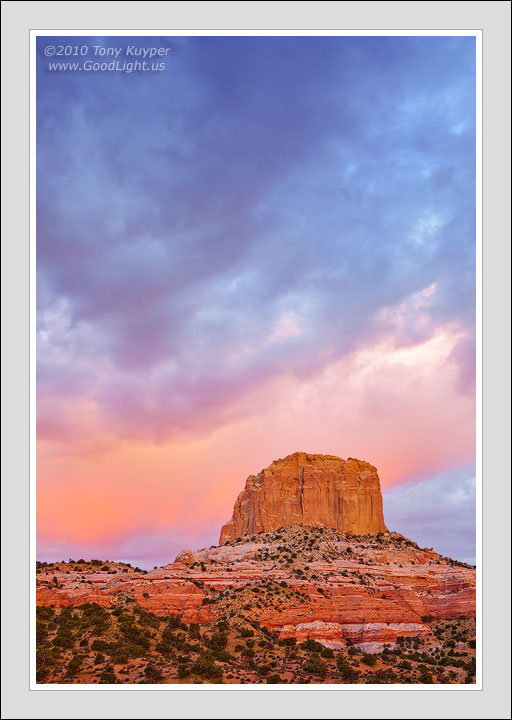
Square Butte is about 7 miles from where I live and right beside the road. I've literally driven past it over a thousand times on trips to Page and elsewhere. I've often thought it might be worth a photo, and have tried several times, but just didn't get the light to make it work. Then one morning in mid-September this year I woke up, looked out, and saw a mostly clear eastern sky and clouds in the west. This was an ideal combo for the image I had in mind, so I quickly drove out, took about 20 minutes worth of pictures, and came home and went to work.

I've posted the exact same image below with one difference. This first image has had the colors converted to sRGB and the sRGB color profile embedded in the image file. The second image, (the one below) also has the colors converted to sRGB, but there is no embedded color profile.

Depending on your monitor and browser, these two images may look the same or they may look different. Based on my observations on my own computer, this is the recommendation for viewing this image in order to see it as I do.

If you're using a wide-gamut monitor, then viewing it in the Firefox 3.6 browser (or Safari) will show the image the same way I see it.

If you're using a standard sRGB monitor, then viewing it in Internet Explorer 8 will show the image the same way I see it.

I attempt discuss the different combination of browsers, monitors, and embedded profiles in this post on the discussion forum.

As always, I'd be interested in your impressions and recommendations regarding this image. I would also be interested in know which browser (FF, IE, Safari) and which type of monitor you viewing the image with (wide-gamut or sRGB) and how the two images look to you to help me better understand if my own observations are correct. Thanks.

Note: Based on the responses so far, I should mention that if you see a difference between the images, it should be pretty dramatic. At least it is on both my monitors. It's not subtle. The two images look obviously different when there is a difference.

Canon 5d2, 28-200 lens.

Follow-up: Thanks for all the help on monitor colors issue, and the thoughtful comments on the image. Mark Stahlke's post on checking the color management settings in Firefox's about:config settings did the trick. Now both the images on Firefox look identical too, and correct for the way I want the image to be seen. It's all described below. My only remaining issue is that IE on the wide-gamut monitor still has over-saturated colors, but that's really not an issue since I don't use IE much. I've gone back and looked at several others' images that previously looked over-saturated, and they're all fine now. Feels great to have sense that what I'm seeing on my monitor now matches what the photographer wants me to see.

Comments

47 comments
Comment posted by Tony Kuyper on October 8, 2010 at 1:22 AM
This is the image without the embedded profile.
Registered on November 1, 2003, 364 Posts, 22328 Comments
Comment posted by Hamed Musharbak on October 8, 2010 at 2:39 AM
what a colors :toast:

the contrast just perfect :smile:

i like it a lot

very well done Tony
Registered on June 1, 2009, 372 Posts, 2282 Comments
Comment posted by Mark Stahlke on October 8, 2010 at 2:53 AM
With FF 3.6.10 and Safari 5.0.2 running on Snow Leopard and an Apple Cinema display I'm hard pressed to detect any difference between the two images. There might be a tiny difference but I can't be sure.
Registered on November 1, 2003, 97 Posts, 782 Comments
Comment posted by Yan Zhang on October 8, 2010 at 3:23 AM
Tony, this is a very nice image in terms of composition and light. I viewed these two versions through Firefox 3.5.13 on my MacBook Air. It turned out that the color of first image is much richer (also nicer) than the second one (the one without embedded profile).
Registered on April 10, 2010, 28 Posts, 292 Comments
Comment posted by Danny Laureys on October 8, 2010 at 5:22 AM
Hi Tony
I'm viewing this on a Dell HD monitor , not the greatest monitor, Thru IE8, I noticed a slight richer color in the first one, not much though. Love the colors in this.
Registered on January 5, 2008, 590 Posts, 1261 Comments
Comment posted by Bill Chambers on October 8, 2010 at 8:18 AM
This is classic Kuyper light for sure. I love the comp you've captured here - the sky's as big an element as the butte. I'm on a lousy work monitor and I don't even know what browser I'm using so I'll wait till I get home to check out any possible viewing difference.
Registered on April 10, 2005, 753 Posts, 21216 Comments
Comment posted by Paul Duval on October 8, 2010 at 9:10 AM
This is very nice Tony,

I have great ocean scenery near home ( Long Beach ) but not the desert like you do. Congrats on finally capturing a familiar local "icon" under stellar light. Your mind must be constantly "on" in order to recognize conditions were perfect to match with what is usually just a "ho-hum" seen this about every day scene. I am using the latest version of Mozilla (Firefox) not sure about the monitor but the images look so close as to be almost identical, although the first seems a hair richer and a shade darker in the sky. Reduces choosing to a matter of personal taste.

Paul
Registered on June 30, 2009, 508 Posts, 1907 Comments
Comment posted by Tony Kuyper on October 8, 2010 at 9:38 AM
Well, that's interesting Paul. FF, at least version 3.5 and up should show a very noticeable difference between the two images. With a wide-gamut monitor, I thought the first would be OK and the second too saturated (or at least noticeably more saturated). With a standard sRGB monitor, the first should look flat and the second should look right and have better saturation. Yan Zhang's experience is also at odds with what I'd expect. The first image (embedded profile) should never look richer/more-saturated than the second image (no embedded profile). Interesting :confused:
Registered on November 1, 2003, 364 Posts, 22328 Comments
Comment posted by Robert Dayton on October 8, 2010 at 9:48 AM
Very pretty, Tony. It's nice to have such beauty in your backyard.
I believe that the colors are more vibrant in the second image.
I'm kind of a novice regarding monitor/browser types; so I can't
help you there.
Registered on November 11, 2008, 281 Posts, 3958 Comments
Comment posted by Mel Ladewig on October 8, 2010 at 9:52 AM
Often working close to home can produce outstanding results, and this is no exception.

They both appear the same to me with FF 3.6 on an sRGB monitor.

Mel-
Registered on July 24, 2005, 114 Posts, 1205 Comments
Comment posted by John Williams on October 8, 2010 at 9:52 AM
Ooops, I made a mistake when I first checked this. (I deleted that comment.)

I am using a standard monitor, and your observation is correct Tony. The second image is more saturated.
Registered on September 6, 2007, 221 Posts, 5985 Comments
Comment posted by Morris McClung on October 8, 2010 at 9:59 AM
Tony, this has fantastic color and light. A great moment for you to be there to capture it as superbly as you always do.
I am getting exactly the conditions you just stated. The first one is slightly lighter and the second has more saturation which seems to lend just a smidge more contrast as well. I am viewing this on an old sRGB monitor and with IE.
Registered on May 7, 2007, 670 Posts, 19650 Comments
Comment posted by Luis Argerich on October 8, 2010 at 10:50 AM
Hi Tony,
I think it's fantastic how the clouds elope on top of the butte. The saturation might be a little high for me in the sky.
I'm using firefox and both photos show up nicely without differences.
Registered on December 22, 2009, 91 Posts, 1349 Comments
Comment posted by Jorne de Bruin on October 8, 2010 at 11:08 AM
Fantastic sky and colour here, I love the way the clouds seem to envelop the rock here. Viewing with FF on a standard calibrated monitor. :wavey:
Registered on June 26, 2008, 178 Posts, 2136 Comments
Comment posted by Scott Smorra on October 8, 2010 at 11:18 AM
Very nice image Tony. I like the composition and the soft lighting.

I'm really glad you are addressing this topic about monitors and color profiles. This drove me absolutely crazy when I first started posting images on the web. Actually it still drives me crazy, because my images don't look right on certain websites when viewed on my wide gamut monitor.

Here are my observations of the images. I use a wide gamut NEC P221W calibrated monitor.

Firefox 3.6.10 - Image 2 is definitely much more saturated and slightly brighter
IE 8 - The images are nearly identical and appear to look the same as Image 2 viewed in FF/Safari (ie more saturated)
Safari 4.0.4 - Same as FF. Image 2 has more saturation.
Registered on November 2, 2009, 161 Posts, 2143 Comments
Comment posted by Tony Kuyper on October 8, 2010 at 11:18 AM
The saturation might be a little high for me in the sky.
I'm using firefox and both photos show up nicely without differences.

This is what I'd expect with a standard monitor and IE. However, with FF I'd expect a difference?

In a standard office pc with Hp monitor and IE, i am seeing actually opposite what most of the people mentioned. to me first one looks slightly with more saturation and contrast.

Hmm, standard office PC would suggest standard (non-wide-gamut) monitor. In this case both images should look the same on IE.

Here are my observations of the images. I use a wide gamut NEC P221W calibrated monitor.

Firefox 3.6.10 - Image 2 is definitely much more saturated and slightly brighter
IE 8 - The images are nearly identical and appear to look the same as Image 2 viewed in FF/Safari (ie more saturated)
Safari 4.0.4 - Same as FF. Image 2 has more saturation.

We have the same monitor, Scott, and get the same results. Embedded profile image looks good in FF and image with no embedded profile is too saturated. Both images are too saturated in IE.
Registered on November 1, 2003, 364 Posts, 22328 Comments
Comment posted by Bill Pelzmann on October 8, 2010 at 11:27 AM
I love the pastels and gradation from warm to cool. You captured the light well.
Registered on January 26, 2005, 27 Posts, 265 Comments
Comment posted by Koveh Tavakkol on October 8, 2010 at 11:33 AM
Beautiful Tony! I love your composition and color in this shot. Both images look the same to me in Firefox, but I am on an uncalibrated monitor at work. I will check at home as well, but I suspect it will be the same.
Registered on September 1, 2009, 41 Posts, 608 Comments
Comment posted by Prashant Khapane on October 8, 2010 at 11:37 AM
on my brand new iMac, and Firefox browser I do not detect any difference. A cool image as usual.
Registered on November 1, 2003, 492 Posts, 4580 Comments
Comment posted by Stan Rose on October 8, 2010 at 11:51 AM
No diff on my work monitor and IE 8--nice shot, pretty colors!
Registered on September 15, 2005, 836 Posts, 17099 Comments
Comment posted by Mat Malone on October 8, 2010 at 12:46 PM
Beautiful image, Tony. I love the contrast between the warm rock and the cool sky.

I am viewing the image on Linux-based FF 3.6 with an sRGB monitor. The colors display the same in both images.
Registered on December 15, 2008, 91 Posts, 882 Comments
Comment posted by Tony Kuyper on October 8, 2010 at 1:15 PM
Well, this is becoming fascinatingly frustrating. Several people using sRGB monitors see no difference in Firefox. On my old Dell CRT (sRGB), the first image is definitely desaturated compared to the second image in Firefox. Now I'm wondering which version people are seeing on their sRGB monitors with Firefox--the correct version (the one I want them to see), or the the super-saturated version or the unsaturated version, both which for me are browser- and monitor-dependent.

With IE, there should be no difference between the two images regardless of which type of monitor is used for viewing, but with FF, there should always be a difference. So interesting that the results are not as expected, at least not all the time.

Registered on November 1, 2003, 364 Posts, 22328 Comments
Comment posted by Dorin Bofan on October 8, 2010 at 1:36 PM
I'm using a standard sRGB monitor and FF 3.6.10 so the images looks exactly the same to me.
Maybe not as intriguing as your other works, but a master piece anyway. The sky is making all the difference here. Always nice to admire your images and to read your insightful technical descriptions, Tony!
Registered on April 30, 2007, 122 Posts, 3086 Comments
Comment posted by Mark Stahlke on October 8, 2010 at 1:39 PM
Tony, what are your FF color management settings in about:config?

I'm one of the people who sees no difference. Here are my settings:
gfx.color_management.mode user set 1
gfx.color_management.rendering_intent default 0
gfx.color_management.display_profile default (blank)

I found a web page that appears to have a good description of the possible values for these settings.
Registered on November 1, 2003, 97 Posts, 782 Comments
Comment posted by Tony Kuyper on October 8, 2010 at 2:06 PM
I'm one of the people who sees no difference. Here are my settings:
gfx.color_management.mode user set 1
gfx.color_management.rendering_intent default 0
gfx.color_management.display_profile default (blank)


That is so helpful, Mark. My gfx.color_management.mode is set to 2 instead of 1. That's listed as the default. Here's the line:

gfx.color_management.mode;2

According to the link you sent, a setting of 2 means "Enable color management for tagged graphics only. (Default)" Am going to experiment with a setting of "1" and see what happens.

Back shortly.

OK, that really made a big, big difference. With gfx.color_management.mode set to "1" instead of "2" both images now look the same in my Firefox browser too.

However, they do NOT look the same in Firefox and Internet Explorer. Nor do they look the same on the wide-gamut and the sRGB monitors. Firefox on the wide-gamut is correct for how the image is supposed to look. IE on the sRGB monitor is also correct. However, Firefox on the sRGB monitor is under-saturated. IE on the wide-gamut monitor is over-saturated. At least that's my impression, though it's not as dramatic as it was before I changed the Firefox setting. And this may be totally normal. The sRGB CRT is not as vivid as the wide-gamut LCD, so it would make sense that an image on it in FF would look under-saturated. And since Internet Explorer only displays sRGB colors, opening it on the wide-gamut monitor, which displays 95% of Adobe RGB color space, would be like opening an sRGB image in Photoshop without converting it to the Adobe RGB color space. In both cases, the sRGB image will be over-saturated in the larger color space. Anyway, that's my current thought on this.

At least I can understand now how people see the images the same in Firefox and can replicate that on my system. I'm also of the mind now that the only combination that will give inaccurate results is Internet Explorer on a wide-gamut monitor, with over-saturation being the result. The previous over-saturation I was experiencing with Firefox and untagged images seems to have resolved with the change in the color management setting in Firefox.
Registered on November 1, 2003, 364 Posts, 22328 Comments
Comment posted by D J Kuklinski on October 8, 2010 at 2:25 PM
Wonderful image!

Using the latest version of FF, they both look the same on my old NEC sRGB monitor.
Registered on January 6, 2008, 25 Posts, 170 Comments
Comment posted by Mark Metternich on October 8, 2010 at 2:37 PM
Since I have been studying color management aggressive lately I find it interesting that you mention all this. I think it may go over some heads for sure though. I resisted learning the nitty gritty of color management for a long while because the learning curve of ACR and PS mastery is immense and I (and a lot of others) could not afford the time necessary. But once the prints got to the point of trying to produce "Master Prints" mastery of the entire color management work flow becomes absolutely necessary. I am in IE right now without a real high end monitor (yet) and love the image.

:toast:
Registered on June 19, 2009, 276 Posts, 6240 Comments
Comment posted by Dean Sauskojus on October 8, 2010 at 3:36 PM
Beauty of an image Tony with spectacular color. No nits whatsoever. I'm using the new Imac 27" with both Safari and FF and see very little difference if any between all posts.
Registered on September 29, 2009, 137 Posts, 2659 Comments
Comment posted by Anthony Vincent on October 8, 2010 at 4:31 PM
Hey Tony,

Stellar image as usual from you and its no surprise you processing looks spot on. I have an older (not too old)
iMac. There isn't a huge difference but I do notice the second version to be slightly more saturated especially in the purple/magenta area above the butte and the reddish striations in the rock. Interesting observation for sure.

You get my email?

Great shot, love it
Registered on February 5, 2009, 199 Posts, 2775 Comments
Comment posted by Buck Ward on October 8, 2010 at 6:26 PM
Hi Tony
I have a good quality LCD monitor (HP LP2465). I don't know if it is wide gamut or sRGB. I viewd both of your images in FF and in IE8. I saw no differences. All four looked pretty much identical. Might help if they were side by side, but there were no obvious differences in saturation.
After reading your general discussion post, I reckoned that I would be able to determine whether my monito was sRGB or wide-gamut, but was not able to.

BTW your picture has wonderful complementary colors that seem to be satureated just the right amount. Terrific.
Registered on December 8, 2003, 96 Posts, 1917 Comments
Comment posted by Harley Goldman on October 8, 2010 at 6:54 PM
Real fine image, TK.

I am on FF, 3.6.10 and see a difference between the two. It is not a dramatic difference, but noticeable. I am also on a really cheap Dell at work with a lousy video card.
Registered on November 19, 2003, 586 Posts, 11271 Comments
Comment posted by Youssef Ismail on October 8, 2010 at 7:22 PM
Tony,

Regarding the two different images, I see no difference in either image on Google Chrome, IE 7, FF 3.0.19, or Safari 3.2 on a Lacie photon 20 vision II monitor.
Registered on November 1, 2003, 474 Posts, 5555 Comments
Comment posted by Chip Phillips on October 8, 2010 at 7:41 PM
Nice image Tony. Interesting write up about the color stuff. I don't notice a difference between the two, but my stuff isn't all that high-tech. The colors look fantastic to me in both! :smile:
Registered on November 26, 2007, 128 Posts, 1436 Comments
Comment posted by Harley Goldman on October 8, 2010 at 8:12 PM
Tk,

Looking at the same image on my home computer, MacPro with wide gamut monitor, FF 3.6.8, there is a huge difference between the images. The image w/o the profile is far more saturated.
Registered on November 19, 2003, 586 Posts, 11271 Comments
Comment posted by Ricardo La Piettra on October 8, 2010 at 9:20 PM
First of all, great scene Tony, beautiful light you have there.

The second photo is more saturated and has more contrast. I´m on a calibrated high end wide-gamut lcd, using the las version of Safari, so everything is as it should be.
Registered on July 22, 2009, 62 Posts, 730 Comments
Comment posted by Eric Good on October 8, 2010 at 10:11 PM
Love the soft pastels and distribution of color captured here. A very cohesive and pretty image top to bottom. As for any differences Tony, they're very subtle on my setup, if at all. I'm viewing it using FF on a calibrated Viewsonic CRT, if that helps. Beautiful work!
Registered on March 17, 2007, 116 Posts, 4764 Comments
Comment posted by Vance Gese on October 8, 2010 at 10:37 PM
Fantastic image, Tony. The light, color, and the remarkable details in the butte are just amazing. Superb work as always.
I'm viewing on a Mac, calibrated (Spyder 3) Apple Cinema display, using Safari, and cannot discern any noticeable difference between the two images.
Registered on November 13, 2008, 298 Posts, 6629 Comments
Comment posted by Chris Chamberlain on October 8, 2010 at 10:59 PM
I have no idea what I'm using, but I see no differences between the two. Sure is a beautiful shot, with amazing light!

Chris
Registered on March 13, 2007, 500 Posts, 8365 Comments
Comment posted by Vincent Grafhorst on October 9, 2010 at 1:15 AM
Hi Tony, I think you have already found your 'answer,' but just for what it's worth I use a NEC wide gamut monitor running FF 3.6.1 and see no difference at all. On my sRGB laptop with FF3.6.1 I also see no difference.

Lovely colorful image! :toast:
Registered on February 24, 2006, 504 Posts, 7203 Comments
Comment posted by Jimmy Gekas on October 9, 2010 at 2:02 AM
Gorgeous shot, Tony! Gotta love that sky and the light on the butte. Glad you finally got to shoot this :toast:

I am on Safari 5.0.2 and see no difference.
Registered on July 26, 2007, 244 Posts, 2807 Comments
Comment posted by Abdullaziz Bin Ali on October 9, 2010 at 5:56 AM
Absolutely beautiful
the first one fixes more with my taste :wink:
Registered on May 31, 2009, 112 Posts, 1590 Comments
Comment posted by Joshua Hardin on October 9, 2010 at 12:20 PM
Using Google Chrome 6.0.4 (runs in almost the same fashion as FF) and a monitor optimized for sRGB the images look the same to me. Nice light and stripes of color on the rocks BTW!
Registered on July 29, 2006, 40 Posts, 414 Comments
Comment posted by Jason Kim on October 9, 2010 at 2:52 PM
Tony,

I am using a Dell 27" wide-gamut display. In FF 3.6.10 with color management enabled, the second image is obviously more saturated (especially the reds) than the first. In IE 6.0.2, both images look identical (and identical to the second image as viewed in FF). Hope this helps.

Registered on July 1, 2006, 60 Posts, 1233 Comments
Comment posted by Nick Bristol on October 9, 2010 at 5:58 PM
This is beautiful, Tony. The colors are just amazing and it is a perfect comp.
Both images look identical on my hp2310m.
Registered on February 1, 2004, 752 Posts, 14140 Comments
Comment posted by Mike Bohlander on October 10, 2010 at 2:56 PM
I'll chime in here as well. I'm on a wide gamut NEC display that was calibrated yesterday, using Safari 5. The butte in the 2nd image is noticeably more red/orange than the 1st image.
Registered on August 22, 2008, 14 Posts, 125 Comments
Comment posted by kevin reaves on October 11, 2010 at 1:42 PM
Incredible Tony....Everything came together perfectly here. :wink:
Registered on June 15, 2004, 19 Posts, 35 Comments
Comment posted by Justin Reznick on October 15, 2010 at 10:45 AM
Wonderful sky to compliment the butte Tony, beautiful scene! Great choice on comp as well!
Registered on November 24, 2009, 79 Posts, 515 Comments