Gallery: WildlifePosted October 22, 2010105 views5 comments
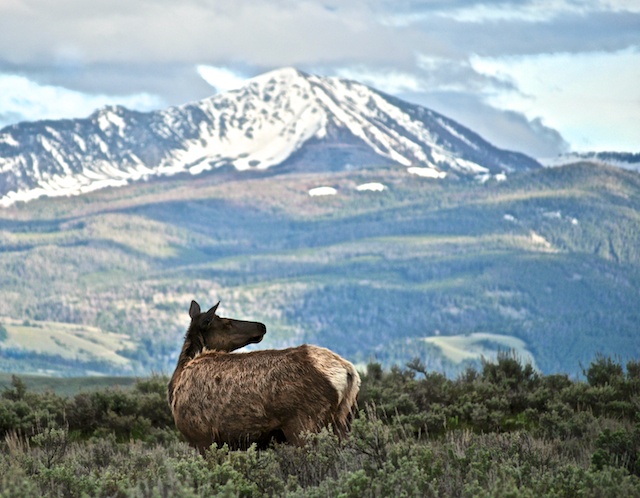
Grand Teton NP May 2010
Small crop from original, early evening shot.
D5000 w/Kit 200mm
Comments
5 comments
Comment posted by Richard Pontius on October 23, 2010 at 7:30 AM
When I saw this thumbnail I recognized Jackson Peak in the background and knew where it had been taken without reading the caption. I pretty much always like like it when the telephoto can be used to bring in distant mountains.
RP
Registered on November 12, 2003, 0 Posts, 17 Comments
Comment posted by Peter Conway on October 23, 2010 at 9:23 AM
I like the idea a lot. I think the dark face and thus lack of detail on the cow hurts this and wonder if some selective work in Photoshop could help.
Peter
Registered on June 25, 2007, 347 Posts, 3913 Comments
Comment posted by Brad Hill on October 23, 2010 at 6:55 PM
HI Jerry,
I like where you're going with this shot (compositionally), but I tend to agree with Peter that some selective work in Photoshop (in specific, bringing out the shadow detail on the facial region of the elk) would help strengthen this image. My personal taste - given the direction the head of the elk is pointed - would be to position the elk just slightly more to the left of the frame...
Cheers...thanks for sharing this....
Brad
Registered on May 29, 2007, 431 Posts, 6061 Comments
Comment posted by Jerry Imprevento on October 23, 2010 at 8:10 PM
Thanks for the tips guys...I actually lightened her face...I use Aperture ( Apple Photoshop ) and still a beginner.
Will attempt to get more out of it and repost. Brad, I was thinking that if I moved her more to the left, then that would have too much open space...In the rule of thirds, should she only occupy 1/3?
Registered on September 11, 2010, 29 Posts, 78 Comments
Comment posted by Steve Canuel on October 23, 2010 at 11:55 PM
I like this one Jerry. The BG mountain has a nice 60's nature documentary feel to me. Agree with the suggestions on lightening the face a touch. Not to hijack your question to Brad but one thing that was pointed out to me about the rule of thirds is that you should try to put the subject of interest at one of the power points (think of a tic-tac-toe grid on your photo. Power points are where the lines intersect) In your photo, her head would be at/near the lower third one. Photoshop allows you to view a grid on your photo, not sure if Aperture does the same. Of course the rule is just a guideline and you can (and should) do whatever looks best to you for your picture. My apologies in advance if you already know this.
Registered on September 12, 2010, 53 Posts, 660 Comments

Comments
5 commentsRP
Peter
I like where you're going with this shot (compositionally), but I tend to agree with Peter that some selective work in Photoshop (in specific, bringing out the shadow detail on the facial region of the elk) would help strengthen this image. My personal taste - given the direction the head of the elk is pointed - would be to position the elk just slightly more to the left of the frame...
Cheers...thanks for sharing this....
Brad
Will attempt to get more out of it and repost. Brad, I was thinking that if I moved her more to the left, then that would have too much open space...In the rule of thirds, should she only occupy 1/3?