Nature Photographers Network
This is the preserved archive of the original Nature Photographers Network. The community continues at naturephotographers.network.
American Kestrel
‹ PreviousAvian GalleryNext ›

American Kestrel

by Harry Harris

Gallery: AvianPosted November 5, 2010233 views10 comments
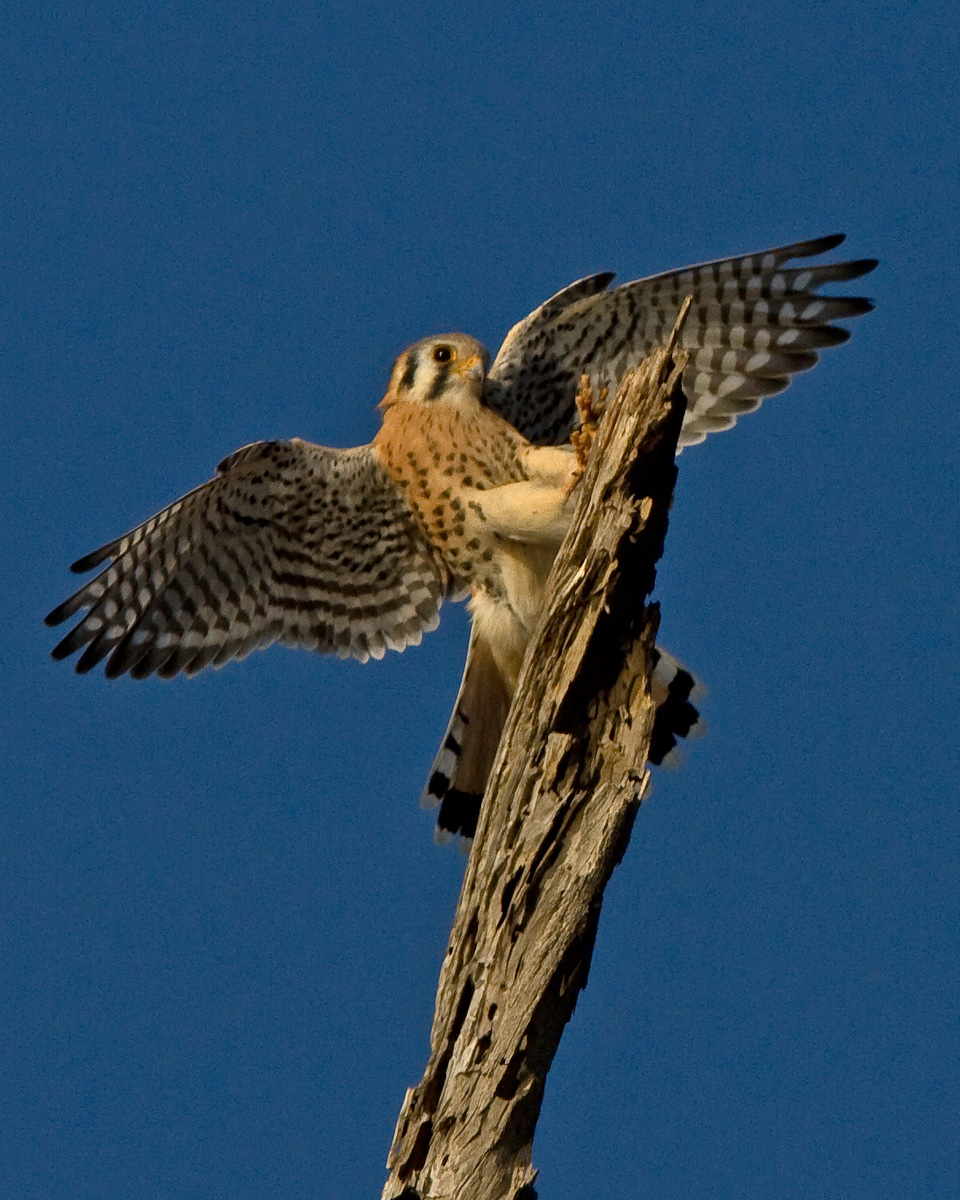
While trying to shoot this Kestrel perched on this snag, thought the whites were burnt out so I adjusted the exposure compensation and while I was doing this, the bird flew off. The Kestrel was nice enough to return and I snapped off a few shots as he landed. I was very lucky to catch this landing. I thought I had set the comp at -2/3 but I went a bit to far so I adjusted the raw exposure up just a bit, sharpened a little and tried to reduce noise. Comments and suggestions are appreciated

Location: Bolsa Chica Eco Reserve in Huntington Beach , California
Date taken 11-04-2010 around 8:30 a.m.
Weather - clear
Canon 7D
EF 300 2.8L w/1.4 420mm
Shooting Mode = Aperture Priority
ISO 200
Shutter 1/3200
f/ 7.1
Exposure Comp. -1 2/3
WB Auto
Handheld
Processed in Elements 8 from Raw image - increased exposure a bit
Cropped to 40% of original image

Comments

10 comments
Comment posted by Charles Gangas on November 5, 2010 at 12:27 PM
You did well isolating this landing- I like the wing position, the outstretched talons, and the perch. The overall scene is still a tad dark IMO, and a slight bit soft. Perhaps less EV and a smaller crop would increase detail and lighten up the image. Just a thought-fine capture none the less Harry. :toast:
Registered on August 12, 2009, 544 Posts, 2414 Comments
Comment posted by Dennis Plank on November 5, 2010 at 1:00 PM
Great moment, Harry. I really like the perch and the pose of the Kestrel. The exposure still looks like it could be boosted a touch, and the bird seems a bit soft. The bg noise seems high for that ISO and shutter speed-I'm not sure what's going on with that. It could be because you had to boost the exposure in post processing-that tends to accentuate noise. If you haven't already, you might want to look at some of the after market noise reduction software. A lot of people like Noise Ninja, and I use Neat Image. You can find lots of comments on the general discussion forum about this subject. :toast:
Registered on January 28, 2008, 1767 Posts, 23192 Comments
Comment posted by Richard Ditch on November 5, 2010 at 1:54 PM
As you noted and others have already commented, -5/3 is way too much exposure compensation and it has rendered the image underexposed a lot. Adding exposure in raw conversion increases the noise in any image where it becomes especially noticeable in the dark parts of the image. Then going for a major crop like this the noise becomes even more noticeable. That doesn't give any help in improving this image, but should be factors to address at the time of exposure.

I like the composition here. The active position of the kestrel is very nice. The old snag adds a lot of interesting texture and a good graphic element. I agree with the previous comments about the missed focus on the head of the kestrel.
Registered on November 1, 2003, 1031 Posts, 12705 Comments
Comment posted by Luke Ormand on November 5, 2010 at 2:46 PM
Between the large crop and the exposure adjustments a lot of noise has been introduced. Give us the full frame, run noise reduction on the BG and maybe selectively brighten the bird and not the BG (through exposure adjustments or maybe even a little shadow/highlight) and this image will shine like it's supposed to.

- Luke
Registered on February 4, 2009, 1093 Posts, 7035 Comments
Comment posted by Brian Gatlin on November 5, 2010 at 7:37 PM
I agree with the other comments here, Harry. Great pose and action.
Registered on March 21, 2009, 202 Posts, 4187 Comments
Comment posted by Monica Siri on November 6, 2010 at 1:33 PM
Harry,
I agree with others too. Very nice dynamic action and pose.
Registered on September 20, 2009, 132 Posts, 3764 Comments
Comment posted by Angela McCain on November 7, 2010 at 8:23 AM
You have an excellent initial image with that great wingspread and landing. I use PSE8 (and love it) and I think that all the suggestions made by others can be carried out with that software in RAW processing. I too would back off on the crop. Most of use can't even get near this bird, let alone have a full frame image of him. Also, what are you doing to get your image ready to post? May be able to get a lot of that softness out.
Registered on April 19, 2009, 367 Posts, 3589 Comments
Comment posted by Mia McPherson on November 8, 2010 at 11:35 AM
Harry,

I'm late in commenting on your image. I agree that the negative compensatio you used did not help the quality of this image. I've found that I quite often have to use +0.3 to +0.7 when photographing kestrels against a blue sky, I use EV compensation gingerly though so as not to blow the whites but try get them close to the right side of the histogram. I love the pose and the eye contact, I might ohave loosened up the crop some to give the kestrel a touch more room and to reduce the effects of the larger crop on loss of detail.
Registered on June 25, 2007, 491 Posts, 12566 Comments
Comment posted by Giorgio Gregori on November 8, 2010 at 5:27 PM
In this image there is an excellent dynamism , given by the three obliques lines , formed by wings , body and perch . Nits mentioned above . Great image in the end.
Giorgio
Registered on November 16, 2007, 87 Posts, 793 Comments
Comment posted by Dottie Short on November 8, 2010 at 9:59 PM
Wow what a nice action shot. I think the American Kestrel is such an amazing bird. I noticed in your metadata that you said that your 7D and the 300 mm lens was 420 mm. The 7D has a crop factor of 1.6 so you should multiply the 300 x 1.6 x 1.4 = 672 mm. So you have more reach that you realized. I also have the 7D, and I had quite a bit of trouble in the beginning with noise until I learned how to deal with it. Make sure the histogram is skewed to the right without blowing out the hi-lights. It will look a little overexposed, but that's alright because you can bring it back in some PP software. I also learned the hard way that skewing the histogram to the right captures more data for you to work with. I use Nik's software Define 2 to remove noise. It's so easy and I apply it to 100% of my images. I bought the entire Nik package from B&H for a good price. I use it as a plugin to Photoshop CS4. PS: Learn to use the custom functions. I have one set up for birds, one for landscape, and one for HDR. I can have my bird custom function ready in seconds.
Registered on April 12, 2010, 61 Posts, 375 Comments