Nature Photographers Network
This is the preserved archive of the original Nature Photographers Network. The community continues at naturephotographers.network.
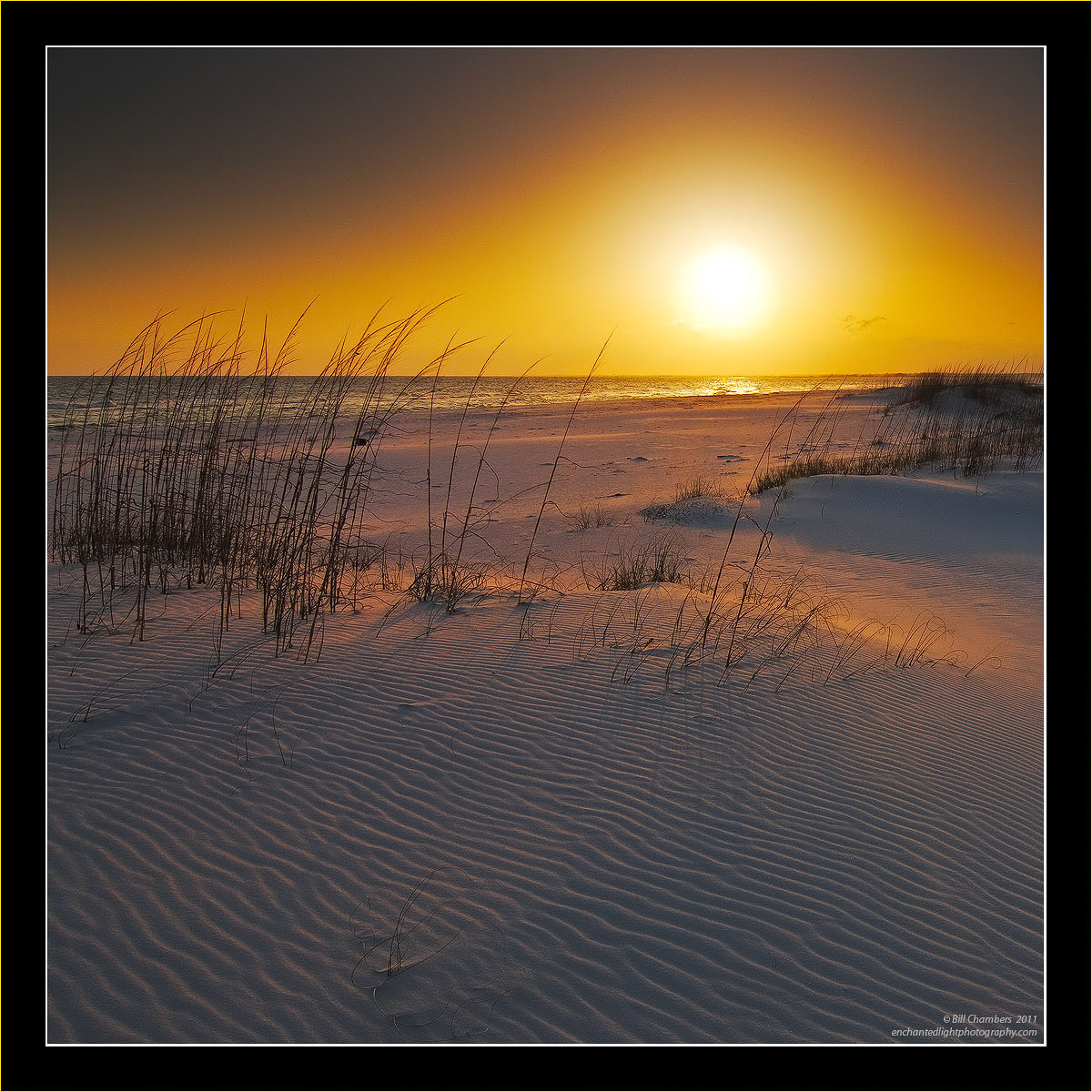
Frozen Sunset
‹ PreviousLandscape GalleryNext ›

Frozen Sunset

by Bill Chambers

Gallery: LandscapePosted January 15, 2011479 views47 comments
I'm a bit hesitant about posting this, but I'd like some help with it. Although the color's warm in this, it was a pretty cold day on the beach. I like the sand, sea oats, and water, but the sky is just killing me. I forget what grad filter I used, but it was probably a 5 hard grad (2&3 stacked) since I was shooting directly into a very harsh, blinding sun. I didn't try a blend since a breeze was blowing and the sea oats wouldn't have matched up at the horizon line. I would like to know any suggestions on how others might have handled the sky differently. Thanks for your help.

LARGER version available for better detail.

D2X w/ Tokina ATX 12-24 @ 15mm
1/125 @ f/11 - MLU and mc-30 remote release
100 ISO
Hard Grads (probably a 5)
Tripod
Capture One 4, CS4, TK's actions

Thanks for commenting and leaving a suggestion, and thanks for looking!

Comments

47 comments
Comment posted by Michele Williams on January 15, 2011 at 10:52 AM
Bill, The lighting on the beach is really, really nice. I'm sorry about the sky. I've had similar results from using a polarizing filter on a super wide angle lens, and I've never figured out what to do about it. I hope one of the experts has some suggestions for treatment.
~Michele
Registered on April 3, 2010, 28 Posts, 146 Comments
Comment posted by Bruce King on January 15, 2011 at 11:03 AM
Bill I like the image despite the funky sky. I had the same issue with a sunrise I posted recently but it wasn't this pronounced. I had stacked a 3-stop reverse and a 2 stop soft. Fortunately I had room to crop much of it out. Sorry no help.
Registered on January 14, 2010, 276 Posts, 2212 Comments
Comment posted by Morris McClung on January 15, 2011 at 11:14 AM
I think it looks fine as is. Imparts a very warm feeling all around. The texture in the sand is exquisite. :toast:
Registered on May 7, 2007, 670 Posts, 19650 Comments
Comment posted by Barbara Graham on January 15, 2011 at 12:07 PM
I can't help about the sky, but the light on the sand and sea oats is just wonderful.
Registered on July 27, 2010, 1310 Posts, 5035 Comments
Comment posted by Dan Baumbach on January 15, 2011 at 12:10 PM
The sky could be better, but this is very nice anyway. The sea oats and sand are beautiful and are enough to make this image work.

- Dan.
Registered on November 1, 2003, 473 Posts, 7980 Comments
Comment posted by James Fougère on January 15, 2011 at 1:08 PM
I have had the same issues with the polarizer :eek: Wonderful image and light!
Registered on October 25, 2010, 41 Posts, 831 Comments
Comment posted by Joel Hazelton on January 15, 2011 at 1:26 PM
Great image :toast:
Registered on August 6, 2008, 194 Posts, 1315 Comments
Comment posted by Wieslaw Poltorak on January 15, 2011 at 1:37 PM
Very nice capture Bill. I think you did excellent job in difficult light condition.
:wavey:
Registered on September 25, 2007, 37 Posts, 187 Comments
Comment posted by Nick Bristol on January 15, 2011 at 2:04 PM
It's beautiful, Bill. The colors are really nice, as is the tall grass (sea oats) and the sand texture and patterns are wonderful. I'm ok with the sky and think you did well with it.

Nick Bristol
lone Rock, WI
Registered on February 1, 2004, 752 Posts, 14140 Comments
Comment posted by Andreas Resch on January 15, 2011 at 2:06 PM
Excellent shot, Bill. The colors are magnificent and the details are great.
Registered on November 14, 2007, 322 Posts, 6101 Comments
Comment posted by Arild Heitmann on January 15, 2011 at 2:46 PM
the sky dont bother me much....looks decent to me atleast.

The foreground however looks amazing!
Registered on October 13, 2010, 27 Posts, 378 Comments
Comment posted by Hamed Musharbak on January 15, 2011 at 2:54 PM
feeling cold :wink:

i like the simplicity here

Registered on June 1, 2009, 372 Posts, 2282 Comments
Comment posted by Gary McGhee on January 15, 2011 at 3:34 PM
Even though you say it was a cold day you would never know Bill, the warm golden light looks great. The sky doesn't bother me but I can see what you mean. As mentioned the textures in the sand look great.

Gary.
Registered on April 15, 2010, 142 Posts, 2416 Comments
Comment posted by Kenn Leonhardt on January 15, 2011 at 3:56 PM
The sky doesn't bother me at all. It's clearly a bit unusual, but I think it works just fine with the rest of the image and it's not something I'd try to change. I like this as it is.

Heads up that there's a dust spot in the top center of the sky.
Registered on March 29, 2008, 27 Posts, 1710 Comments
Comment posted by Bill Fach on January 15, 2011 at 4:04 PM
Bill: I figured this as one of yours from the thumbnail. I'm OK with the sky. The light on the sand is so compelling that I think the sky is almost an afterthought. Stunning shot.>=))>
Registered on November 1, 2003, 1805 Posts, 26981 Comments
Comment posted by Wayne Willison on January 15, 2011 at 5:22 PM
Bill, its a wonderful image as is. The quality of light on the sand and the smooth textures are there because of the sky. Love it. But if you're still convinced the dark corners have to go, try blending the same raw file.
Registered on April 10, 2009, 292 Posts, 3967 Comments
Comment posted by Tony Kuyper on January 15, 2011 at 7:20 PM
Oh my, Bill. This is done to perfection. Really like the square comp with the perfectly placed sun. The light is exquisite, as usual. Fantastic!
Registered on November 1, 2003, 364 Posts, 22328 Comments
Comment posted by David Page on January 15, 2011 at 8:05 PM
Bill, like everyone else - I agree this is beautiful. Great light on the sand and well composed. My only suggestion if you're not to happy about the upper part of the sky would be to crop it out. I think you have enough room to crop down to just above the sun. Won't get rid of all the darkness, but most of it will be gone.

Registered on April 15, 2009, 19 Posts, 199 Comments
Comment posted by Wayne Jones on January 15, 2011 at 9:03 PM
Bill,
This is beautiful as is, but I have to agree with you that the sky might look better with that dark area moved out of the frame. You can use a combination of techniques with layers to make the dark area significantly lighter. For instance, using curves or levels and perhaps shadow/highlight would be a start; then you can duplicate the layer heavily feathered, and stretch and warp it to move the darkest parts out of the frame. I think that maybe a cooler tone might help also, by making the transition between the "hot" Sun colors and the surrounding "cooler" colors less obvious. Of course, that would also make the whole image look colder, so that's a change you will want to play with gently according to your taste. It's kind of touchy trial-and-error work, but in this case I think it's worth it. If I were you, I'd give that a try, because the textures of the sand and the shadows of the vegetation are absolutely gorgeous.
Registered on April 18, 2007, 953 Posts, 6435 Comments
Comment posted by Tom Haxby on January 15, 2011 at 9:19 PM
The image is beautiful. The sky makes it look warmer.
Registered on July 6, 2006, 126 Posts, 647 Comments
Comment posted by Eva McDermott on January 15, 2011 at 10:45 PM
The light on the sand and water is absolutely gorgeous Bill. Do not know how to fix the sky. I have run into this problem several times. I think the combo of polarizer and multiple grads may be the culprit as I think it has been with some of my images. Just don't know how to correct it. Regardless, this is beautiful.
Registered on January 4, 2009, 1015 Posts, 13229 Comments
Comment posted by Paul Wegemann on January 15, 2011 at 11:04 PM
I say go with this, Bill. The sky may not be what we finicky landscape photographers usually prefer, but the image works so well overall. The lighting on the beach is incredible. I bet if you asked several non photographers about this they wouldn't even mention the sky, except to say that it looks cool.
Registered on December 14, 2006, 58 Posts, 1888 Comments
Comment posted by Richard Hartmann on January 16, 2011 at 1:28 AM
I’ll take it just the way it is. This is the classic landscape, a darn nice one!

I don’t know anything about Photoshop but can’t one simply sample a part of the orange sky, then use it to color out all of the black parts?
Registered on January 15, 2009, 13 Posts, 772 Comments
Comment posted by Mark Pelton on January 16, 2011 at 9:08 AM
Bill, outstanding image. I would just crop down to above the sun. This would get rid of most of the dark.
Registered on November 25, 2003, 380 Posts, 4647 Comments
Comment posted by Bill Maile on January 16, 2011 at 9:52 AM
Bill this is beautiful as is, I don't think the sky in general is a worry at all. Just that spot or remnant to the lower right of the sun stands out to me. Not sure if it's a cloud, something in the BG, etc.? Great mood and capture!
Registered on March 2, 2009, 984 Posts, 2518 Comments
Comment posted by Paul Duval on January 16, 2011 at 10:43 AM
Bill,

While bright, I think this is about as close to way it was a you can get. I think it is a well done representation of what you saw or I would see at this time; at this place. So a very hard earned well done. Your cut the glare down extremely well. It took some thought and courage to shoot directly into that sun, because for the most part those images end up not getting processed and are considered rejects.

Paul
Registered on June 30, 2009, 508 Posts, 1907 Comments
Comment posted by Chris Chamberlain on January 16, 2011 at 12:01 PM
Like everyone else so far, I think this is great as is! The ambience is powerful here, and I love that. I understand your frustration with the sky, but I agree, most non photogs would just think it looks neat. One thing you might try would be to use Harley's 15% clone technique. It works amazingly well for introducing detail in hot spots on clouds and such. It might take some experimentation with the amount of opacity though. Just paint in some of the orange onto the darker areas to reduce thier size. Then if it works, you can just paint it all out or some to your taste. I know cloning is a sticky subject, so it might not be an option for you. I have never attempted it on an area as large as this before.

Chris
Registered on March 13, 2007, 500 Posts, 8365 Comments
Comment posted by Gino Cortez on January 16, 2011 at 1:47 PM
I think you've probably done everything you could do with the sun without over-processing the shot. This works for me very nicely...especially the foreground. :toast:
Registered on November 23, 2010, 57 Posts, 396 Comments
Comment posted by Rick Goldwasser on January 16, 2011 at 4:59 PM
No clue how to fix that, just seems like pretty rough lighting conditions. Still like the image a lot, nice work!
Registered on May 10, 2009, 127 Posts, 970 Comments
Comment posted by Andrew Morrill on January 16, 2011 at 6:26 PM
Very nice shot - wonderful color and great composition with square crop. Myself I like the sky as it is - it adds a sort of surreal feel to the image that I think works. If you really want to fix it I would second the suggestion to blend with a different raw process of the same image. To target the correct dark sections try Tony Kuyper's Luminosity actions (http://goodlight.us/writing/luminositymasks/luminositymasks-1.html). To avoid the problem in the first place you could maybe try using a reverse grad which are meant for exactly this situation (http://www.singh-ray.com/reversegrads.html).
Registered on June 10, 2010, 51 Posts, 216 Comments
Comment posted by Ian Haskell on January 16, 2011 at 8:01 PM
Hi Bill, this is super and I really like the foreground detail ripples.

Ian
Registered on October 30, 2008, 24 Posts, 673 Comments
Comment posted by Youssef Ismail on January 16, 2011 at 9:09 PM
Hi Bill,

Check Your Email.
Registered on November 1, 2003, 474 Posts, 5555 Comments
Comment posted by Bill Chambers on January 16, 2011 at 10:27 PM
Thanks everyone for your comments and suggestions, I really appreciate it and will try them.

Youssef - I will hopefully check my email within the next few days. It is currently down since we changed service providers and they haven't been able to get the email working yet. :mad:
Registered on April 10, 2005, 753 Posts, 21216 Comments
Comment posted by Youssef Ismail on January 16, 2011 at 10:55 PM
Bill ok I let you know here.

I normally never do this, but I saved the larger version as I detected a hint of blue in the dark areas of the sky. I brought the image into PS and using the color picker found out that the dark areas were nearly perfectly neutral! So then using a TK luminosity mask and a couple of curve layers I was able to bring almost any color balance into those dark portions. If you give me the liberty I can post the corrections I made. I can also walk you through the whole process if you would like. ON the other hand if I have crossed the line in any way by saving the image to work on it, let me know I will delete it immediately. Again just trying to help, and they say a picture is worth a 1000 words, so why not show you?

Let me know.
Registered on November 1, 2003, 474 Posts, 5555 Comments
Comment posted by Stan Rose on January 16, 2011 at 11:05 PM
Just perfect Bill--keep raising the bar! :smile:
EDIT: i wrote that first, then read the comments--well, all i can say is--this sky works for me, it works for this shot.
Registered on September 15, 2005, 836 Posts, 17099 Comments
Comment posted by Bill Chambers on January 16, 2011 at 11:09 PM
Youssef - by all means go ahead! I would love the see your version,and learn your methods. I used TK;s Luminosity Masks on other parts of the image, but had no real luck using them on the sky. They helped the sun area, but increased banding at the same time, so I just left the sky as it was in camera.
Registered on April 10, 2005, 753 Posts, 21216 Comments
Comment posted by Youssef Ismail on January 17, 2011 at 12:25 AM
Okay Bill.

First I brought the as presented image into PS and clicked on the eyedropper tool and checked the RGB values in the dark sky. They showed that the sky was nearly neutral.

Then I created all the dark TK luminosity masks as channels. I clicked on the Channels tab and examined the channels and decided that the Dark Darks channel isolated the dark portions best. Here it is.
Registered on November 1, 2003, 474 Posts, 5555 Comments
Comment posted by Youssef Ismail on January 17, 2011 at 12:28 AM
I then Ctrol-Clicked on that channel to select it and added a curves layer to the image. I did not want to effect the beach or reeds so I clicked OK on the layer to close its dialog box and then Alt-Clicked on the layer mask and then using a large diameter brush tool with 0% hardness I painted over the all the areas of the mask except the sky to obtain this final mask that I used. Here it is.
Registered on November 1, 2003, 474 Posts, 5555 Comments
Comment posted by Youssef Ismail on January 17, 2011 at 12:34 AM
Once I had the modified mask I reopened the layer dialog box and adjusted the individual RGB curves and the composite curve as such to bring blue into the dark portions. This created some deep vivid blues in the sky. Here is the curves adjustment.
Registered on November 1, 2003, 474 Posts, 5555 Comments
Comment posted by Youssef Ismail on January 17, 2011 at 12:35 AM
Here is the images with the vivid blues in the sky.
Registered on November 1, 2003, 474 Posts, 5555 Comments
Comment posted by Youssef Ismail on January 17, 2011 at 12:39 AM
I felt that I made the sky a bit to blue, even though the sand was picking up the blue from the sky, I duplicated the curves layer and then adjusted the individual RGb curves to render the sky very warm. Here are the curves adjustment for a warm sky.
Registered on November 1, 2003, 474 Posts, 5555 Comments
Comment posted by Youssef Ismail on January 17, 2011 at 12:41 AM
This is what the image looks like with only the Warm curve applied.
Registered on November 1, 2003, 474 Posts, 5555 Comments
Comment posted by Youssef Ismail on January 17, 2011 at 12:44 AM
Then I simply applied the cool sky adjustment layer at 100% opacity and set the opacity on the warm sky adjustment layer to 40% to achieve what I felt was a good balance to blend in the warm gradient to the cooler sky while still allowing the plausibility of the cool tones in the sand. I have no idea what the original sky looked like when you were there Bill but it is what I would expect. Here is the final image and I hope this explanation has helped and comes close to what it really looked like.
Registered on November 1, 2003, 474 Posts, 5555 Comments
Comment posted by Geoffrey Baker on January 17, 2011 at 6:42 AM
This is great, you had some lovely light to work with.
Well done.

Geoff.
Registered on August 20, 2010, 192 Posts, 980 Comments
Comment posted by Bill Chambers on January 17, 2011 at 6:58 AM
Wow Youssef, that's a dramatic improvement to my eyes! Thanks so much for the tutorial - looks like I need to "re-learn" Lum Masks. Thanks again!
Registered on April 10, 2005, 753 Posts, 21216 Comments
Comment posted by Kevin Trinkner on January 17, 2011 at 9:09 AM
Very pretty scene Bill, love all the details in the sand and the warm colors. After reading to teh bottom I can see I really need to learn more about photoshop, pretty amazing what Youssef was able to do with it..

Great image either way.
Registered on June 30, 2008, 203 Posts, 2641 Comments
Comment posted by Doug Roane on January 18, 2011 at 1:00 AM
the sky is a bit funky, perhaps, but I like the image quite alot!
Registered on December 12, 2008, 213 Posts, 2226 Comments