Comment posted by Mia McPherson on February 26, 2011 at 7:33 AM
Andrius,
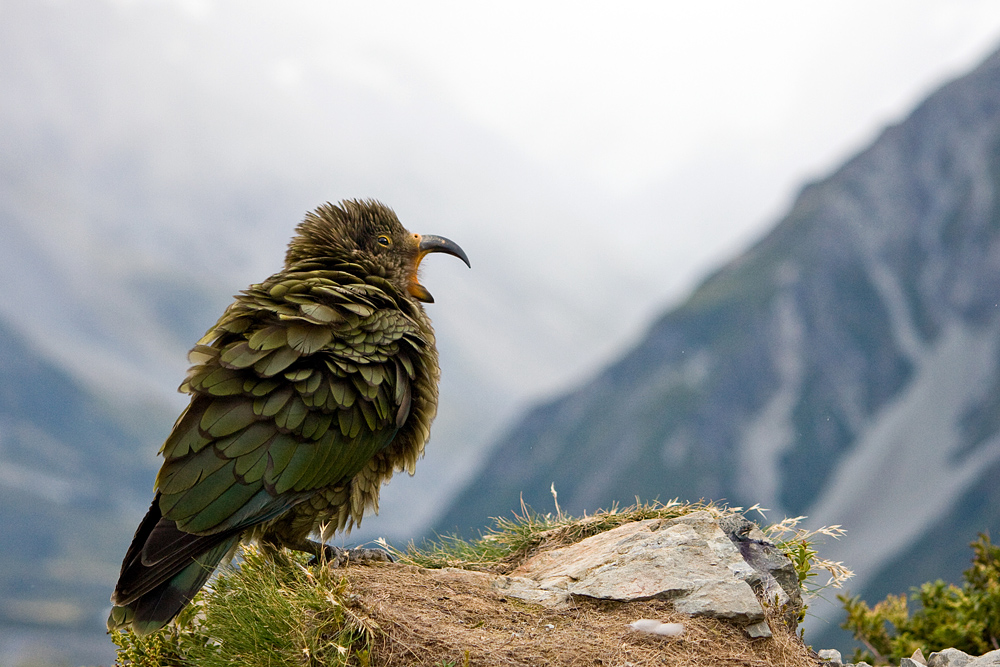
I love the open bill of the yawning Kea, the ruffled feathers, catchlight in the eye and the mountainous setting. I think I'd allow a touch more space at the bottom to show more of the rocks and grasses below the tail and remove some from the top since the lightness there does seem to pull my eye upwards. Lovely sharpness and details.
*edited because I wanted to add one more thing. I looked at this again after commenting on it earlier and noticed there is a fine, light halo around some parts of the Kea, I would work on resolving the halo.
Registered on June 25, 2007, 491 Posts, 12566 Comments
Comment posted by Andrius Pašukonis on February 26, 2011 at 8:09 AM
hmm...I'm kinda perplexed about the halo you're mentioning. First, because I'm not sure that I really see it and second, because I didn't really do anything that could create one.. I tweaked the Lightroom "fill light" option and used a tiny bit of lightning mask just around the eye.
Registered on July 23, 2005, 111 Posts, 408 Comments
Comment posted by Mia McPherson on February 26, 2011 at 8:39 AM
Hi again Andruis,
I can see the halo with my naked eye but I'll show you where it is in the graphic I am attaching. I applied a temporary theshold layer to a screen shot of your image and by moving the slider to 214 it shows the halo around the bill (red arrown pointed there). It also shows the white in the upper right corner that I mentioned earlier as being blown.
Very careful masking of the subject (s) often eliminates those halos, you may need to contract the mask by one pixel to achieve that.
Registered on June 25, 2007, 491 Posts, 12566 Comments
Comment posted by Ron Dudley on February 26, 2011 at 8:43 AM
I really like the yawning pose, fluffed up plumage and strong setting Andrius. The texture in those feathers is a strong point for me. My taste would prefer just a few more pixels at bottom. Very nice.
Registered on March 30, 2007, 437 Posts, 10915 Comments
Comment posted by Gary Gulash on February 26, 2011 at 11:59 AM
Love the setting, bird and the pose. Feels a little bit tight at the bottom, but I imagine you had good reason to crop as you did.
Registered on January 28, 2005, 879 Posts, 12098 Comments
Comment posted by Simon Bennett on February 26, 2011 at 5:15 PM
Love the Kea's yawn and ruffled feathers, along with the typical alpine setting.
Registered on February 4, 2007, 350 Posts, 4614 Comments
Comment posted by KC Choo on February 26, 2011 at 6:55 PM
Love the pose and setting, but from a composition point of view, I'd move the bird up a little.
Registered on November 15, 2004, 519 Posts, 8278 Comments
Comment posted by Richard Ditch on February 26, 2011 at 7:09 PM
I love this. A unique image with a strong sense of place.
Registered on November 1, 2003, 1031 Posts, 12705 Comments
Comment posted by Andrius Pašukonis on February 26, 2011 at 8:13 PM
Thanks for all your helpful comments! Mia, thanks for taking your time to point out that halo to me. I still don't really understand what's going on. I only get it when I resize my picture for uploading and before that it's nowhere to be found. I didn't use any masks on the beak at all. Anyone knows what is happening?
As for the crop, I tried to add those few pixels at the bottom that everybody was talking about. I did have to clone out a couple of leafs on the LLC for that. I also added a tiny bit more of vibrance. Does it look better?
Registered on July 23, 2005, 111 Posts, 408 Comments
Comment posted by Mia McPherson on February 27, 2011 at 7:11 AM
Andrius,
I think that the little bit more room you left on the repost works very well and does look better.
About the halo, did you mask the bird and foreground to sharpen them or did you sharpen globally? Sharpening the entire image can produce the halo I am seeing.
Registered on June 25, 2007, 491 Posts, 12566 Comments
Comment posted by Andrius Pašukonis on February 27, 2011 at 7:25 AM
I did sharpen globally using USM on resized picture and I'll keep in mind the fact that it may cause halos. But the strange thing is that this halo appears after I resize but even before I sharpen the picture. Unless Lightroom does some autosharpen when exporting pictures to jpeg, it wasn't sharpened before resizing.
Registered on July 23, 2005, 111 Posts, 408 Comments
Comment posted by Mia McPherson on February 27, 2011 at 7:45 AM
Andrius,
I don't use Light Room so I can't help you there (I only use photoshop for editing my images) but I know there are times in PhotoShop I have ti use Bilinear when resizing an image instead of bicubic or a halo appears. It happens for me most often when a bird is against a blue sky or water or if the tones/colors of the bird are very similar to the ones in the background.What I do is after resizing using bicubic I apply a threshold layer to see if a halo was produced in resizing, if it was I back up and resize again using bilinear.
I only sharpen the subjects (birds, animals, etc.) or other areas like your lovely foreground by masking them. Sharpening globally can produce the halo and it can also increase noise in the background, plus any whites in the background can get brighter which isn't always a good thing.
Registered on June 25, 2007, 491 Posts, 12566 Comments

Comments
12 commentsI love the open bill of the yawning Kea, the ruffled feathers, catchlight in the eye and the mountainous setting. I think I'd allow a touch more space at the bottom to show more of the rocks and grasses below the tail and remove some from the top since the lightness there does seem to pull my eye upwards. Lovely sharpness and details.
*edited because I wanted to add one more thing. I looked at this again after commenting on it earlier and noticed there is a fine, light halo around some parts of the Kea, I would work on resolving the halo.
I can see the halo with my naked eye but I'll show you where it is in the graphic I am attaching. I applied a temporary theshold layer to a screen shot of your image and by moving the slider to 214 it shows the halo around the bill (red arrown pointed there). It also shows the white in the upper right corner that I mentioned earlier as being blown.
Very careful masking of the subject (s) often eliminates those halos, you may need to contract the mask by one pixel to achieve that.
As for the crop, I tried to add those few pixels at the bottom that everybody was talking about. I did have to clone out a couple of leafs on the LLC for that. I also added a tiny bit more of vibrance. Does it look better?
I think that the little bit more room you left on the repost works very well and does look better.
About the halo, did you mask the bird and foreground to sharpen them or did you sharpen globally? Sharpening the entire image can produce the halo I am seeing.
I don't use Light Room so I can't help you there (I only use photoshop for editing my images) but I know there are times in PhotoShop I have ti use Bilinear when resizing an image instead of bicubic or a halo appears. It happens for me most often when a bird is against a blue sky or water or if the tones/colors of the bird are very similar to the ones in the background.What I do is after resizing using bicubic I apply a threshold layer to see if a halo was produced in resizing, if it was I back up and resize again using bilinear.
I only sharpen the subjects (birds, animals, etc.) or other areas like your lovely foreground by masking them. Sharpening globally can produce the halo and it can also increase noise in the background, plus any whites in the background can get brighter which isn't always a good thing.