Nature Photographers Network
This is the preserved archive of the original Nature Photographers Network. The community continues at naturephotographers.network.
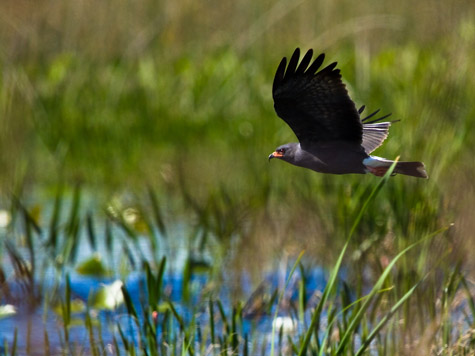
Afternoon hunting
‹ PreviousAvian GalleryNext ›

Afternoon hunting

by Thomas Miller

Gallery: AvianPosted March 12, 2011140 views12 comments
Common Black Hawk hunting for giant snails. Fells Cove, FL.
Canon EOS 7D, Canon 100-400L IS, hand held @ 400mm. f/5.6 @ 1/1250 second, ISO @ 400.

Everybody was telling me my last upload was small. I'm following the guidlines of this site, maybe I'm not sizing my images correctly. Hopefully this one is ok.

Comments

12 comments
Comment posted by Mia McPherson on March 12, 2011 at 11:06 AM
Thomas,

The images are showing way too small, the smallest one is 288 pixels on the long side, it should be 720, the larger one is only 475 pixels on the long side. I'm sure that someone can help with your resizing issues but we'd need to know which program you are using for editing.

This is actually a Snail Kite not a Common Black Hawk. The image looks over saturated and contrasty at the sizes posted.
Registered on June 25, 2007, 491 Posts, 12566 Comments
Comment posted by Thomas Miller on March 12, 2011 at 12:39 PM
I wasn't sure what this bird was. The closest I found was a Black Hawk, But thanks for correcting me. I'm using Photoshop CS4 to re-size my photos. When I put in 720 pixels,it's still too large of a file, and it won't up load.
Registered on March 10, 2011, 56 Posts, 56 Comments
Comment posted by Sharon Hallowell on March 12, 2011 at 1:03 PM
I'll try to help you...
In Photoshop under File, Select "Save for Web and Devices" .
For your smaller photo under image size you want to use 720 as your longest side. If the file is still too big, (over 300 kb), then you will have to reduce the quality until you have it under 300.
For your larger file, you want to use 1200 as your longer side. Again, if it's over 500kb, then you will have to reduce the quality.
Hope that helps you a little. I would love to have had the opportunity to photograph your snail kite! Sharon
Registered on November 1, 2003, 392 Posts, 4810 Comments
Comment posted by Mia McPherson on March 12, 2011 at 1:15 PM
Thomas, Sharon gave you some sound advice on resizing in CS4, just wanted you to know you can repost the 720 pixel version where you make comments on your own post.
Registered on June 25, 2007, 491 Posts, 12566 Comments
Comment posted by Thomas Miller on March 12, 2011 at 2:29 PM
Here's a re-sized version. Thanks for all your help!!
Registered on March 10, 2011, 56 Posts, 56 Comments
Comment posted by Sharon Hallowell on March 12, 2011 at 2:45 PM
The latest one you posted is only 520. You want to use 720!
But it is bigger!
Registered on November 1, 2003, 392 Posts, 4810 Comments
Comment posted by Thomas Miller on March 12, 2011 at 2:52 PM
I tried the 720 size, it was still too big. It's telling me I can't upload a file larger than 300kb, which is the last one I uploaded.
Registered on March 10, 2011, 56 Posts, 56 Comments
Comment posted by Nate Chappell on March 12, 2011 at 3:06 PM
Hi Thomas,
You need to move the slider to the left to reduce the quality to get the file under 300kb when you save it. I can usually get mine under 300kb by reducing the quality from 12 to 10 but occasionally I need to go lower than 10. I use "save as" rather than "save for web".
Registered on February 1, 2006, 1158 Posts, 19528 Comments
Comment posted by Mia McPherson on March 12, 2011 at 3:18 PM
Thomas,

Rich Ditch who posts here on NPN writess about resizing on his website, you may want to check that out here
Registered on June 25, 2007, 491 Posts, 12566 Comments
Comment posted by Thomas Miller on March 12, 2011 at 3:44 PM
Lets see how this one looks.
Registered on March 10, 2011, 56 Posts, 56 Comments
Comment posted by Mia McPherson on March 12, 2011 at 4:05 PM
Thomas,

The latest repost is 720 pixels on the long side but it is only 66.4 KB so you may need to compress less so as not to lose detail & sharpness
Registered on June 25, 2007, 491 Posts, 12566 Comments
Comment posted by Nancy Lea Sandy on March 12, 2011 at 6:42 PM
Thomas, I use PS CS4. when you resize, are you setting your resolution to 72? Then if you resize to 720 it should be a small enough file. Hope this helps.
Registered on January 24, 2011, 576 Posts, 6942 Comments