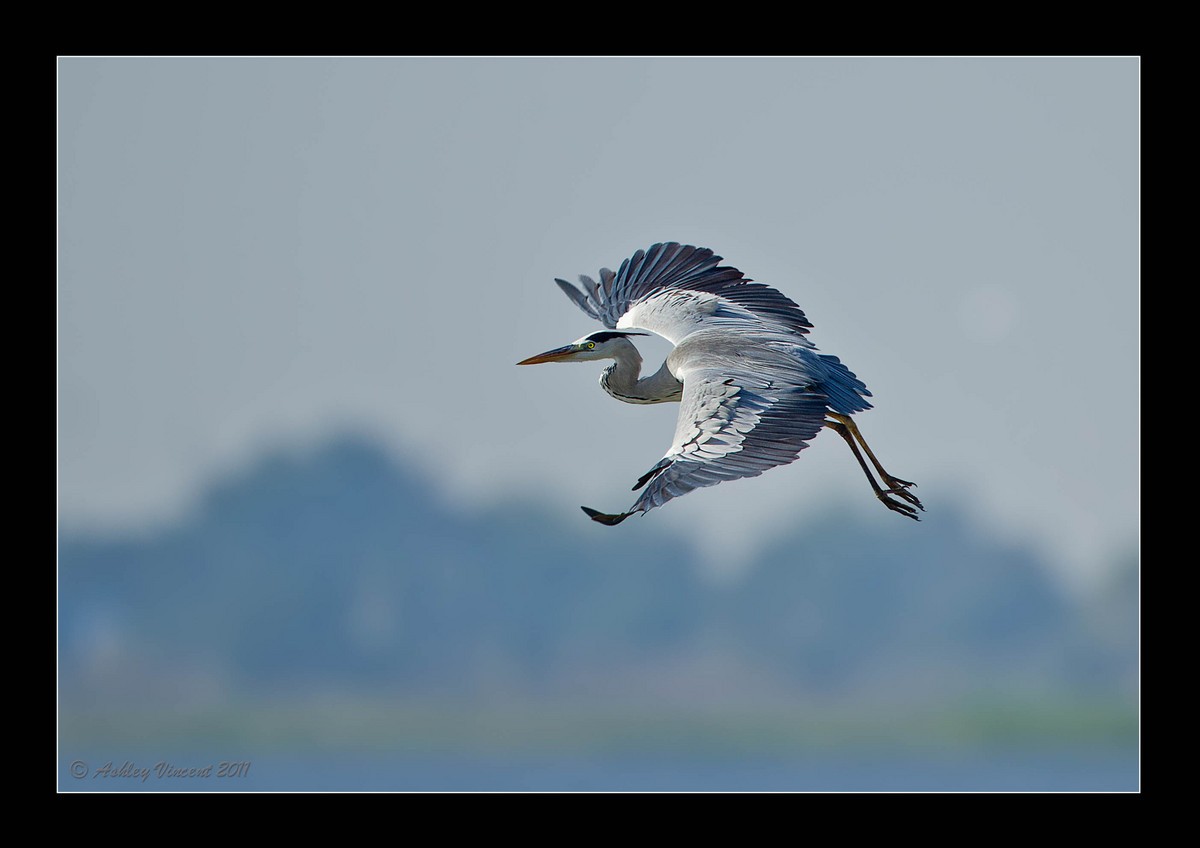
Grey Heron - Reworked
by Ashley Vincent
Canon EOS 7D, EF 500mm f/4L IS USM, Aperture Priority, f/4 (1/2000 sec), ISO 200, +2/3 EV, Handheld, JPG from RAW, Cropped About 50%
Following on from the Little Cormorant, the second of this three-part series of large birds in flight is, as many of you will surely recognise, a Grey Heron.
Boraphet Lake hosts a number of different sized islands that are home to nesting colonies of many large birds and they also attracted a diverse range of smaller birds.
Between November and December of last year I was fortunate enough to visit Bueng Boraphet three times and managed to capture photos of all the following:
Herons – Grey, Purple, Black-Capped Night, and Chinese Pond.
Egrets (which I understand are also a species of Heron, though please correct me if I'm wrong!) - Great, Intermediate, and Little.
Other large birds include the Oriental Darter (a species of Anhinga), Asian Openbill (a species of Stork), Spotted Pelican, Little Cormorant, and Osprey.
Birds of the smaller kind include Blue-Tailed Bee-Eater, Common Stonechat, Pied Cuckoo, Common Kingfisher, Pied Kingfisher, Asian Pied Starling, Lesser Whistling Duck, Pheasant-Tailed Jacana, Purple Swamphen, and White-Breasted Waterhen.
Haven't yet decided on when I'll make my next trip, but I'm not going to leave too much longer ;^)
Critique and comments always welcome and much appreciated, thanks in advance :^)

Comments
15 commentsThis is outstanding!!
Also, I highly suspect this is a product of me viewing this on my laptop, but I can see some funky gradation changes in the sky. Because some of these lines seemed to follow the shape of the bird, I wondered if there was some processing you could tweak, but again, I'm betting that this would be great on my regular monitor.
I LOVE how the colours of the heron are mirrored in the sky and OOF background (trees? mountains?).
Great stuff, as usual.
I was getting ready to go out photographing by stopped to take a look at this heron image you posted. I know you are on a completely different time zone in Thailand so hopefully you will see this soon.
I checked your file sizes for these images, the small version is 66 kb, the large version is only 87.1 kb, which tells me the files have been over compressed. The detail in an uncompressed original version is most likely much better than it is in these two files. To me I'm not seeing the detail I would expect in your heron and believe that with less compression more fine details would show.
I've attached another screen shot of a threshold levels layer on this heron. The red arrow is pointing to the halo I see, the green arrow is pointing at the artifacts I mentioned on your last post that can be caused by over compression and the bluish arrow is pointing at some blocky areas that often indicate that a file has been compressed too much.
The gradation in the sky that John mentioned can also be caused by over compression.
I see an area behind the bird's upper wing and a bit towards the right side of the frame where there is a circle that is lighter than the sky surrounding it, that looks like something might have been cloned out there, like an OOF bird or something?
I like the pose, the background's setting and the comp you used. I think if you can work out the halo, artifact and over compression issues this image could be much stronger.
OK, I've just spent the past hour and a half completely reworking this one from scratch. The main thing that took so long was working from Mia's suggestion of applying Threshold and then cloning (I take it this was the tool I was supposed to be using Mia?!?!) out virtually all the background then, with a much smaller brush, carefully cloning over the smallest black pixels running along the outline of the subject.
The first attempt took about half an hour before I checked in proper picture mode and realised I'd made a bit of a hash of things, and started again from scratch ;^.
Perhaps the most challenging part - and, frankly, I still think it's far from perfect - was trying to determine how many black pixels to clone out that from the top of the tree-line; the LH side looks sort of wrong to me, but I've been at the computer about 10 hours today and I'm kinda' beat.
After ironing out (hopefully) most of the disturbing artifacts and such in the BG, including the circle Mia noticed - it wasn't actually anything like an OOF bird, but more of a large dust spot that I'd attempted to remove with one click of the healing brush, well spotted though Mia ;^) - I selected everything but the Heron and worked some Surface Blur, then clicked Inverse and did some sharpening, brightened the eye with the Dodge Tool and, remembering Keith's and John's observation at the last minute, added a little extra light to the neck and head ;^)
I really can't get my head around the compression thingy right now, however, for some reason with this version I was able to save it as a JPEG at a higher Quality setting than I was last time. One last point on all this, bearing in mind that my aim is to sell the best of my work as prints, although there does appear even to me at times deterioration in the quality of JPEG's I post up, when I make prints from the PSD files I'm happy to say they come out looking pretty darn good :^)
Anyhow, it's coming up to 10pm my time and I reckon enough is enough for one day ... all being well I'll have another one tomorrow ;^)
Thanks again one and all, hope you like the improvements in this new version :^)
Hope this helps,
Dennis: I always start of my workflow in Lightroom 3 (LR3), a programme I was working with some months before installing PS CS5 and, as such, am only gradually weaning myself off the tools in LR3 to make most of my main adjustments in PS. Once my images have been downloaded to LR3 (automatically converted to DGN files) I make very basic adjustments (e.g. White Balance and increasing or decreasing exposure if I feel there's a big need for one or the other) and my choice of crop, then the images I think have potential to make into prints I will right-click on to Edit in PS. I'm not 100% sure, but I think the files I send in this way go through to PS as DNG's not TIFF's, and I've never seen any choice in this offered.
Once I've made my adjustments in PS I prefer to save them to disk as PSD files, as I find they work out smaller in size than TIFF's yet appear to offer the same high quality. When I'm ready to prepare an image for posting I do so from the PSD back in LR3's print module, where I add my border and copyright before saving it as a JPEG; File Resolution: 240 ppi, Print Sharpening: On Standard, Media Type: Glossy, and with JPEG Quality I go for the highest I'm able to while still keeping the JPEG under 300kb in size.
More than likely I'll end up eventually doing things like cropping and/or resizing as well as borders and the like in PS, once I've become more accustomed to working with all the relevant tools and features CS5 has to offer, but for now, seeing as there's only been suggestion of degradation due to compression issues in two of the 41 images I've posted up so far, I'll probably stick with LR3 for this purpose for the time being until I can dedicate more time to PS.
John: "Funky" was just the word I was looking for - LOL ;^)
Mia: I must confess I'm a little confused :^. Although admittedly you didn't instruct me to do this, by virtue of the fact you pointed out those areas showing artifacts that were creating the halo as well as the "blocky areas that often indicate that a file has been compressed too much", I assumed that the reason you were pointing these distractions out was so that I could do something about them, and the only thing that seemed to make sense was cloning them out, which is exactly what I did.
Had I merely tried to clone the artifacts running closest to the edges of the subject, I figured all this would achieve would be to create a wider band of halo, hence the reason I why I chose to "clean" the entire background, which I actually think worked quiet well, that is, aside from the stumbling block I hit upon when I couldn't make out clearly where the tree-line began and ended due to there being too many black pixels clumped together.
I think the method I used would probably work best on shots where there's only a subject set against a background of clear, even sky or, perhaps, on images like, say, the ones I posted up recently of Owls and a Kingfisher at night, where I wanted to clone out virtually everything from the background making it completely black.
Anyhow, despite me apparently not having done whatever it was you expected me to do by way of showing me those screen grabs, I remain immensely grateful for the time you've shared with me, as I feel you've helped me considerably over yet another hurdle in my learning of post-processing, so many thanks again ;^)
cheers
Rob
I think I know what the issue might be. Your description of the workflow helps a lot. It sounds like you are prepping your files for printing and then posting them. That works, but when you resize them at 240 dpi, it doesn't really fit the on-screen presentation very well. For web presentation, after you're done prepping the image for print, if you change the resolution to 72 dpi first, then resize, I think you'll get better results. Processing in DNG and PSD works just as well as TIFF-I believe it's still an uncompressed format. There are some tutorials in the educational part of the site on prepping images for the web-that's where I came up with my workflow.
Thanks again for getting back to me on this Mia and Dennis :^)
Mia: I thought I mentioned this but perhaps I forgot; I DID work completely from scratch from the original RAW file, not from the JPEG I originally posted ;^)
Dennis: I'm obviously going to have to spend more time studying and experimenting with all this, and your suggestion for reducing the dpi/ppi to 72 down from 240 sound like a good starting point :^)
Many thanks again guys :^)