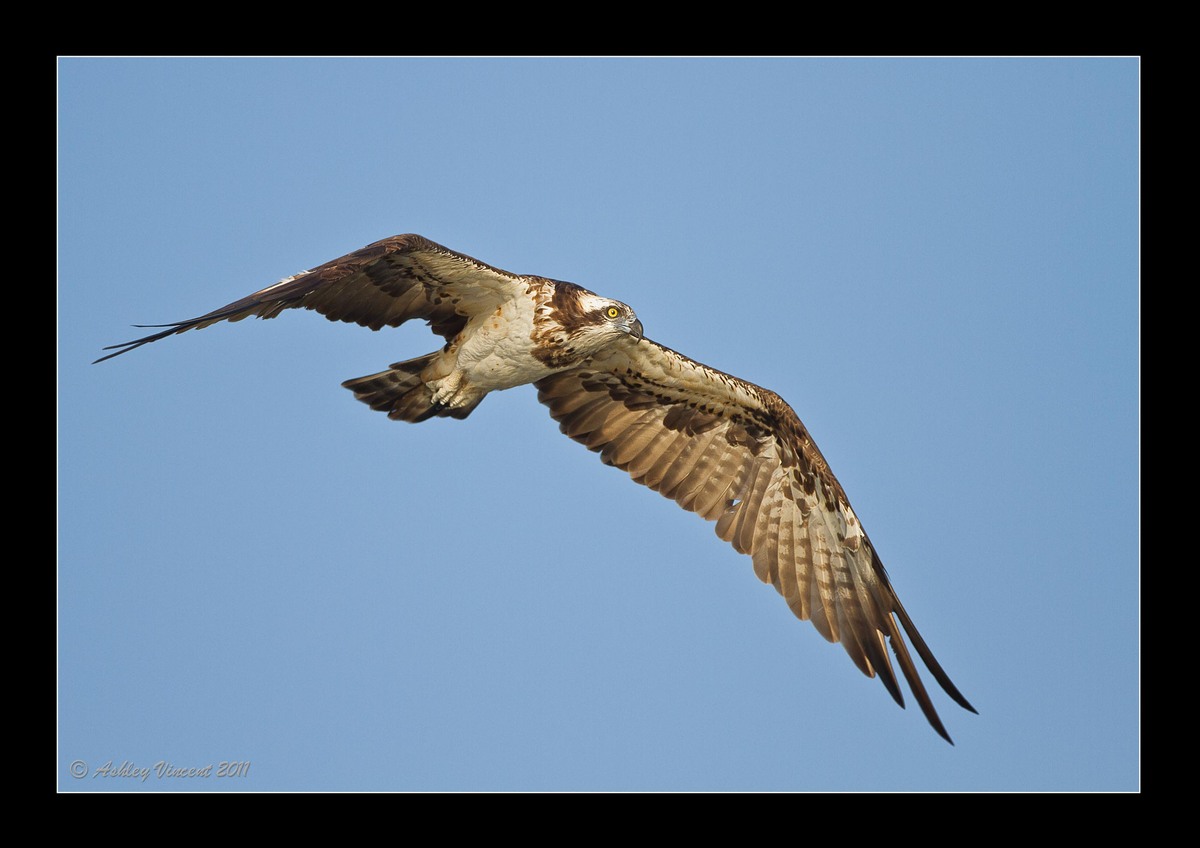
Osprey
by Ashley Vincent
Canon EOS 7D, EF 500mm f/4L IS USM, Aperture Priority, f/4 (1/2000 sec), ISO 200, +2/3 EV, Handheld, JPG from RAW, Cropped About 15% in Total from Upper and Left-Hand Edges
And here's the last of the current 3-part mini series on large birds in flight shot at Beung Boraphet, Nakhon Sawan, here in Thailand.
This Osprey was pretty cooperative or, more likely, totally disinterested in me snapping pictures of it from our boat ;^)
We got to watch it take off, circle the water numerous times making several unsuccessful attempts at catching fishy treats, then returning to the same tree to rest for a while before setting off again.
It wasn't our first encounter with this spectacular raptor; we'd already come across it the day before in the same location, only that time we actually saw it in flight with a headless fish in it's talons, however, the shots I got of that were set against a stark white sky and, probably due to my excitement at this being my first opportunity with an Osprey, the best focus I acquired left a lot to be desired, hence the reason why I'm showing you this one instead ;^)
Time spent offering thoughts, opinions and/or advice will be much appreciated as always, thanks in advance :^)
The following is a message to Mia if you happen to be here …... for some reason I seem to be rhyming everything I say … dare I say, today?!?! ;^p
Although I can't see one in this image as is, I checked it with Threshold looking for a halo and hidden artefacts. Seeing it in B&W there didn't seem to be a halo as such, but there were many black pixels graduating away from the subject growing more dense as they reached the outer edges of the frame so, still not completely sure whether I should do anything with this or not, I cloned 'em all out :^.
The finished result looked a lot worse than when I started; lumpy kinda' background and much softer edges of the Osprey itself, hence, I decided to post the photo how I original processed it and thought I'd wait and see what you might say ;^)

Comments
12 commentsThe artifacts you describe are jpeg compression, and they show up her because you've compressed this a lot more than you needed to do. The large image is only 112KB - a far cry from the 500KB maximum allowed at NPN. Jpeg compression works by finding clusters of pixels that have the similar RGB values and substituting a single value for all of them so that each pixel does not need to be recored as a unique RGB entry in a table. The more compression you ask for the less similar the cluster needs to be and the algorithm ends up creating larger blocks of uniform RGB where before there was a smooth gradation.
Using a threshold layer is only a means to reveal this to you and should not be used to try to fix the field by excessive cloning - instead back up in yuor work flow and fix the step that led to the problems detected ( a hallow almost always means you made too much of a tonal adjustment with shadow/highlight or levels or curves; jagged edges along sharp transitions and blockiness in what should be smooth skies is the result of too much compression in making the jpeg file).
Richard: First and foremost, thanks for going through all this again for me; I think a combination of explanations I've received so far is finally gelling in my mind and making some sense - LOL ;^)
As it happens, reading what you wrote here helped me figure out one main thing that had been puzzling me, and that was why I never seemed to be having any compression issues with most of the other images I'd posted up previously. Well, I just remembered that the bulk of the JPEG images I originally uploaded to my Flickr account were at least 500kb in size, but when I noticed that Flickr has a monthly limit (for free account holders) on total size, I decided to limit the size of all my JPEGs to 300kb (some even came out around 250kb!), seeing as there didn't seem to be too much difference between the two sizes on my screen, plus this had the added benefit of cutting down of the amount of time I had to wait for each batch to upload; the speed of my internet at home is pretty slow.
I think this is one problem that is in fact much more easily resolved than I dared hope it might be; simply by me uploading JPEGs at 500kb in size same as I used in the beginning ;^)
Please don't feel you've wasted your time with me on all this though Richard, as I really feel I've learned a lot about a number of things I didn't really have a clue about before, so major thanks once again :^)
Also great to know I don't need to waste an hour and a half cloning every image that appears to have a halo in it - LOL ;^)
All the best :^)
cheers
Rob
but you have a very sharp image. How do you set up the camera for focusing- I am trying different ways and would really like to know what you do. Again, awesome image.
Ron Huff
Ron: Having good equipment and wonderful subjects is always a bonus, but nothing can replace the practical benefits of constant practice ;^)
In answer to your questions, I would usually only drop the ISO to 200 in a situation exactly like this, where I appear to have time targeting a large circling BIF set against a bright sky, as I'm pretty sure that on aperture priority the ambient light will be more than sufficient to provide me with a high shutter speed even with relatively low ISOs.
However, more often than not I'll keep my ISO at 400 for BIF shots as, invariably I find at some point while tracking them they'll fly into an area where the background suddenly turns to tree tops or the like, creating a situation where the camera registers less light available and compensates by setting a slower shutter speed, which of course can result in a less than sharp images.
As to your question regarding how I set the camera up for focusing: When in comes to BIF shots, truth be told, I'm still experimenting with this myself ;^)
Generally speaking though, I find the best results I seem to get come from having the camera set to Spot AF (Auto Focus); not sure if you're using Canon or Nikon, but this is what Canon calls it, and it's specifically designed for pinpoint focusing. Though seeing as this only covers an extremely small area, of course the main challenge is in keeping the Spot on the eye (or areas close to it) of a BIF even when AI Servo (Canon's mode for keeping AF locked onto moving subjects when the focusing distance keeps changing) is being used, which of course works the best for birds in flight.
I read that some photographers prefer to use some form of Point or Zone Expansion (whereby a larger number of focus points through the viewfinder are selected), which increases the chances of at least some part of the subject being in focus while they track it in flight, and this is what I'm also currently experimenting with, particularly with small birds that suddenly shoot off from the perch they were on, but so far I've found that, even when I do get some part of the bird in pretty good focus, it's hardly ever the eye that come up perfectly sharp.
As suggested, this is something I'm still trying to figure out for myself, so if anyone else reading this thread has any experience or advice to share I'm sure both Ron and I would be very grateful :^)
The pose is very nice here and I love seeing the yellow eye. Comp works well for my tastes.
I've saved all the advice that's been offered to me (as I always do with any advice that's been shared!) regarding this issue of halos and how to prevent them from occurring while resizing etc. to file, as this is something I will definitely be revisiting again when I can make more time. Aside from current time restraints, the other reasons why I'm not jumping all over this right now are that, unless I'm completely wrong (in which case please advise me accordingly!), this issues of halos only really occurs with darker subjects set set against a large area of bright background, such as the sky, and seeing as it will probably be a while before I post up any other such shots this gives me a bit more time ;^)
Secondly, having printed this image up in both A4 and A3 size, neither I nor anyone else I've showed these to can see any evidence of a halo, so really I'm pretty much good-to-go on those :^)
Thanks again and hope you're enjoying your weekend :^)