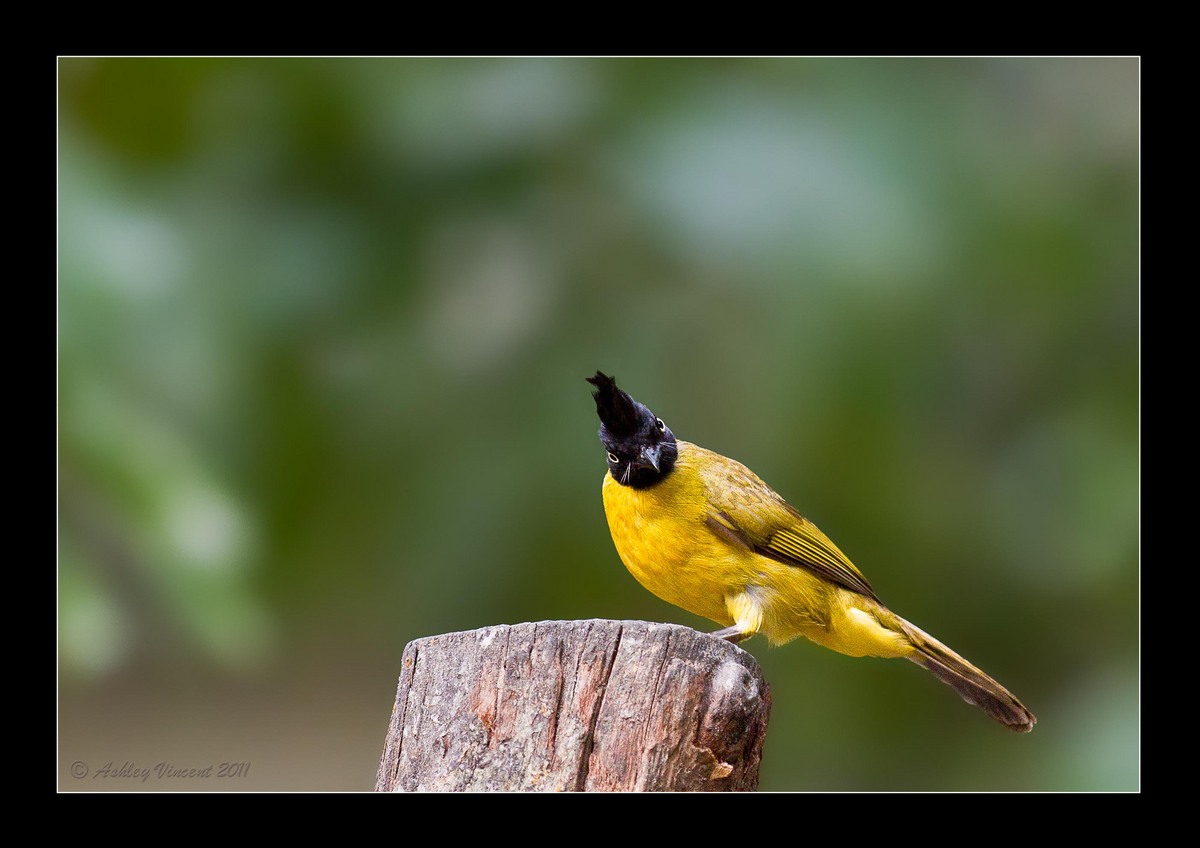
BC Bulbul - Reworked
by Ashley Vincent
Canon EOS 7D, EF 70-200mm f/2.8L IS II USM, Shutter Priority, f/2.8 (1/250 sec), ISO 400, -2/3 EV, Handheld, JPG from RAW, Cropped About 50%
The next three images I have lined up to show you were all shot at my local open zoo, however, only this one, the Black-Crested Bulbul, was taken in their avery, of course making it a captive subject - hard to tell though huh?!?! ;^) - the other two are of birds that flew into the wide open parts of their own free will, which is one of the things I love about this place :^)
While in general I'm not a big fan at all of birds (or animals for that matter) in cages, the avery at our zoo is perhaps the best one I've ever visited, not just for the numerous different species of birds, but they've really done, and do, a remarkable job of creating a natural environment.
Anyhow, thought I'd show you this one first and see what you think.
Critique and comments always welcome :^)

Comments
14 commentsI like the pose and how the bird looks curious about your presence. As Dennis mentioned the size of the larger file indicates it has been over compressed, you may need to use "save as" in CS5 and make sure the slider is up to 12, giving it a file size of about 363 kb. In a temp threshold layer I can see the artifacts caused by over compression. In the larger version I can see color noise creeping into the tail, if you brought up the exposure and/or used shadow/highlight it can cause the noise to become more noticeable. I like the comp you used and the background.
I like the inquisitive pose he gave you. I think normally I would like to see the bird higher in the frame but here that would entail including more of the rather unattractive cut off perch. Cropping some more off the top and left might be an option if you can retain enough detail.
Dennis & Mia: No idea why the size of the large file is showing up as only 124kb for you, as the JPEG file size I have showing for this on my hard drive (which is where I uploaded it from; as I've been having trouble getting URLs from my Flickr account recently) is 315kb.
Mia: Using "save as" in CS5 (assuming you meant my choice should be for a JPEG file) and taking the slider up to 12 (which is the maximum) gives me a JPEG file of this particular image of 8.4 MB, somewhat large than you suggested. Obviously there's still something I'm missing here with my understanding.
Colour noise you seeing creeping into the tail area I suspect was already introduced when I added two full stops of light in LR3, to compensate for the originally very dark image. This is another photo I shot on shutter priority, as the ambient light was at best offering me a speed of only 1/10 in aperture priority, which wasn't nearly fast enough to freeze perfectly the slightest movements of my subjects in this setting.
John & Keith: Now that you mention it, although this species is quiet common to me over here, I appreciate that showing a full profile shot first might have been better for those of you who aren't so familiar before going for the interesting pose. Sorry 'bout that, and I'll work another shot into this series that should satisfy your curiosity on that score ;^)
Kurt & Nate: I also thought the stump was a bit too centrally placed, but at the time I cropped this I was concentrating more on not centralising the subject.
In line with all your observations and suggestions I've reworked this from scratch again, sizing the JPEG as close to the 300kb limit as possible (in fact it comes to 295kb), hopefully this is an improvement.
After re-reading this on your Gray Heron post: it sounds to me like you are using LR to do your final "save". I don't know anything about that in LR because I don't use it. I've attached a screen shot of the larger version (resized to fit on your thread) of your Bulbul that I put into PS and then used "Save As". You can see the slider and how the file would come out to 363.5 kb at the maximum setting of 12. You can add your copyright and border in PS, then do your final save in PS thus avoiding an unneccessary step in your work flow.
Speaking of borders though; they are probably great on a printed photo, but with this file you lost about 115 pixels of the full 1200 pixel limit just on the border side to side. For critiquing purposes here it might be to your advantage to omit the border so the people doing the critiques can see the details and sharpness at the full sized 1200 pixels.
Looking that the original frame that you posted and seeing how much you had to increase exposure in post processing more than likely was the cause for the color noise I noted plus the large crop adding to the issue. Your use of -2/3 EV compensation in the field didn't work in your favor in this case. It is always much more problematic to increase exposure in post processing because it will add noise, better to get the exposure right in the field.
Thanks again for your time in response :^)
Although the screen grab you're showing here for JPEG options looks exactly the same as mine, I can't understand why when I tried to "save as" and moved the slider to "12" the saved image came out at 8.4 MB for me. For the record, this was a DNG file I sent over from LR to PS, did the adjustments in PS, then "save as JPEG" while still in PS.
I do understand that in PS one can also add boarders and signatures, however, this isn't something I've had time to figure out so far and, seeing as LR seems to give me what I'm looking for and I'm already well familiar the set-up, unless I really need to do something different with borders that doesn't seem possible in LR, I don't see too much point right now investing time on learning about extra tools I may not really need.
While I appreciate what you're saying with respect to losing a certain amount of pixels by choosing to add a border to the images I present here, now that I'm back to saving my web images closer to the respective 300 and 500kb marks permitted (which until recently I always did and never had any comments made about faults seen due to compression issues), I feel that the images still come up large enough for people to critique on.
I know some people don't like to see borders on images posted in galleries, but I like them very much, as I feel they tend to add a nice finish to the presentation, and overall visual impact is one of the main things I aiming to achieve. Way I see it, as long as there aren't serious noise compression issues (which hopefully there won't be in my images from now on!), losing less than 10% of the pixels I'm allowed won't make (and to my knowledge hasn't made) any difference to the specific observations and feedback I receive on the images I post, while I also believe the border helps to create the finished look I'm after.
I totally agree that my use of -2/3 EV compensation didn't work in my favour in this case. What I didn't mention previously was that when I came across this accommodating Bulbul, I was actually in the middle of an hour-long shoot of Golden Pheasants. I doubt many here will have heard of let alone seen one of these before, but they are perhaps one of the most vividly coloured and uniquely designed birds I've ever had the pleasure to see and photograph (a photo or two will be forthcoming!), but due to the highly reflective feathers on their heads, the slightest amount of naked light striking them seems to blow out at least some of the highlights, hence the reason why I had the camera set in negative compensation value ;^)
Apologies for the long-winded response, but at least you can be sure it's really me and not someone trying to make out they are - LOL ;^)
I respect and appreciate your feelings regarding having borders in critique forums, I also think I should go with what I feel most comfortable with, and borders make me feel more comfortable when showing my own work ;^)