The Mist of Elowah
by Scott Miller
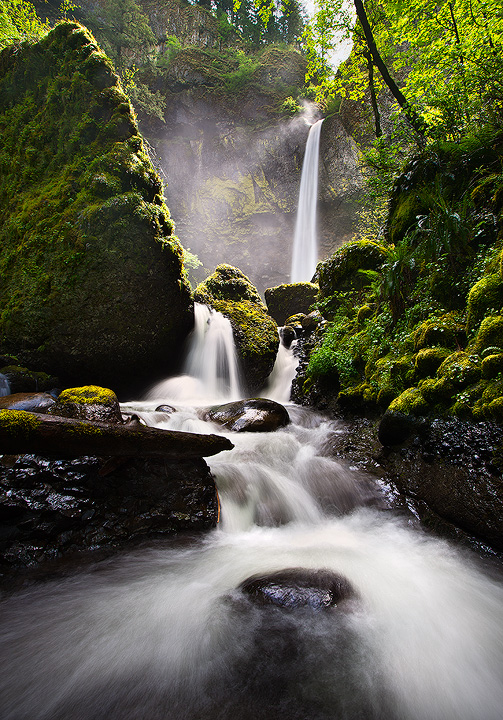
So in looking through my gorge photos I realized I had somehow never made it to Elowah or Poneytail fails in the spring. The fall, yes, the spring, no. So this weekend when my wife got a cold and had to cancel all of our plans one day, I went out and got her some soup and then grabbed the tripod and headed out to see these two icons of the gorge in the spring.
This was actual not my favorite composition of Elowah after the winter's log rearrangement in the ravine, but while I was standing here the sun peaked through the clouds and a huge wind gust kicked up at the same time, sending illuminated mist down the ravine. so while I like my other composition more, I decided to post this one due to the mist. The wind / sun combo only lasted for about 1 minute, and then the sun was gone for the rest of my time here. This is a blend of 4 shots from that minute:
- one for the sky
- one for water highlight cleanup
- one for the mist / background
- one for the foreground
The mist and the foreground images are very similar, the second foreground image was largely needed to cleanup the 287483749234 water spots the mist placed on my lens.
Let me know what you think!

Comments
22 commentsPeter
Peter: Thanks for the compliment! Yes, this is in the Gorge, Elowah Falls, just a few miles past Multnomah Falls.
Sean: Yeah, 1PM with sunlight is not your typical ideal conditions for shooting waterfalls so you don't see too many shots with this light. Honestly, I was there for the overcast and the sun just burst through at the right time. Without the wind / mist I think it would have been way too harsh. And you should like the processing, since most of the processing was done using stuff you demonstrate in your exposure blending tutorials. :) Thanks for the critique on the shadows, as I mentioned to Harry, here is a new version with the shadows brightened up a bit. I also manually sized for the web this time, instead of using a PS action I have, since I realized the action was adding a ton of contrast, and thus killing the shadows.
Thanks again!
Thanks again.
Oh and there isn't really a trail to this spot, you just have to scurry down the ravine a bit and climb in to the river. :) While it isn't a marked path, enough people take it that it is pretty well beaten down at this point.
As someone already mentioned, I think you nailed it with the repost. The original was just way too contrasty for me - but I understand too about your sizing and prepping for the web issues. I think though upon looking at this some more that perhaps you could back off the changes a small bit, maybe 5-10% to introduce some darker values in areas like under the moss covered rocks on the right. But that's all subjective at this point. Great job with the composition and catching the mist and light.
Lon
here's an aside - in the past weeks we've seen a number of renditions of these falls on this forum. you guys must be queuing here! as a person who NEVER bumps into other photographers this must be very strange!
John - Thanks for the comment
David - I really don't want to crop off the top of the large rock on the left, I tend to find images of Elowah to be much more pleasing with that rock shown completely. However, you are definitely correct that the blend at the top there is not perfect. Because of wind motion and the drastic exposure difference between the sky and foreground exposures, the blend is really challenging. A lot of the issues don't show up in a crop this size, so I posted without perfecting that portion of the image. I will probably go back and spend some time to really nail that section of the image. Honestly right now my PS skills aren't good enough for that section.
I have a few questions. Is "blending" a procedure that is used in a program such as
HDR (high dynamic range)? With the 4 different shots listed in your explanation does
that mean that you had a different exposure reading (shutter speed) for each one of
those areas, or did you use a different DOF reading for each of those areas?
I have HDR but haven't used it much. I've only used it for exposure. For example, I
have taken three shots of a scenic at -2, right on, and + 2 and then combined the
three in HDR. I don not have any Photoshop version but am able to do this in Elements
7.
Thank you and keep posting beautiful images such as this.
I don't really like the look that most HDR software gives to images most of the time, so I tend to prefer using layer masks to blend the images by hand.
Mark