
Nature Photographers Network
This is the preserved archive of the original Nature Photographers Network. The community continues at naturephotographers.network.
Yellow Wagtail
‹ PreviousRegional: UKNP GalleryNext ›

Yellow Wagtail

by Kim Connolly

Gallery: Regional: UKNPPosted July 15, 2011144 views8 comments
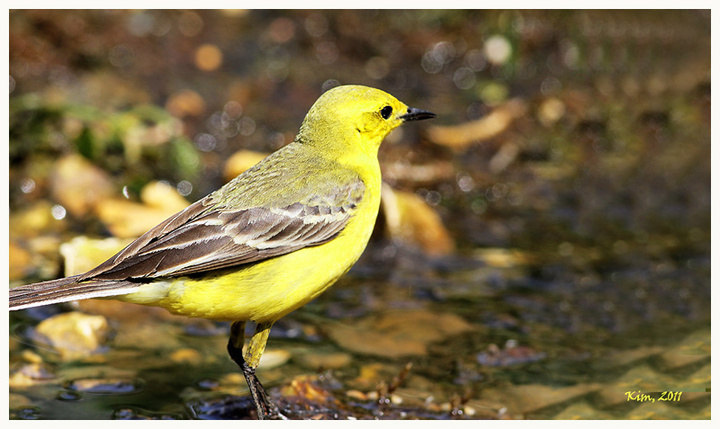
I am expecting criticism for this one, but am curious as to how others might have dealt with it, Bin job perhaps! :biggrin: The Wagtail landed very close to where I was sitting in a hide - and I had my fixed lens, result- I cut off tip of the tail and feet!!! Also it was too big in the frame!! But it was the only shot I had of a Yellow Wagtail. I have increased the canvas size on the RH side and that's about it.
C & C really appreciated.

7d+ 400mm f5l6
Exposure Time = 1/1000"
F Number = F7.1
Exposure Program = Aperture priority
ISO Speed Ratings = 400
Evaluative :wavey:

Comments

8 comments
Comment posted by Simon Litten on July 15, 2011 at 11:59 AM
In instances like this when the subject is too close and won't fit in the frame my reaction is to rotate the camera to portrait and hope it turns head on as you'll be able to get all the bird in, head to foot. Sometimes though I think you've just got to admit defeat, forget about the photography and just appreciate the wildlife :biggrin:

Simon
Registered on June 22, 2006, 24 Posts, 275 Comments
Comment posted by Graham Goddard on July 15, 2011 at 12:58 PM
same for me I'm afraid Kim - on top of the missing feet/tail, the lighting looks very harsh and the subject is looking away from you........I'd have binned it and tried again :wavey:
Registered on November 21, 2008, 66 Posts, 253 Comments
Comment posted by David Sewell on July 15, 2011 at 1:06 PM
Hi Kim, Firstly, if it were my first picture of a new species, there would be no way I would bin it, even if it were a lot worse than this. There were some difficult lighting conditions, and you could do worse than play around with the lighting levels to get the contrast on the bird down. I think I would then be inclined to crop it further so that only the head and breast remained. This is on the basis that if you can't get all the bird in, at least make it look like it was a deliberate choice to only show part.

Fundamentally though, I do agree with Simon. There are times when it is best to just sit back and enjoy the spectacle.

David
Registered on September 10, 2008, 63 Posts, 801 Comments
Comment posted by Phil Ellard on July 15, 2011 at 1:18 PM
I can see why you wanted to add canvas but it is a bit obvious even on the small version. I can see why you want to make something of it though. My advice would be a portrait crop showing just head and shoulders with dead space rhs and top. This would sort out the cut off feet and tail and address the rhs somewhat. Think it could look good. Alsp bring highlights down a touch. Would be interested if my idea works!!!! :toast:
Registered on December 17, 2010, 60 Posts, 634 Comments
Comment posted by keith mitchell on July 15, 2011 at 2:29 PM
Hi Kim.
Kim it's a pity that the bird was so close but what you got looks good, can't help myself but what Phils says sounds good.

Cheers Keith,
Registered on July 12, 2008, 127 Posts, 1735 Comments
Comment posted by John Robinson on July 15, 2011 at 4:12 PM
Kim
Get a zoom lens sweetie !! :biggrin: :biggrin: :biggrin: :wink:
John
Registered on March 2, 2008, 535 Posts, 2453 Comments
Comment posted by Malcolm Muir on July 16, 2011 at 4:56 AM
I wouldn't bin any shot of a yellow wagtail,a s I don't have any yet! As a record shot it does the job and you are obviously well aware of the main limitations. When increasing canvas size, I tend to make use of the healing brush at various sizes and sources to try to break up obvious repeating patterns. Others may have better suggestions - I am not by any means a PS expert!
Registered on August 14, 2005, 12 Posts, 66 Comments
Comment posted by John Robinson on July 16, 2011 at 7:33 AM
Kim
There is another way of adding canvas ifits not too much. Select all of the area to thr right or wherever. Cut and paste onto the oriinal image having first enlarged the canvas. Then enlarge the pasted bit not proportionally- keep the hieght the same but make the width say 120% USE BICUBIC RE SIZING NOT BI LINEAR. Place it over the original and you should get a seamless join, The re crop the whole thing and merge. Simples. Dont overdo the stretch obviously.
next time youcome over I will smuggle you into my office and show you my etchings and then how to do it !! :biggrin: :biggrin: :toast: :toast:
John
Registered on March 2, 2008, 535 Posts, 2453 Comments