Nature Photographers Network
This is the preserved archive of the original Nature Photographers Network. The community continues at naturephotographers.network.
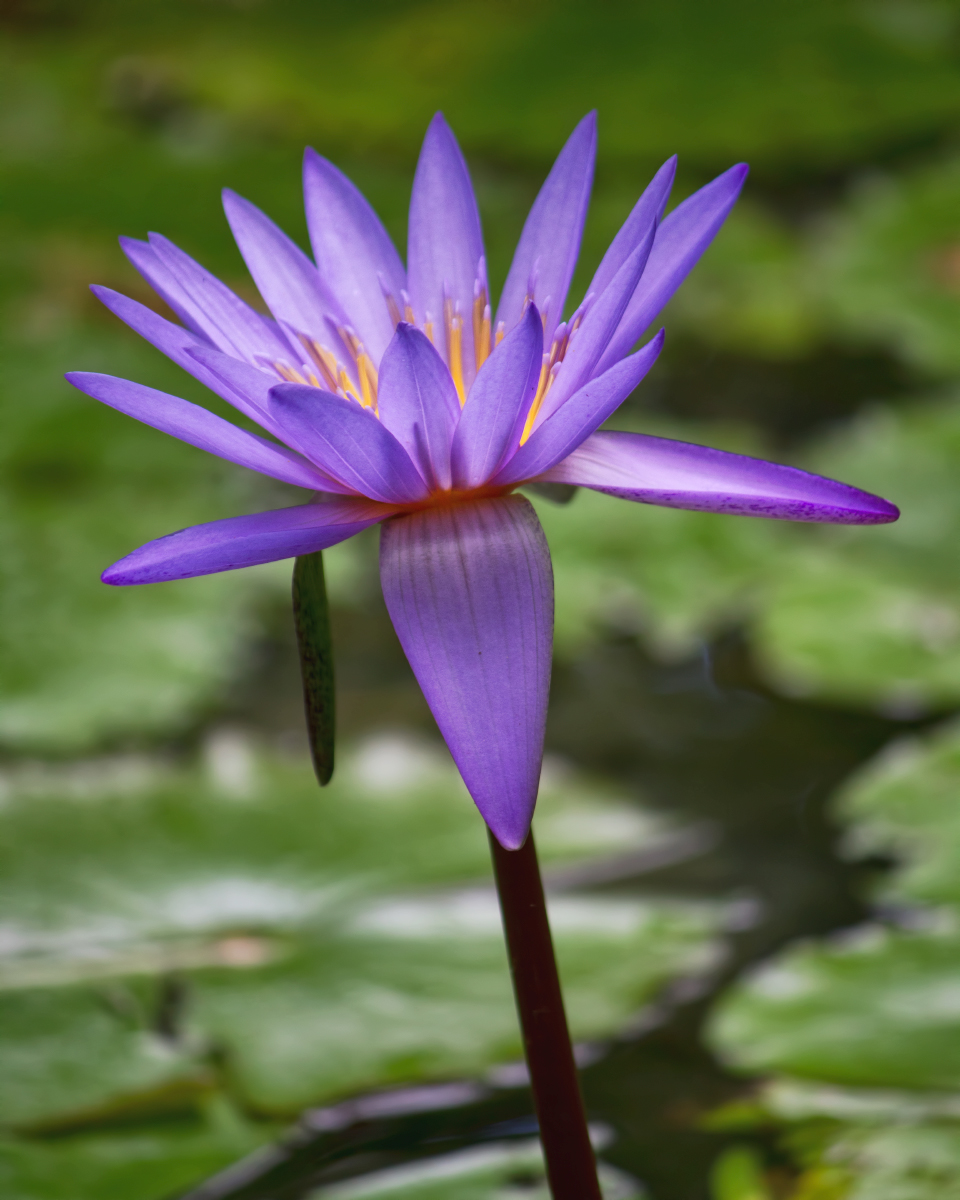
Waterlily in CS5
‹ PreviousFlora GalleryNext ›

Waterlily in CS5

by Barbara Graham

Gallery: FloraPosted August 29, 2011153 views12 comments
Canon EOS REBEL T2i
EF-S55-250mm f/4-5.6 IS
8/24/2011 – 11:10:26 AM in the shade
1/250 sec
Aperture priority
f/5.6
ISO 400
Focal length 214 mm
Tree Hill Nature Center, Jacksonville
Raw, Lightroom 3, CS5 (please see below)

I've purchased with great discounts Lightroom 3 and CS5, and I'm having to not only figure out the programs but develop a new workflow. I've been told in the past by some of my mentors in Avian not to use Save for Web but to use Save As, which was fine in Elements. In CS5, if it's a 16-bit file and you use Save As to save as JPG you don't get an indication of the resulting JPG file size. So I'll either need to change the files to 8-bit files first or use Save for Web.

All that to say that for this one I used Save for Web. I'm a bit overwhelmed at the moment so can't be sure how/whether anything in this process affected the image adversely. Over time I'll clear it all up, though.

I was really happy on this day to see this waterlily, because images of them always look so beautiful to me.

Comments/critiques/suggestions are desired and appreciated.

Thank you!

Comments

12 comments
Comment posted by SandyRichardsBrown on August 29, 2011 at 2:34 PM
In CS5, when you use "Save As.." you'll get a box with a slider to choose the jpeg size.
Look on Amazon, and pick up a good used copy of one of the "CS5 for nature photographers book".

This waterlilly is gorgeous! Great colours, nice perspective, and good detail. The whole image is a little bright, imo, (doesn't seem in the shade) so you might consider darkening a bit with the brightness control.
If you want to go further, you might blur the BG a bit - run a magnetic lasso around the flower, then invert the selection so you have effectively chosen the BG only. Choose "Gaussian blur" then use the slider to determine how much you want to blur.

Nice work!
Sandy
Registered on November 24, 2003, 3937 Posts, 12909 Comments
Comment posted by Mauro Pasquero on August 29, 2011 at 3:09 PM
Cool shot, Barbara, We do like the same colors :wink:
Mauro
Registered on January 21, 2010, 650 Posts, 2500 Comments
Comment posted by Bill Fach on August 29, 2011 at 4:17 PM
Barbara: I always use Save for Web because I like the Optimize to File Size feature. For my large image files I just plug in 500kb and for the regular posts 300kb and let the program do the necessary resizing. Bear in mind that all JPEGs are 8 bit but in the save for web workflow the program does it all automatically. All you really have to do before saving is flatten the image.

As for the shot itself, I like it and on my monitor it looks pretty good. Consider using a polarizer on outdoor shots like this where water is around; it helps to tame some of the highlights. Congrats on the program upgrade. I know you will put it to good use. >=))>
Registered on November 1, 2003, 1805 Posts, 26981 Comments
Comment posted by Ian Wolfenden on August 29, 2011 at 4:25 PM
This is a beautiful capture of the flower, Barbara - sharp and excellently exposed. I do like Sandy's suggestion of a bit of extra blur for the bg ( should be fun trying that !! ) but this remains ok as is to my eye.
Registered on May 18, 2007, 1108 Posts, 7647 Comments
Comment posted by Sandy Steinman on August 29, 2011 at 5:58 PM
Water lilies are a great subject. I like the purple/green/yellow color contrasts and composition. I like the idea of trying to blur the background. I also would consider taming the whitish highlights in the green area; possibly with recovery in lightroom or darkening with a brush in lightroom or photoshop.
Registered on March 14, 2010, 10 Posts, 83 Comments
Comment posted by Pat Sampson on August 29, 2011 at 7:14 PM
Congrats on the software Barbara.

I like this image, particularly the bg. The light also produces a nice sheen on the bloom. Very nice...

pat
Registered on May 19, 2007, 953 Posts, 15989 Comments
Comment posted by Gary Yeoh on August 29, 2011 at 8:29 PM
Barbara:

Nice color in the waterlily. The blooms looks a little soft for my taste; you did not mention whether a tripod was used but I am assuming this is motion blur from the breeze.
Registered on September 1, 2009, 588 Posts, 8184 Comments
Comment posted by Nathan Buck on August 29, 2011 at 10:09 PM
Very pretty bloom Barbara. I like seeing a little peak at the center. I could see darkening the bloom just a tad. Nice job overall - good luck on the new programs!

Nathan
Registered on November 1, 2003, 1101 Posts, 13589 Comments
Comment posted by Craig Strand on August 30, 2011 at 7:17 AM
Wonderful lily and well captured Barbara. I agree that the BG seems too bright, toning that down would help the bloom pop even more.
Registered on March 30, 2008, 416 Posts, 2885 Comments
Comment posted by Carolyn Derstine on August 30, 2011 at 1:36 PM
Kudos to you, Barbara for all you are working at learning! It seems there is always so much more one can learn.

I also really like waterlilies and you found a beauty here. Good comp and I like the way the front petal droops. More sharpening could probably be done on the flower since it does appear a little soft, by selecting the flower only and then sharpening.
Registered on February 16, 2011, 610 Posts, 3684 Comments
Comment posted by Ramamohan Pai on August 30, 2011 at 8:05 PM
Barbara, Apart from the great colors, I also like the composition - specially the slant to the Lily. I also like the hint of stamens making their shadows felt through the frontal petals. Cool Work :cool:
Registered on November 1, 2003, 550 Posts, 9037 Comments
Comment posted by Albert Darmo on September 3, 2011 at 10:13 PM
Hi barbara :wavey: Enjoy how you captured the geometric symmetry, and color of this lily.very well composed! Bill's advice should help your sizing problems and Sandy, with bg options :wink:
Albert Darmo
Canada
Registered on November 25, 2008, 1386 Posts, 11978 Comments