Nature Photographers Network
This is the preserved archive of the original Nature Photographers Network. The community continues at naturephotographers.network.
Great Blue Heron
‹ PreviousAvian GalleryNext ›

Great Blue Heron

by Allen Brooks

Gallery: AvianPosted September 7, 2011109 views7 comments
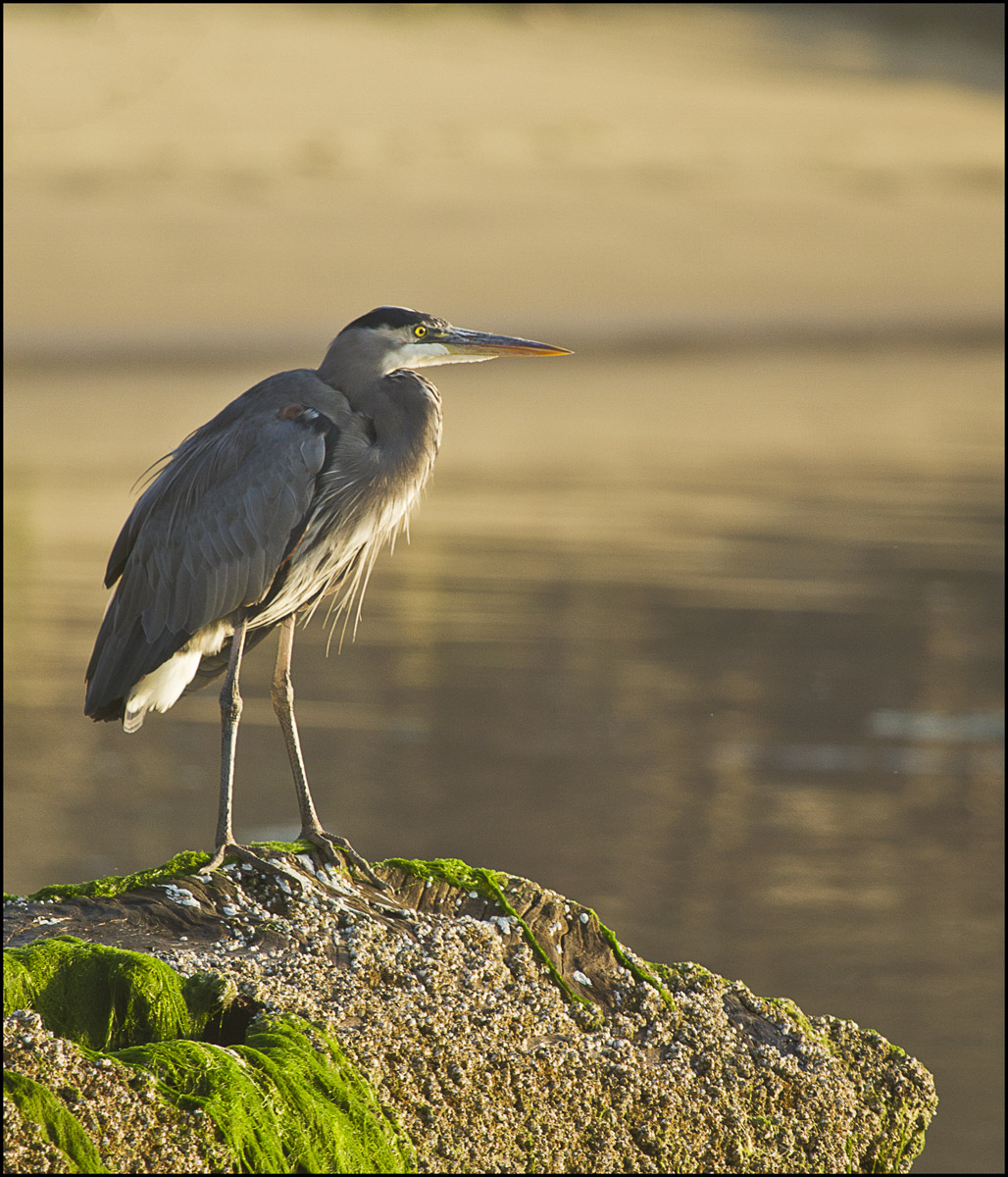
My infatuation with Great Blue continues. Taken on the Siuslaw River one hour after sunrise. The Heron is facing east, catching the morning sun.

The photo seems sharp enough and I played around with it in PS, but other than sharpening, I couldn't get the Heron to "pop" like I've seen in other posts. Any thoughts would be appreciated.

Canon 7d
100-400 at 400mm
1/400 @ f5.6
ISO 320
Raw, processed in ACR and sharpened in PS CS5.

Thanks for looking. :wavey:

Comments

7 comments
Comment posted by Dennis Plank on September 7, 2011 at 11:23 PM
Beautiful light, pose and perch, Allen. I'm on my work laptop with a horrible screen, but it looks like the brightest whites might be a bit hot. You can probably bring them down a bit in ACR. As for getting it to pop, the curves in either ACR or Photoshop can help a lot with that. There are more sophisticated methods, like luminosity masks, but the curves are a good starting point. The screen opens as a graph with a straight line. Click in the middle to put an anchor point. Click half way above that on the line and drag the point slightly upwards. Click half way between the middle and bottom and drag slightly downwards. It doesn't take much. Judicious use can sometimes make an enormous difference. You can play with it and see what happens.

:toast:
Registered on January 28, 2008, 1767 Posts, 23192 Comments
Comment posted by Brian Gatlin on September 8, 2011 at 8:55 AM
Allen, this has some good things going for it--I really like the early light, the perch, the water, and the pose. What Dennis has suggested for adding a bit of contrast in curves is almost exactly what I typically do (except I don't use the middle anchor, just the two that are midway between the center and the edges--and I use the arrow keys to move the line up/down because it lets me do it one 'click' at a time--usually two clicks down on the lower and two clicks up on the upper is just about right). However, I'm not sure that will work in this case because in this case darkening the darks will just make (most of) the heron darker, which I think is already sort of the issue here, at least for me. The ideal situation would have been to get around to your right and get more direct light on the bird, but that doesn't look like it would have been possible in the field.
Registered on March 21, 2009, 202 Posts, 4187 Comments
Comment posted by Allen Brooks on September 8, 2011 at 1:00 PM
Thanks Dennis and Brian for your suggestions. I appreciate your time to write the comments and will try your suggestions.
Registered on July 27, 2011, 262 Posts, 2597 Comments
Comment posted by Scott Frye on September 8, 2011 at 5:54 PM
Wishing that background line was not wasn't cutting across the face and beak -- perch looks good
Registered on February 3, 2007, 387 Posts, 1136 Comments
Comment posted by Nate Chappell on September 8, 2011 at 8:08 PM
I like the side/back lighting and the seaweed covered perch. I agree that ideally the line wouldn't cross through the heron's head but it's still a very nice image. :toast:
Registered on February 1, 2006, 1158 Posts, 19528 Comments
Comment posted by Barbara Graham on September 8, 2011 at 11:06 PM
Allen, I especially like the perch and the light here.
Registered on July 27, 2010, 1310 Posts, 5035 Comments
Comment posted by Ray Whitt on September 11, 2011 at 9:19 PM
The light is really nice and the perch too, agree adding a little contrast. Nice work.

Ray
Registered on May 27, 2011, 92 Posts, 2619 Comments