Nature Photographers Network
This is the preserved archive of the original Nature Photographers Network. The community continues at naturephotographers.network.
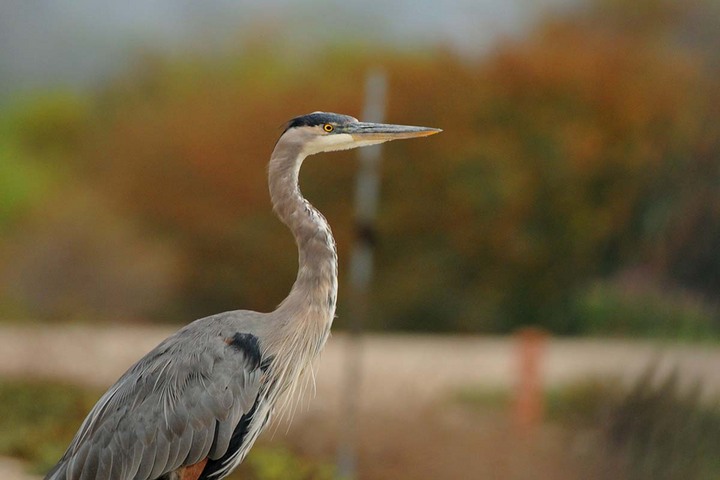
Great Blue Heron
‹ PreviousAvian GalleryNext ›

Great Blue Heron

by Patrick O'Healy

Gallery: AvianPosted September 24, 2011119 views6 comments
I took this photo of a Great Blue Heron at San Joaquin Wildlife Preserve 9/5/11. The lake was being drained and we took photos of this Blue and several Snowy Egrets. This fellow walked up the bank and posed for ten minutes. Unfortunately, there were two people farther back behind the bird and I had to position myself with the out of focus post behind his head. A beginner with Photoshop, I followed the directions in two manuals to try and eliminate the post from the photo without luck. I followed the directions exactly several times in the one by Scott Kelby. I am sure there is a simply way to do this, but it eludes me at the moment.

Details:
Nikon 300D Nikon 200-400 lens. Aperture priority f/5 1/320
-0.3 step ISO-500 29.9 meters from the subject normal saturation & brightness and manual white balance

Comments

6 comments
Comment posted by Patrick O'Healy on September 24, 2011 at 6:15 PM
I neglected to mention that comments are welcome. I appreciate the opportunity to learn from all of you.
Patrick
Registered on March 13, 2011, 326 Posts, 1679 Comments
Comment posted by Scott Frye on September 24, 2011 at 7:19 PM
Good job getting close to the GBH. The OOF post is a major distraction because it crosses the beak. Also, the horizontal "road" near the bottom also is a distraction because it crosses the bird. You can often take some background distraction from the picture by getting lower. Background colors are very nice and show the bird off well
Registered on February 3, 2007, 387 Posts, 1136 Comments
Comment posted by Richard Ditch on September 24, 2011 at 9:32 PM
Exposure and focus look good; technicals overall are fine.

Big issues are compositional: the OOF stake is a real distraction, as is the road as Scott mentions. I also find the crop across the lower body a strange choice that makes the image very unbalanced. With 10 minutes to work this cooperative bird I think you could have found a better vantage point and stronger composition.
Registered on November 1, 2003, 1031 Posts, 12705 Comments
Comment posted by Jim DeWitt on September 24, 2011 at 10:48 PM
I have to agree with Richard and Scott. Was there a reason you couldn't turn the camera 90 degrees to get more of the bird?

Photoshopping out objects as big as the vertical post against a varied background isn't trivial. It's much, much easier to try and get it right in the field. :frown:
Registered on August 28, 2006, 1240 Posts, 8506 Comments
Comment posted by Barbara Graham on September 25, 2011 at 1:00 PM
Beautiful light and detail.
Registered on July 27, 2010, 1310 Posts, 5035 Comments
Comment posted by Dennis Plank on September 25, 2011 at 3:06 PM
I agree with others comments on taking the image in vertical format. As far as getting a different angle, I have no idea what constraints you were dealing with and some preserve paths do restrict one pretty severely. Given what you have to work with here, I think I'd recrop it into more of a portrait (thus eliminating most of the path. If you have a version of Photoshop with the patch tool, it should be fairly easy to get rid of the post. Outline fairly small chunks of it at a time and drag them horizontally until they just clear (that keeps the bg pretty similar). You'll have to zoom in and do some careful work around the beak so you don't mess it up, but it should be doable. As Barbara mentioned, you have some sweet light here, so it would be a shame not to make something of this image.
:toast:
Registered on January 28, 2008, 1767 Posts, 23192 Comments