Gallery: AvianPosted January 17, 2012161 views9 comments
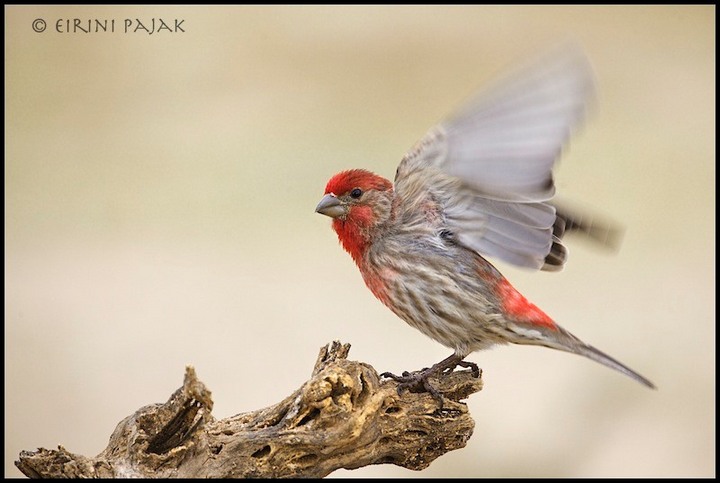
EVERYTIME I post a photo on this forum the colors go flat. Anyone have any ideas why? My photos post normally on other sites.
ISO 800, f7.2, 1/400 .33ev
5D2 @400mm
C&C appreciated!
Comments
9 comments
Comment posted by Tonia Graves on January 17, 2012 at 3:46 PM
Your colors look alright to me... I like the movement in the wings here while everything else on the finch (?) is sharp. Gotta love the cholla skeleton perch too!
Registered on October 29, 2011, 92 Posts, 1035 Comments
Comment posted by Ron Bielefeld on January 17, 2012 at 5:50 PM
I also think the colors look good. The comp is nice and the blurred wings add a lot to this shot IMO.
Registered on December 6, 2008, 360 Posts, 7132 Comments
Comment posted by SandyRichardsBrown on January 17, 2012 at 7:18 PM
Colours look fine friom here too. Nice bird, perch, pose, and the blurred wings are interesting.
Sandy
Registered on November 24, 2003, 3937 Posts, 12909 Comments
Comment posted by Richard Ditch on January 17, 2012 at 7:36 PM
I like the finch, perch, action, and composition.
To my eye the reds on this House Finch appear over saturated, not flat. Looking at the image there is no embedded color profile, so the image will be rendered by whatever default setting the viewer's browser and operating system assign to an untagged image.
- What color space do you work in (usually Adobe RGB or sRGB)?
- What application do you work in (Photoshop, PS Elements, Lightroom, or something else)?
- do you at any point in your workflow change/convert/assign a color space?
- what operating system do you use?
- what browser do you use?
- have you toggled on color awareness in your browser if it allows that setting?
- Is your computer and monitor calibrated?
Registered on November 1, 2003, 1031 Posts, 12705 Comments
Comment posted by Eirini Pajak on January 17, 2012 at 7:54 PM
I feel dumb but I don't know what color space I use! I use Aperture which is similar to Lightroom. I have a Mac and am using OS 10.6.8. I use Safari as my browser, no I have not calibrated anything.
It's not that the color itself is radically different, only some of the highlights seem to disappear & everything looks flatter to me. It seems to do this on this forum in particular, not on my website or any other forum!
Registered on December 13, 2011, 216 Posts, 1671 Comments
Comment posted by Philip Hodgkins on January 17, 2012 at 9:43 PM
Agree with the others. They don't look flat on my calibrated monitor. Richard has asked all the right questions.
Registered on July 24, 2006, 2741 Posts, 12349 Comments
Comment posted by Hans Overduin on January 18, 2012 at 9:45 AM
Nice moment you have frozen here, I do not see anything odd about the colors....
Cheers, Hans
Registered on August 31, 2011, 491 Posts, 3807 Comments
Comment posted by Cheryl Molennor on January 19, 2012 at 12:38 PM
Colors look great to me and I like the image. I had a similar experiance last week and it was all down to the color space.
Registered on June 30, 2009, 300 Posts, 5051 Comments
Comment posted by Ron Dudley on January 20, 2012 at 9:28 AM
Nice action from the finch with good head turn to accompany it. I also like the perch and especially the composition. Colors don't look flat to me at all - in fact if anything the reds may be slightly oversaturated.
Registered on March 30, 2007, 437 Posts, 10915 Comments

Comments
9 commentsSandy
To my eye the reds on this House Finch appear over saturated, not flat. Looking at the image there is no embedded color profile, so the image will be rendered by whatever default setting the viewer's browser and operating system assign to an untagged image.
- What color space do you work in (usually Adobe RGB or sRGB)?
- What application do you work in (Photoshop, PS Elements, Lightroom, or something else)?
- do you at any point in your workflow change/convert/assign a color space?
- what operating system do you use?
- what browser do you use?
- have you toggled on color awareness in your browser if it allows that setting?
- Is your computer and monitor calibrated?
It's not that the color itself is radically different, only some of the highlights seem to disappear & everything looks flatter to me. It seems to do this on this forum in particular, not on my website or any other forum!
Cheers, Hans