Nature Photographers Network
This is the preserved archive of the original Nature Photographers Network. The community continues at naturephotographers.network.
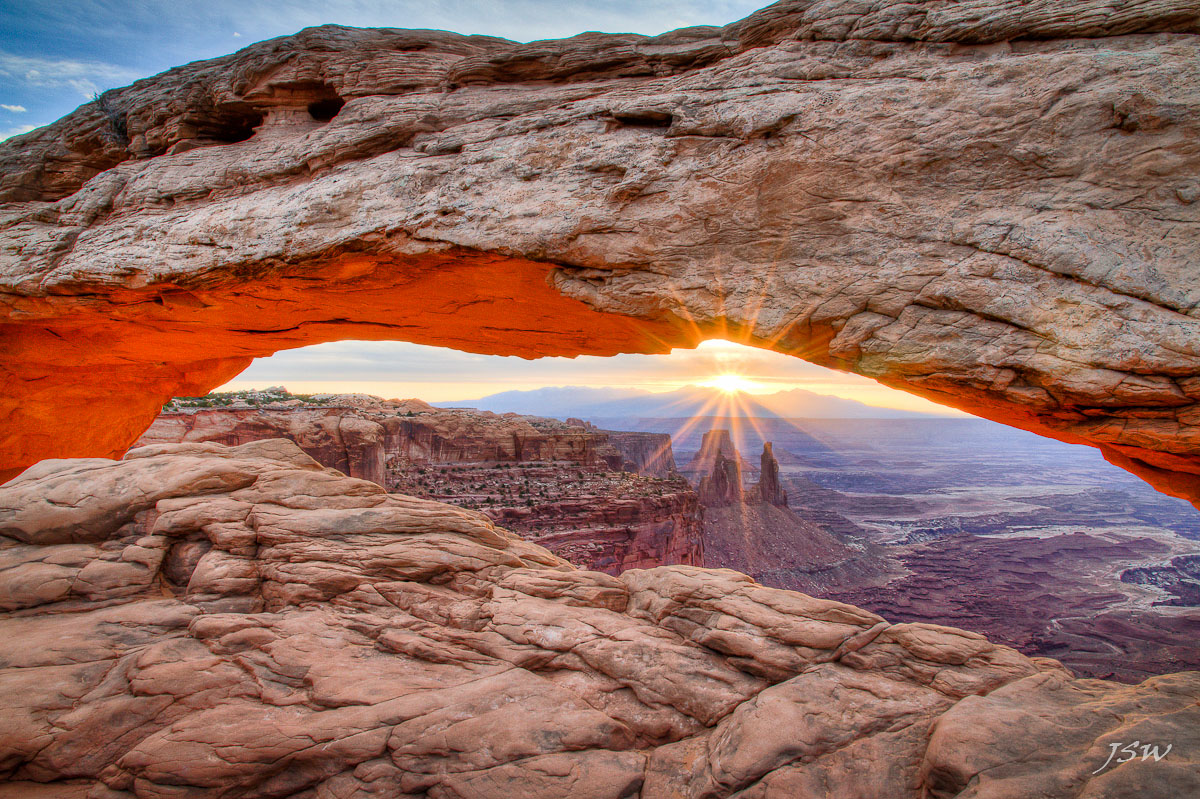
Mesa Morning (+ repost)
‹ PreviousLandscape GalleryNext ›

Mesa Morning (+ repost)

by Jared Warren

Gallery: LandscapePosted July 3, 2012409 views12 comments
It's a popular spot (Mesa Arch, Canyonlands) but here's my attempt. Three bracketed exposures using tone mapping in Photomatix. Canon 7D, 15-85mm @15mm, f/18. I'm worried it looks a little too processed. What would you recommend to make this wall-worthy?

Comments

12 comments
Comment posted by Stan Rose on July 3, 2012 at 1:39 AM
It's too processed :wink: I avoid HDR software like the plague so i cant help you with Photomatix, but basically the tone mapping sucked all the contrast out of the shot. Everything except the classic orange glow on the bottom of the arch and the sunstar (which looks real nice) should be considerably darker, so that the highlights stand out more. You've got 3 exposures--so hand blend them, im sure that will give you a good result.
Registered on September 15, 2005, 836 Posts, 17099 Comments
Comment posted by John Mumaw on July 3, 2012 at 6:35 AM
I couldn't disagree more. We've all seen plenty of poorly processed HDR blends and this is not one of them. There's plenty of contrast present here. The foreground and the face of the arch could stand to be burned down just a bit, but otherwise you captured a classic shot rather well, IMO.
Registered on September 9, 2005, 62 Posts, 2289 Comments
Comment posted by Harry Lichtman on July 3, 2012 at 8:47 AM
I'd have to say that most of the image is over exposed for my taste. It lacks drama and mood which you feel when the underside is illuminated in the early morning. The image feels and looks like mid-day. I would agree with Stan, darken everything/add contrast to everything but under the arch and the sunstar, which I would expect to be bright. Maybe take one of your darker exposures used in the HDR, and use it as a mask. As long as there is detail in the shadows, left of histogram, you could erase over this image and reveal the darker exposure more represetative of this time of day. Go slow, and the blend should work out fine and seamless.
Registered on September 17, 2010, 304 Posts, 3507 Comments
Comment posted by Lon Overacker on July 3, 2012 at 11:05 AM
Jared,

Let's make the score 2-2. I'm more with John in thinking that this is NOT one of those poorly processed HDR. Sure, contrast and selective burning could improve things a bit, but this does not look HDR in general. I think you've done well to capture the classic moment of Mesa Arch.

Lon
Registered on November 24, 2006, 521 Posts, 19147 Comments
Comment posted by Wick Smith on July 3, 2012 at 2:12 PM
I'm going to split the tie & say that Photomatix did a much better job than I would have expected. It does not look like the classic HDR shot. While I hand blend, this is a good start. I do think the underside of the arch is just a bit overdone and the rocks could stand a bit more contrast, you have a great shot here that, with a few tweaks, will be a proud addition to your wall hangings. I hope to get out there some day to shoot the arch.
Registered on June 12, 2009, 91 Posts, 379 Comments
Comment posted by Jared Warren on July 3, 2012 at 6:03 PM
Thanks for your helpful feedback. At a previous visit to Mesa Arch I did my best with a single exposure, and found the background under the arch blown out while the arch and foreground was too dark (hence my experiment with Photomatix). I'm still learning about manual blending in PS but will give that a shot (95% of my edits are done in Lightroom). In the meantime, I'm attaching a modified version with slightly increased contrast, and exposure of most of the scene decreased by about 1/3. Does this help, hurt, or can you even notice a difference? Any further recommendations? Thanks!

Jared
Registered on May 11, 2012, 84 Posts, 931 Comments
Comment posted by Wick Smith on July 3, 2012 at 6:25 PM
On the repost, the foreground rocks don't look nearly so flat. That's an improvement for sure. I'd be tempted to keep going with it just a bit, especially on the rocks, both foreground and on the arch. If I got really picky, I'd say to desaturate the top left corner. The blue is a bit strong there as it's the only part of the sky with that deep tone. Not much - just a bit.

It's still a great shot!
Registered on June 12, 2009, 91 Posts, 379 Comments
Comment posted by Dennis Harding on July 3, 2012 at 8:14 PM
This is a good example of how realist HDR can be...it's all in the processing. Recently I've been experimenting with ways to achieve a more natural result. Firstly I would recommend that you add contrast to this image in steps and as your image gets darker pull back any over saturated colors as you go.
Sometimes I reprocesses and blend in parts of the middle exposed tiff. Also if your highlights get to bright you can blend in that part of the underexposed image.
Registered on January 19, 2011, 33 Posts, 408 Comments
Comment posted by Brian Schrayer on July 3, 2012 at 8:48 PM
Although this is a familiar composition I think you had some interesting conditions to work in. Additionally, the processing looks clean here in that you have avoided many of the digital artifacts that are common with tone mapping (with the exception of some haloing / color fringing on the top of the arch). The one recommendation that I would have is to darken the shadows more in the canyon beyond the arch. This would bring back some of the contrast to the image.
Registered on May 28, 2004, 114 Posts, 2890 Comments
Comment posted by Tony Kuyper on July 3, 2012 at 10:23 PM
Clouds are a nice addition. Rock maybe feels a bit overexposed. Second version much improved.
Registered on November 1, 2003, 364 Posts, 22328 Comments
Comment posted by Mark Pelton on July 3, 2012 at 10:54 PM
I have found that you can get a pretty realistic looking blend in Photomatix tone mapping. You just have to add back midtone contrast after the blend. Your repost is better, but I would start by selecting the midtones and increasing contrast with an S curve further still.
Registered on November 25, 2003, 380 Posts, 4647 Comments
Comment posted by John Williams on July 4, 2012 at 12:36 PM
My biggest nit with both of these is that my eye expects the back side of the rock to be very dark when looking straight into the sun. If you bracketed such that one shot has shadow detail and one highlight detail, take a look at the shot in the middle of those two and try to keep that mood in the blend. When I'm blending, I prefer to just bring detail back into the shadows and highlights as opposed to turning everything into mid-tones.

All that aside, there's huge potential here. You caught a classic composition wonderfully, and the red glow on the underside of the arch is lovely.
Registered on September 6, 2007, 221 Posts, 5985 Comments