Gallery: AvianPosted July 23, 2012228 views23 comments
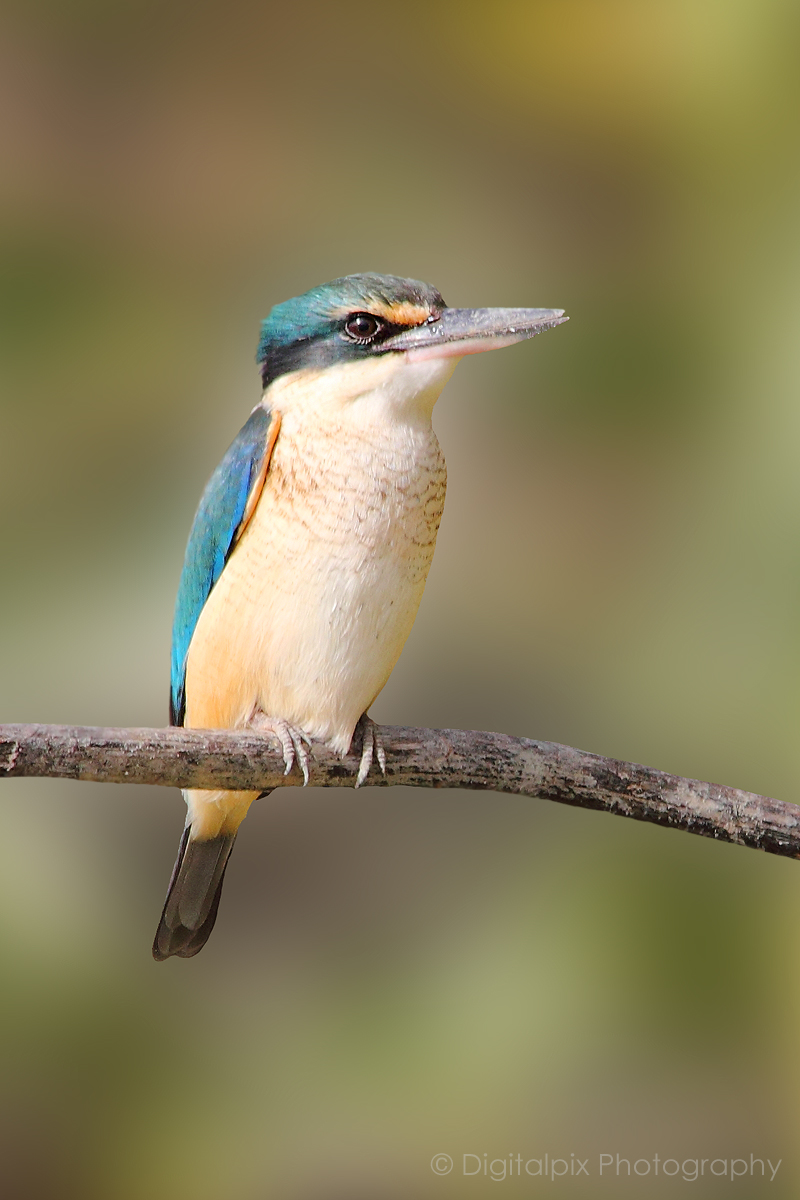
Another one from my kingfisher hunt :) I am super pleased with this shot. Have cropped and slightly blurred the background.
Canon 550D
500mm
1/400 sec
f/8
ISO 200
Comments
23 comments
Comment posted by Dennis Plank on July 23, 2012 at 11:43 PM
Nice pose and bg, Toya. I can see why you like it, though on my monitor it looks a bit bright-but then I don't know the species.
Registered on January 28, 2008, 1767 Posts, 23192 Comments
Comment posted by Toya Heatley on July 24, 2012 at 12:12 AM
The colours are correct - I am not sure which way it goes but when I see them in pairs, one is always brighter and more vivid in colour than the other.
Registered on June 13, 2012, 36 Posts, 98 Comments
Comment posted by Jim DeWitt on July 24, 2012 at 1:01 AM
By "bright" I think Dennis means "hot," blown or nearly-blown whites. There is a loss of detail in the neck that suggests Dennis may be right. I don't know about Kingfishers in your hemisphere, but in ours they are very difficult to approach. Impressive stalking skills.
About the only suggestion I can offer assumes you have Photoshop. When you do a selective filter, use the Refine Edge command under the Select menu and Smooth and Feather the edge just a little so the effect of the filter (blur, in your case) isn't quite so obvious.
It's a very good shot; my criticisms are minor and all got to post-processing.
Registered on August 28, 2006, 1240 Posts, 8506 Comments
Comment posted by John Tobias on July 24, 2012 at 7:47 AM
Toya, nice shot, but I also think the colors are a bit washed out. Nice BG. Thanks for sharing.
Registered on September 12, 2009, 2120 Posts, 6455 Comments
Comment posted by Basri Akcasoy on July 24, 2012 at 7:57 AM
Nice kingfisher shot with sharpness, lean composition and BG. TFS.
Registered on February 16, 2012, 118 Posts, 767 Comments
Comment posted by Rick Turner on July 24, 2012 at 9:19 AM
Great capture Tonya. This is an elusive species and detailed well.
Registered on February 18, 2012, 534 Posts, 2755 Comments
Comment posted by Keith Bauer on July 24, 2012 at 10:29 AM
Very nice capture. Nice pose and background. Agree with other comments about the overall brightness. The highlights look like they might have a tiny bit of detail. Some post processing recovery should definitely help. If this does not look bright on your monitor, is your monitor calibrated?
Registered on November 20, 2003, 458 Posts, 4836 Comments
Comment posted by Kurt Bowman on July 24, 2012 at 2:39 PM
Toya, I see detail in the whites on my monitor, so not sure why people have suggested it is hot. I do think it is a bit over-exposed though as Keith suggested. but ftp me, it just looks a little bit bright overall....I would tweak it, but not too much. Maybe owed the exposure -.3 or so. I assume you pay attention to your histogram when processing? If not, regardless of the monitor I use, I still rely heavily on it.
My only other tiny nit...and it is a small one...I think the head can use another round of sharpening, but would be careful to only add a little more and not over do it. I just think it would make it pop more on the web.
I do want to say..still a very nice image overall and hope to see a re-post of it if you decide to re-work it based on feedback.
Registered on June 19, 2008, 1005 Posts, 8028 Comments
Comment posted by Toya Heatley on July 24, 2012 at 2:47 PM
Thank you all for your comments. This is the first time I have processed in this way so it's a learning curve for me. I appreciate the advice given as I know I have a lot to learn in this area. That's one of the reasons I joined this site - so I could learn from the best :)
I don't see the brightness that is mentioned and my monitor is just fine but that's ok :). It doesn't matter how calibrated a monitor is, no two monitors are ever going to see the picture in the same way - it's just the way it is. I am happy with the detail in this image and it prints out perfectly on commercial printers so that is all I am worried about :)
Registered on June 13, 2012, 36 Posts, 98 Comments
Comment posted by Keith Bauer on July 24, 2012 at 3:19 PM
I don't see the brightness that is mentioned and my monitor is just fine but that's ok :). It doesn't matter how calibrated a monitor is, no two monitors are ever going to see the picture in the same way - it's just the way it is.
I'm glad you are happy with your image. It is a very nice image. With so many comments about the brightness, there must be a reason. A calibrated monitor (done with a hardware calibration puck) is the only way to be sure what you are seeing is truly accurate. If it prints well, that doesn't mean the commercial printer isn't making adjustments to insure it prints well. We just asked to see if your monitor was calibrated. It is a critically important step in the overall post processing workflow.
Registered on November 20, 2003, 458 Posts, 4836 Comments
Comment posted by Toya Heatley on July 24, 2012 at 4:08 PM
Then the answer is no my monitor is not calibrated and it never will be. I will have another go at processing this image when I get home from work today and will repost. I am taking on board the comments and am trying to learn from them. Thank you.
Cheers
Toya
PS. The commercial printer I use does not make any adjustments to my images as I have asked them to print as is. They do a lot of printing for photographers and understand our pickiness :)
Registered on June 13, 2012, 36 Posts, 98 Comments
Comment posted by SandyRichardsBrown on July 24, 2012 at 6:09 PM
Excellent image - nits mentionned.
" my monitor is not calibrated and it never will be."
Toya, Monitor calibration is quite important, and it's a simple thing to get a used calibrator off of EBay or elsewhere. Your images are top-notch, and deserve the best processing you can manage. We wouldn't be commenting so specifically if we didn't see your talent and know you wanted to improve as much as possible.
Sandy
Registered on November 24, 2003, 3937 Posts, 12909 Comments
Comment posted by Toya Heatley on July 24, 2012 at 9:34 PM
I have dulled it down a bit, darkened the perch, adjusted the edges and the background behind the bird to remove the 'glow' and cropped slightly. I will be interested if you can still see whites and highlights in the repost as apart from the catch light in the eye there are no whites.
I will look into the calibration but am not convinced it is going to help me any. What am I calibrating it with? I don't do my own printing so I don't need to calibrate it with my printer. I can never guarantee that the colours I save it with are going to be what is viewed on the internet anywhere else even if I do calibrate it. I know a lot of people swear by it but I have yet to be convinced - however I am open to listening to reasons why I should. On the other hand I do have the best monitor I could get for the work I do - I did a lot of research on monitors before purchasing it.
Registered on June 13, 2012, 36 Posts, 98 Comments
Comment posted by Keith Bauer on July 24, 2012 at 11:25 PM
Toya:
You can have the best monitor money can buy, but without color calibration, you simply do not know that what you are looking at represents the actual pixel values in the image. You asked "what am I calibrating against" You are calibrating against known luminance values measured in cd/in 2 (candelas per square inch), and the software from a hardware calibration system will create known color values based on RGB values, display them on the screen, the hardware puck will read what it really gets and make the appropriate corrections to insure the values displayed match known color values. You seem to have serious doubts about the value. If you don't want to take this critical step, that's fine, but read any book in the world on color management and you'll find that all of the advice you've been given here is accurate and correct.
Registered on November 20, 2003, 458 Posts, 4836 Comments
Comment posted by Verdon on July 24, 2012 at 11:49 PM
you calling that "slightly blurred bg", saw the same picture on your www and it is huge slightly different, anyway I would like to know more about post process because i like it the way how the picture looks.... The bird looks on my monitor little bit to bright but overall the shot is very cool, thank you for sharing!
Registered on June 10, 2011, 147 Posts, 1444 Comments
Comment posted by Keith Bauer on July 25, 2012 at 9:08 AM
After reading Verdon's comment, I was a bit confused. I checked out your website. (Some nice work). I too would say that the background on the posted image is a bit more than "slightly blurred". It's certainly fine to do these kinds of edits, but of course nice to disclose the extent of the photoshop work.
Registered on November 20, 2003, 458 Posts, 4836 Comments
Comment posted by Toya Heatley on July 25, 2012 at 2:40 PM
I apologise if I was misleading with my original comment. I never hid the fact that it was a photoshop blurred background. It was achieved with a mask and gausian? blur. I don't know how much I just moved the slider. I tried it because I was looking at another image that someone else had done and was trying to work out how they had achieved it in camera with the lens they were using. I can do it easily in camera with my 70-300 lens but the 150-500 doesn't always achieve the same result. So I figured they must have done it in photoshop, and gave it a go. I am not a big photoshop user and much prefer to get my effects in camera. This is the first bird/nature image I have manipulated to this extent. If the image is offending to the site then I am happy for it to be removed.
Registered on June 13, 2012, 36 Posts, 98 Comments
Comment posted by Keith Bauer on July 25, 2012 at 3:28 PM
Hi Toya: Not offending at all. Not implying that is is. Just asking for info on what processing was done. Gaussian blur with a well done layer mask to mask off the kingfisher. We want NPN'ers to see other work, understand the camera / lens data and the post processing as all of it adds up to the final image.
Registered on November 20, 2003, 458 Posts, 4836 Comments
Comment posted by Verdon on July 25, 2012 at 3:29 PM
come on girl, everything is OK, like I said I like the shot and for sure should be here, cheers VDN!
Registered on June 10, 2011, 147 Posts, 1444 Comments
Comment posted by Toya Heatley on July 25, 2012 at 4:30 PM
Phew!
Ok in the interest of sharing, this is the original image which I didn't like because the kingfisher was so close to all the flax and scrub.
Registered on June 13, 2012, 36 Posts, 98 Comments
Comment posted by Howard Cheek on July 25, 2012 at 6:22 PM
Interesting exposure debate Toya, enough said
Very good overall, I would be excited to get a nice shot of this bird as well!
Registered on July 24, 2008, 1201 Posts, 10758 Comments
Comment posted by John Tobias on July 26, 2012 at 8:28 AM
Toya, I have to admit I like the original photo best with the plants in the BG. That is just my personal opinion. Thanks for sharing it with NPN.
Registered on September 12, 2009, 2120 Posts, 6455 Comments
Comment posted by Kurt Bowman on July 28, 2012 at 11:37 AM
Hi Toya, I think the repost looks a bit better on the brightness. As far as the post processing blur....I think it was an excellent job of post processing and like the end result.
Registered on June 19, 2008, 1005 Posts, 8028 Comments

Comments
23 commentsAbout the only suggestion I can offer assumes you have Photoshop. When you do a selective filter, use the Refine Edge command under the Select menu and Smooth and Feather the edge just a little so the effect of the filter (blur, in your case) isn't quite so obvious.
It's a very good shot; my criticisms are minor and all got to post-processing.
My only other tiny nit...and it is a small one...I think the head can use another round of sharpening, but would be careful to only add a little more and not over do it. I just think it would make it pop more on the web.
I do want to say..still a very nice image overall and hope to see a re-post of it if you decide to re-work it based on feedback.
I don't see the brightness that is mentioned and my monitor is just fine but that's ok :). It doesn't matter how calibrated a monitor is, no two monitors are ever going to see the picture in the same way - it's just the way it is. I am happy with the detail in this image and it prints out perfectly on commercial printers so that is all I am worried about :)
I'm glad you are happy with your image. It is a very nice image. With so many comments about the brightness, there must be a reason. A calibrated monitor (done with a hardware calibration puck) is the only way to be sure what you are seeing is truly accurate. If it prints well, that doesn't mean the commercial printer isn't making adjustments to insure it prints well. We just asked to see if your monitor was calibrated. It is a critically important step in the overall post processing workflow.
Cheers
Toya
PS. The commercial printer I use does not make any adjustments to my images as I have asked them to print as is. They do a lot of printing for photographers and understand our pickiness :)
" my monitor is not calibrated and it never will be."
Toya, Monitor calibration is quite important, and it's a simple thing to get a used calibrator off of EBay or elsewhere. Your images are top-notch, and deserve the best processing you can manage. We wouldn't be commenting so specifically if we didn't see your talent and know you wanted to improve as much as possible.
Sandy
I will look into the calibration but am not convinced it is going to help me any. What am I calibrating it with? I don't do my own printing so I don't need to calibrate it with my printer. I can never guarantee that the colours I save it with are going to be what is viewed on the internet anywhere else even if I do calibrate it. I know a lot of people swear by it but I have yet to be convinced - however I am open to listening to reasons why I should. On the other hand I do have the best monitor I could get for the work I do - I did a lot of research on monitors before purchasing it.
You can have the best monitor money can buy, but without color calibration, you simply do not know that what you are looking at represents the actual pixel values in the image. You asked "what am I calibrating against" You are calibrating against known luminance values measured in cd/in 2 (candelas per square inch), and the software from a hardware calibration system will create known color values based on RGB values, display them on the screen, the hardware puck will read what it really gets and make the appropriate corrections to insure the values displayed match known color values. You seem to have serious doubts about the value. If you don't want to take this critical step, that's fine, but read any book in the world on color management and you'll find that all of the advice you've been given here is accurate and correct.
Ok in the interest of sharing, this is the original image which I didn't like because the kingfisher was so close to all the flax and scrub.
Very good overall, I would be excited to get a nice shot of this bird as well!