Nature Photographers Network
This is the preserved archive of the original Nature Photographers Network. The community continues at naturephotographers.network.
Autumn WarmtW Edits
‹ PreviousLandscape GalleryNext ›

Autumn WarmtW Edits

by Chris Chamberlain

Gallery: LandscapePosted November 24, 2012474 views26 comments
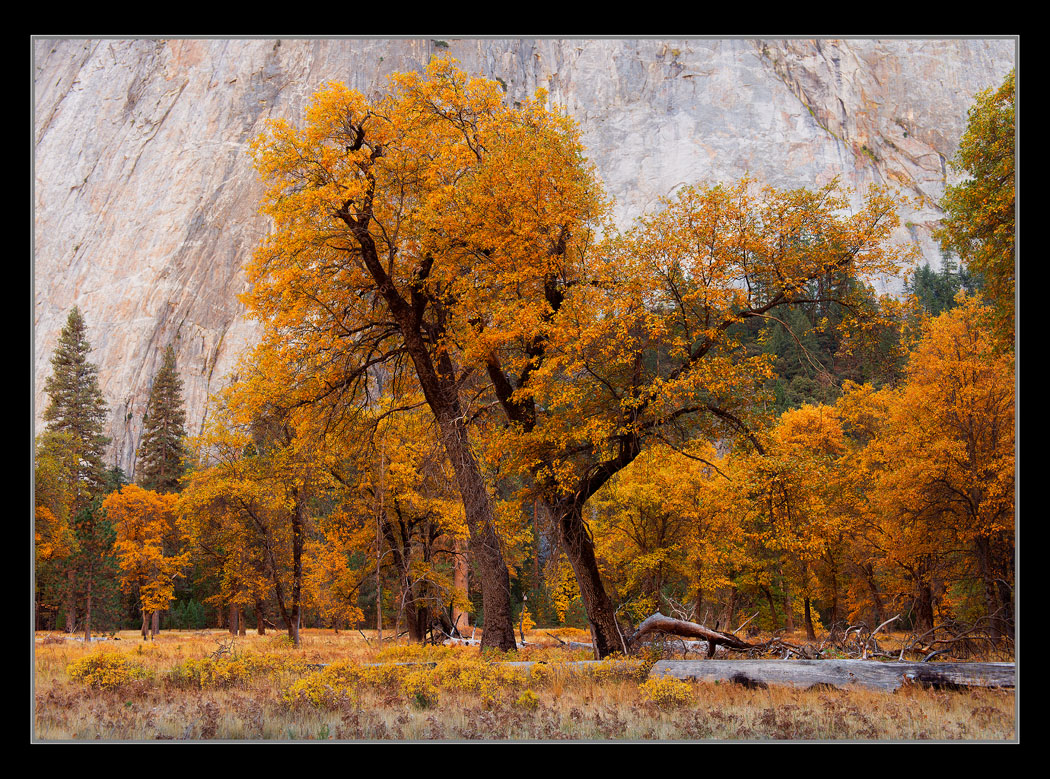
Well, here's my capture and interpretation of this set of trees. Taken in different lighting/weather conditions, and four days later than Lon made his. I made what I think are very small color balance adjustments, as well as selective color adjustments to arrive at this end result. Would love to hear your thoughts. Look at the larger one!

D800,
24-70mm,
1/3sec, F/11

Thanks,
CHris

Comments

26 comments
Comment posted by Nick Bristol on November 24, 2012 at 5:44 PM
Really nice Chris. I love the light and these colors feel so nice to me. It really is a pretty spot, and one I hope to visit one of these day! :toast:

Nick Bristol
Lone Rock, WI
Registered on February 1, 2004, 752 Posts, 14140 Comments
Comment posted by Lon Overacker on November 24, 2012 at 5:50 PM
Chris,

I'm hesitating being the first to comment here and put a damper on this lovely El Cap Meadow landscape. A familiar site indeed and a beautiful rendition.

Right away though, I gotta say that the color is off, IMHO. Which I find uncharacteristic of your processing. Actually the meadow, grass and even the gray fallen trunk all look pretty good. It's the granite wall that has me thrown for a loop. The granite is too yellow/red in my book. Interesting too, go back and look at my image and where you commented, "The color of the background wall looks perfect to me." Between the two images I don't see them as being close. Now I won't claim that mine is correct, in fact it might be too blue, but at least for me, these cliffs, and on the shady side at that, are at a minimum more gray/neutral, if not leaning blue than they are brown/yellow. Now, I would grant some influence from El Cap, especially if it's in full sun reflecting a warmer light, but still, it looks off to me. the other clue for me are the black oak trunks - a little on the red side.

Having said that, it's amazing how much the oaks changed in those 4 days! Note the absence of green leaves from my image to yours.

Anyway, sorry for the lengthy nit... I do love the scene, but I think needs some color work.

Lon
Registered on November 24, 2006, 521 Posts, 19147 Comments
Comment posted by John&Patty Benway on November 24, 2012 at 6:12 PM
Very pretty indeed Chris, what grabs me right off is the warm appealing mood it carries, along with the beautiful color and comp.I would definitely like to make it there someday.
John
Registered on May 12, 2006, 626 Posts, 8700 Comments
Comment posted by Robert Dayton on November 24, 2012 at 6:13 PM
Well composed and very pretty.
Registered on November 11, 2008, 281 Posts, 3958 Comments
Comment posted by Chris Chamberlain on November 24, 2012 at 7:00 PM
Lon,
I see what you mean. Although the granite walls are rendered much lighter and warmer in my raw file than your image portrays. But, lke I said, it looks right on to me in your image. I have included the raw capture converted to jpeg. I did my normal adjustments in raw before hand.

I'm also including another rework from scratch. I think I went a little too far in the first. Also, a little lazy in the masking. So I painted out 100% of any of the color adjustments I made out of the granite, and the tree trunks. The granite is still quite a bit lighter, and warmer than in your capture. But I think it's true to the original capture enough. The white balance was captured at 5750. 5500 is auto, and daylight rendered it at 6100. So the 5750 original capture with a curves adjustment to bring it down a bit, and some burning to deepen the greys.

I think this is a big improvement, so thanks, I think! :smile:

Chris
Registered on March 13, 2007, 500 Posts, 8365 Comments
Comment posted by Chris Chamberlain on November 24, 2012 at 7:03 PM
Here's the reworked version.
Registered on March 13, 2007, 500 Posts, 8365 Comments
Comment posted by Eva McDermott on November 24, 2012 at 7:20 PM
Not knowing the light conditions and actual colors at time of capture, I like this Chris. A beautiful autumn scene. The granite backdrop seems a touch light but easily corrected. This is the biggest dilemma I have with digital (regardless of the # of stops of dynamic range)..... You start with a very bland RAW image and need to get back to what you thought you saw and give it life. Film on the other hand, has life (albeit, a life of its own which may need to be toned down at times) and you do need to deal with the possibility of blocked shadows (as in my latest post). I like your original post best BTW.
Registered on January 4, 2009, 1015 Posts, 13229 Comments
Comment posted by Lon Overacker on November 24, 2012 at 7:27 PM
Chris,

The overall color balance certainly looks much better. I apologize up front if I'm being overly critical or picky... but I always say I'll be the most picky on images that deserve to be their best. ;-) The last version I think reveals another suggestion. I think in general it's a little bright. The wall is perhaps even a full stop over and the meadow/oaks maybe a 1/2? Perhaps not best to describe in terms of stops, but if you took the richness and exposure of the original and matched it with the color balance of the repost, I think it would be better yet.

I'll stop here and hope that someone else chimes in. I'd like to think I'm not all that far off in my view of this. Am I just seeing things? Tell me I'm not crazy. Wait, don't answer that. :redface: :rolleyes:

Lon
Registered on November 24, 2006, 521 Posts, 19147 Comments
Comment posted by Brian Schrayer on November 24, 2012 at 8:09 PM
I don't usually read through others' comments before commenting on an image but I did this time for some reason and while I can't speak to the color temperature of the granite wall the color in the foliage looks appropriate. I think the background could benefit from a little additional contrast, but that's pretty minor. I like your composition and the way that you have arranged the elements in the scene. Without knowing how the scene actually looked, I would say that the original posting looks good and believable to my eye even if not completely accurate.
Registered on May 28, 2004, 114 Posts, 2890 Comments
Comment posted by Youssef Ismail on November 24, 2012 at 8:11 PM
Great take on this Chris. I too feel the color is bit wild in the first post and better controlled in the rework. The granite wall does seem a bit to bright in the rework, but not the trees or meadow. Mask off the trees and bring the wall down a bit and I think your golden, to use a pun.
Registered on November 1, 2003, 474 Posts, 5555 Comments
Comment posted by Nancy Lea Sandy on November 24, 2012 at 9:27 PM
I appreciate you inclusion of so many versions of this scene, especially the "unprocessed" jpeg. I found the color discussion very interesting and informative. So thanks for that.
This really is a lovely scene and I do like your second version just a touch better than the first. The warm fall foliage is most alluring with the deep green of the conifers as 'back-up'. Nice work
Registered on January 24, 2011, 576 Posts, 6942 Comments
Comment posted by Bill Fach on November 24, 2012 at 11:31 PM
Chris: I do prefer the rework a bit better but I like the original as well. Wonderful scene superbly captured. >=))>
Registered on November 1, 2003, 1805 Posts, 26981 Comments
Comment posted by David Chauvin on November 24, 2012 at 11:32 PM
The arrangement of the trees in the comp is sweet, Chris. I'll stay out of the color discussion since the closest I've been to Yosemite is watching Sam on Saturday mornings. :rolleyes: That being said, I prefer the reposted version but I've been in a blue processing mood lately.
Registered on August 5, 2004, 1007 Posts, 5595 Comments
Comment posted by R.Bill Moser on November 25, 2012 at 10:39 AM
I love the comp and indeed it's a great landscpae. I'd prefer the repost though it's hard to tell not knowing the light conditions. Both are good but it goes in different ways.
Registered on January 29, 2010, 285 Posts, 4281 Comments
Comment posted by Chris Chamberlain on November 25, 2012 at 11:15 AM
Thanks everybody for the input.

Lon,

Remember that conversation we had about histograms? That's how we(digital shooters) judge exposure. I don't know if there are those digital shooters that still use a light meter or not. I don't, I just review my histogram. This exposure was pretty even and displayed no loss or detail in highlites, or shadows. So I never really considered doing any luminosity adjustments. So, that goes to show that sometimes you need to trust your eyes more than the technology, I guess.

Don't sweat the nit picks, I appreciate it. I guess this was just going to be one of those that I was going to make a mess out of! :smile: Kind of reminds me of tha Bridal Vail Creek shot from a while back. But with the help of some of my friends, we managed to get that fixed up.

So, here's a final adjustment with some curves. I think it brought out more color also, that I like. If this doesn't get it, I'll probably set this image aside for a while, and go ack to it later with a fresh start.

Thanks,
Chris
Registered on March 13, 2007, 500 Posts, 8365 Comments
Comment posted by Daniel Rappaport on November 25, 2012 at 12:27 PM
Nicely composed image. It is definitely the trees' diagonals that is the eye grabber, but the overall composition and colors are striking. The last version is most pleasing to me, a little less intense in the yellow/orange.
Registered on September 9, 2009, 294 Posts, 2006 Comments
Comment posted by Morris McClung on November 25, 2012 at 12:48 PM
I really like your take on this Chris. The horizontal wider view allows all of the parts to have their own space without feeling cramped. I like the original version, but then I tend to go overboard a bit anyway. :jump:
Registered on May 7, 2007, 670 Posts, 19650 Comments
Comment posted by Lon Overacker on November 25, 2012 at 12:58 PM
Chris,

This last repost is the best - and getting closer (closer to my opinion anyway.... :cool: )

So, that goes to show that sometimes you need to trust your eyes more than the technology, I guess.

Interesting that you bring this up because I was going to mention it earlier on when you were talking about color temperatures and numbers. IMHO, our "mind's eye" is the ultimate arbiter of whether or not something is right. Just because a histogram is real pretty, doesn't mean the color is accurate, does it? I can say the exact same thing about film. We all know that different sensors may have different electronic responses to different color temperatures and frequencies; toss a lens over the top of that and you're altering color again (not to mention contrast, saturation, hue, DR, etc. etc.) Put our brain on top of all that, and it explains the hugely diverse response to color, and our opinions and interpretations of it.

While I think it's essential to understand the numbers, and know the why's and how's it works to help your decision making process, ultimately use those numbers to guide you and more importantly help confirm the decisions of your mind's eye.

Registered on November 24, 2006, 521 Posts, 19147 Comments
Comment posted by Preston Birdwell on November 25, 2012 at 2:27 PM
This has been a very interesting discussion and a perfect example of how an image evolves in terms of color, luminoisty, and contrast.

This last repost is the best - and getting closer (closer to my opinion anyway.... :smile:


--------------------------------------------------------------------------------
So, that goes to show that sometimes you need to trust your eyes more than the technology, I guess.
--------------------------------------------------------------------------------


Interesting that you bring this up because I was going to mention it earlier on when you were talking about color temperatures and numbers. IMHO, our "mind's eye" is the ultimate arbiter of whether or not something is right.


I agree with Lon's comment, here. The latest version works the best, in my opinion. I also agree, whole heartedly, that our mind's eye is the final arbiter. The RGB histogram, while it doesn't really lie, shows only the distribution of pixels at a given luminance level (0-255) within some standard deviation. The same is true for the histograms for each of the color channels. Therefore, they can give a reasonable approximation of color and their respective luminance, but they are not as discerning as our own eyes, and our emotions.

It's a very nice image, Chris, and I applaud you for 'keeping after it' in order to realize it's potential.

--P
Registered on November 1, 2003, 471 Posts, 5188 Comments
Comment posted by Peter Richter on November 25, 2012 at 2:49 PM
Chris, your last - and maybe final - version is a great experience for me. The separation of colors is spot on to my eye and I really enjoy the interplay of warm and cool tones. The opposed diagonals in the rock face add a lot of interesting tension for me. It will certainly be a pleasure to look at this as a large print.

Peter
Registered on November 10, 2010, 218 Posts, 2723 Comments
Comment posted by Paul Gasior on November 25, 2012 at 3:49 PM
Nice comp. and colors :wavey:
Registered on March 7, 2010, 99 Posts, 502 Comments
Comment posted by Nathan Apodaca on November 25, 2012 at 6:47 PM
The colors were captured just at the perfect time. What a stunning backdrop to the scene...
Registered on November 16, 2011, 67 Posts, 1127 Comments
Comment posted by Harley Goldman on November 26, 2012 at 2:25 PM
Repost is real nice, Chris. A classic Yosemite fall meadow image.
Registered on November 19, 2003, 586 Posts, 11271 Comments
Comment posted by Stan Rose on November 26, 2012 at 3:51 PM
I love the fg--bg seems a tad soft. the last post is getting close, still seems a tiny bit flat to me. Nice shot tho.
Registered on September 15, 2005, 836 Posts, 17099 Comments
Comment posted by Dietrich Gloger on November 27, 2012 at 1:09 AM
Very beautiful Chris. I love the rich saturated color - the warm tones are highly appealing! So saw Lons comment and your rework. Well I guess I would like something in the middle between the two. I think your rework looks closer to "reality", but it comes across as flatter. I am not suggesting anymore because Lon already gave you a hard time... :wink:
Seriously, as an unbiased spectator I do like the first one very much and I don't see much to improve. My perfect version would be to dial down the saturation a tad and work on the color balance of the granite - a little bit more blue.
Registered on January 26, 2007, 360 Posts, 9876 Comments
Comment posted by Russell Colletta on November 27, 2012 at 4:24 PM
Beautiful Chris. In addition to the light on color, the BG in the original image is a perfect complement to the trees IMO. Actually, my favorite of all the posts. Wonderful capture of the valley.
Registered on October 31, 2009, 114 Posts, 1008 Comments