Object
by John Clulow
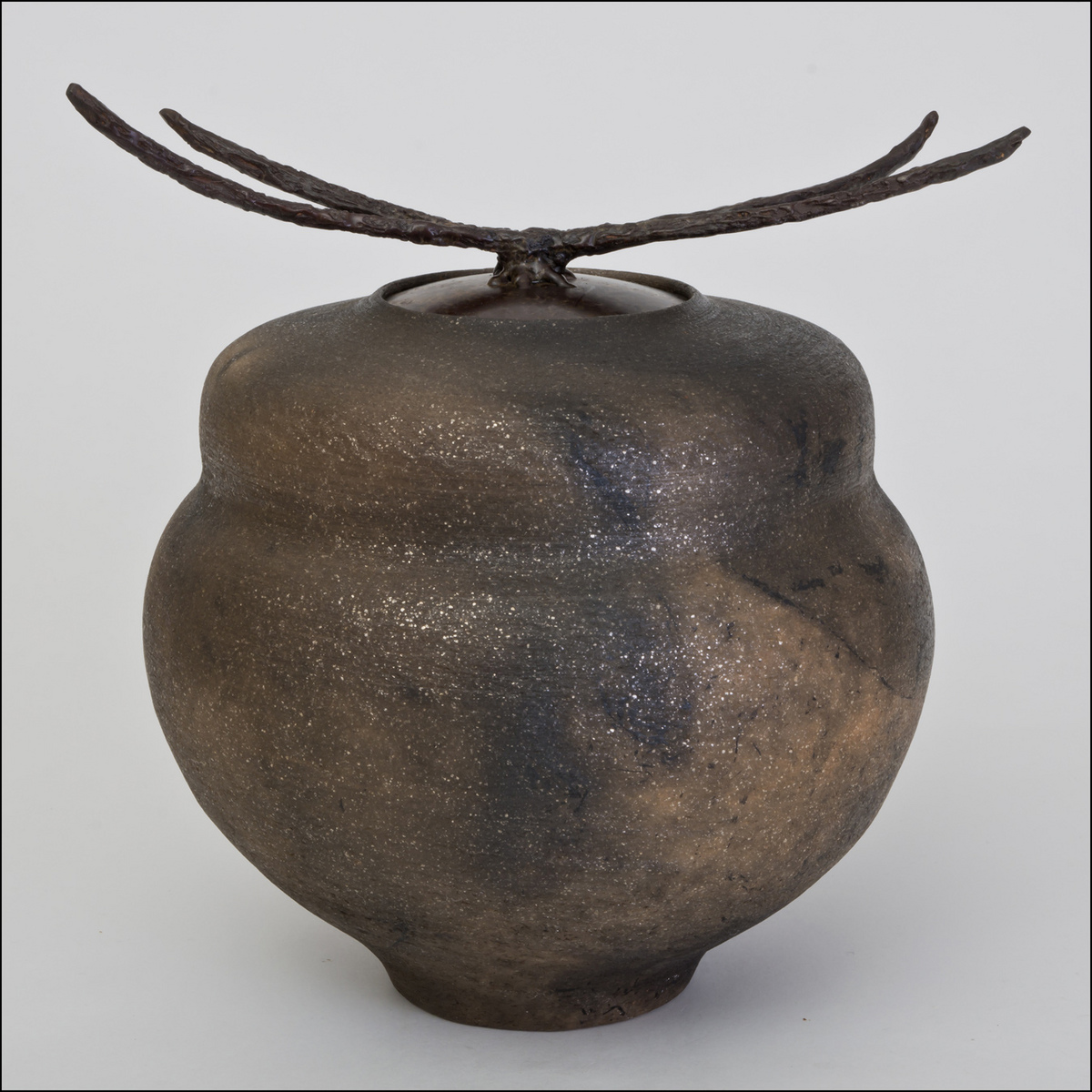
One of my wife Carol's recent pieces: Her gourd series thrown with mica clay. The colors come from raku firing where the red-hot pot is placed in a can filled with combustible materials and the lid put on to create a reduction atmosphere. The carbon impregnates the clay leaving random variations in color and luminosity. The technique was invented in Japan in the 16th century.
The lid was made from two twigs Carol found and assembled into the shape she wanted. This constitutes the "nature" connection. A rubber mold was made of that assembly and that was used to make a wax replica that was then encased in a ceramic shell. The wax was burned off in a kiln leaving a hollow cavity. Then bronze was poured into the cavity to form the handles of the lid. This was then welded onto a copper lid fabricated to fit the mouth, and the entire assembly was given a brown patina by heating it with a torch and spraying on a mixture of ferric nitrate and nitric acid. This gave the surface a brown-oxide coloration.
I photgraphed this just now with three lights; two at 45° on each side, each metered at f/5.6 and then one bounced off the ceiling such that the entire array metered f/16. Shot, then, at f/16 with a Tamron 17-50 mm at 50mm, ISO 100. I used a white paper background, by the way and applied my standard ACR adjustments.
The only other unique aspect of this, beyond being my first picture this year, is it was the first one I have taken using manual fous with the KatzEye I recently installed in my Pentax K-5 (similar to a D7000). I also shot it with my mom's 1958 Voightlander "vitomatic II" with a 50mm Zeiss lens, using Fuji Provia 100F, just to see how slide scans up to 9600 dpi will compare to a 16.3 MP DSLR image. I'll post the results of that experiment when I get the film back from the lab.
As I have assumed responsibility for commercial photography for Carol's business, I would very much appreciate any critique and improvement suggestions.

Comments
15 commentsAs far as the photo; I understand your process, but maybe f16 wasn't enough. It may be my monitor or my eyes, but there does't seem to be any part of the piece that is critically sharp, at least in the larger photo. Maybe it's the scan. The white background seems a little blue gray also. Again, it may be my laptop or the laptop operator.
Thanks for taking the time to comment.
Then I got to the Voigtlaender part. My first real camera was a Voigtlaender Vito CL. It was retired after many years when the iris shutter stopped operating reliably.
I'm on my iPad 3 right now and the image looks sharp to me. The background seems to have a cast, as was pointed out. I wonder how the image would look with the exposure and/or whites adjusted a bit to the right, but you may well have tried that already. Any possibility that a cast could be introduced by the reflection off the ceiling? Just a thought.
==================
postscript - You know it's really weird! Both images look significantly more blue here on NPN than they do on the same monitor in CS5. Same files. How can that be??? Carol told me the first image didn't appear too blue on her computer. So I just sent the "corrected" file to her and on both of our computers it definitely has a slightly yellow cast whereas on NPN it is decidely purplish.
Is there some explanation for these differences between NPN produced images via the internets and how they appear on the same monitors in native display programs like CS5 and Windows?
The repost is a big improvement. Changing the WB made a big difference.
I agree with Barry on the background. I did some turquoise jewelry images for a friend's jewelry business. I shot some with a plain white background and some on some sandstone flagstone and the flagstone images just jumped off the screen. It made a huge difference in the presentation.
Definitely a nice piece. Looks like it has a kind of glazed texture - I'm sure a result of the firing process.
Speaking of "processing," here's my two cents. First, if these are going to be representational images (brochures, web, whatever,) you should certainly make sure you clean up the dust bunnies, dust, little things on the backdrop, etc. "Cleaning up" an image is the very first thing I do in my workflow. Trying to spot clean things later when you've got multiple pixel changing layers doesn't work very well.
Agree with the others of the white balance, and honestly the brightness of the background. The color isn't off too much, but for me it's more dull that off color wise. I simply opened a Levels layer, used the white point dropper and selected a white point somewhere near the very top, brightest area for a sample. Then, since that went too bright white, I simply reduced the opacity of that layer to something like 50%. Lastly, because the white point adjustment also brought up and reduced the shadow of the piece, I used a TK burn/doge layer and painted the shadow back in a little better - because clearly there is, and probably should be a little shadow going on, otherwise it doesn't look right.
I think you're close with this one. With your permission I can post my version.
Lastly as far as how the image looks in different browsers, I noticed that at least the large version isn't tagged with a color profilie. this will most certainly result in different color representations in different browsers. As part of your saving to the web process, you need to make sure you save this as sRGB, that ensures you will get consistent behavior between browsers.
You should also be calibrating your monitor.
Hope this helps,
Lon
And thanks for the sRGB info, Lon. I will definitely make sure of that in the future.
I'd love to see the result of your processing!
I've really learned a lot from everyone's comments, and I appreciate it so much! Thank you!
All of this gives me a lot to think about and work with and I appreciate it very much.