my first SEO
by Jeff Lewis
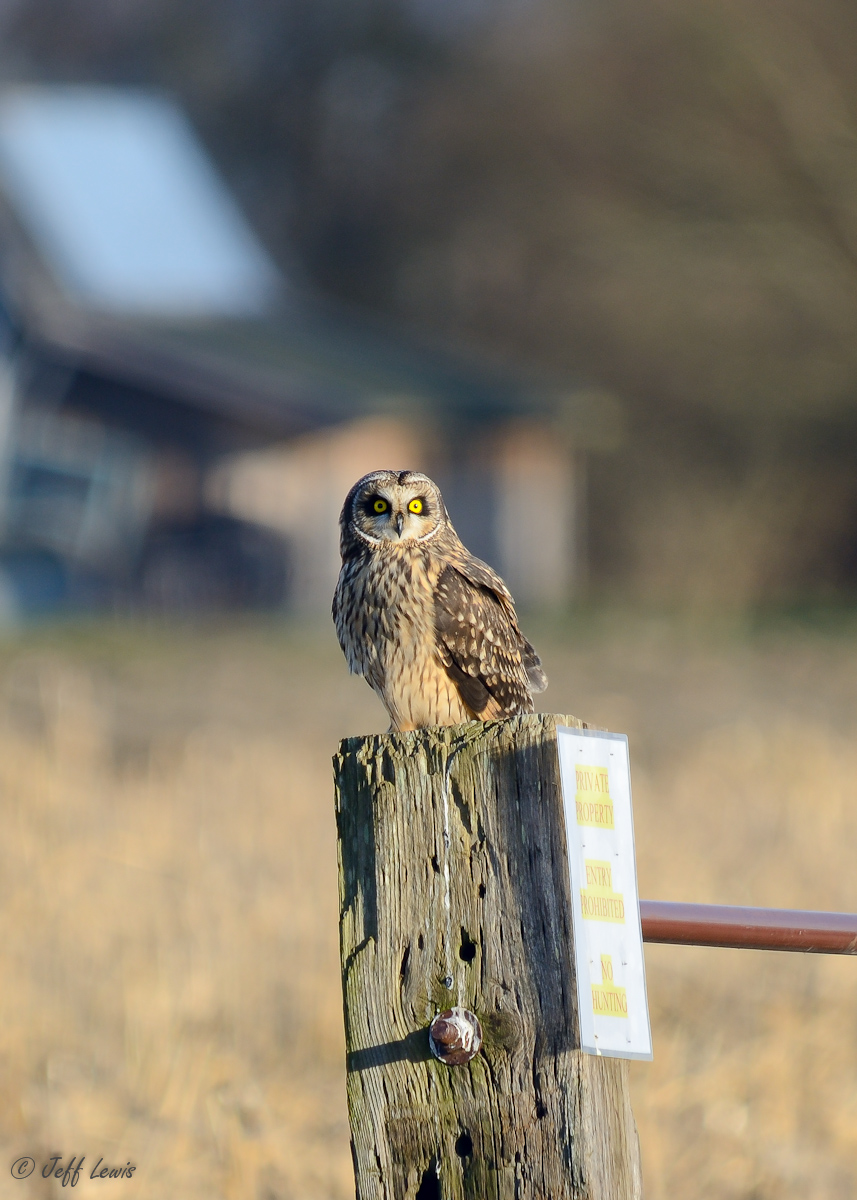
Short-eared owl, Samish Flats, WA, Jan 2013
I like the light in this one and the background. The perch not so much.
D7000, Sigma 150-500 @ 500mm
1/320, -1/3EV, f6.3(wide open @ 500mm), ISO100
25% crop seemed to be pushing it so couldn't get more of the perch out
post-processing a morass of beginner-ness mucking around, eventually resulting in:
ViewNX2 NEF (didn't change white balance or picture control) -> Tif
-> Lightroom 3.6 where I did
exp +0.18, black clip +3, saturation +5, sharpen 70/1.2/75/50,
Noise Red. 10/80/0/0 -> export to jpg with "low" screen sharpen
Questions - should I not even bother with this picture because of the perch? Maybe at least clone out the words on the white sign? Too much post-processing, as in is that way too much sharpening needed? Not enough?
Thanks, my first post but no need to be gentle :) And I'm super happy to hand anyone the RAW if they have the itch to show me what I SHOULD have done.

Comments
8 commentsIn terms of your question about "should I even bother with this picture," I think the answer depends on a lot of factors, many of which are personal. For a species I've never shot before, I'd take pictures even on a bad perch, just to have something to build from. But I'd also take advantage of the time that it was perched to make sure I had my exposure dialed in just right (you did), and then set up hoping for some flight shots when it chose to leave the perch. Specifically, in this case I'd have changed from where you were to ISO 400 and 1/1250 to have enough shutter speed for some action.
Looking forward to more of your work!
Brian has given you a solid critique and I second the points he has already made.
I like the light in this image, and I like the owl's posture and position on the stump. I find the texture on the stump to be interesting and a plus in the image, but I agree that the white sign detracts. I don't think that is something that can be "fixed" in post processing - it would have been better to deal with in the field by shooting from farther to the left if that was possible.
As Brian pointed out a bigger distraction is the OOF shed in the background - especially the light colored roof that pulls the viewer's eye out of the frame to the top left. Again, a different shooting position if possible would have eliminated that problem.
In terms of your parameters the exposure settings are fine, but I would definitely have been at a higher ISO to give more flexibility. 1/320th second is pretty slow for avian subjects and long lenses: a tripod will keep the camera steady but won't help if the subject moves much. I shoot with D300 bodies and rarely go below ISO 400 and use ISO 800 when needed in low morning light.
I've not used ViewNX2 other than for my initial review of raw files, and I don't have Lightroom to know enough to speak on it. But going by the same adjustments in Photoshop your values seem reasonably harmless.
Does the 25% crop mean that this is only 25% of the full image, or 75%?
With proper exposure (as you have here) and the low ISO I wouldn't expect any need for any noise reduction. Did you apply the NR selectively to the entire image? I rarely use it (even at ISO 1600) and never apply it to the subject.
Sharpening is generally the last operation I perform on any image, and only after the tif has been reduced to posting dimensions. I use Smart Sharpen and tweak the amount for each and every image.
Sometimes there is really nothing that you can do photographically when you get a shot like this. You've found the Owl, and that's 90% of the battle. If the Owl is staying in the area then you need to spend the time to see where it is perching regularly and be ready when he is in a better location. Get a small blind (under $100) and set up to take your shot. Be patient and wait for the perfect shot. Sure, you could do a lot of photoshop here to remove the sign... but you would be happier with a clean shot that was done in camera. Look into a Kwik Cammo or a doghouse type blind for getting closer to birds in general. If the Owl is using this perch frequently maybe you could move the sign down six inches or so. Also, try not to have the building in the background.
The crop is to about 25% of full-frame, sorry for the confusion. Also forgot to mention shot from my car across the road, no beanbag, clearly I need to get one of those as well based on the amount of use they get for the shots here. I got about 10 shots then a big utility truck came from the other direction and chased it off. I ended up going back to that area a couple more times and it turns out there were at least 5-10 owls hunting around there, so I did get some flight shots, as I was down there specifically trying BIF for the first time. I'll work on one and put it up. Plus eagles, rough-legged, GBH, harriers, one merlin and one peregrine. It's a really nice spot in the winter.
Thanks for all the exposure advice, I certainly need it. Before this I may actually have only used my camera in shutter-priority a handful of times, despite having had DSLRs for 10 years now. I got settings from somewhere and have set my "U2" saved shooting configuration to 1/1250, shutter-priority, Auto-ISO with a 100-3200 range. Hadn't used Auto-ISO previously, either, and it clearly is saving all kinds of shots for me I've previously screwed up, and will hopefully help me out until I get a better idea what various situations call for.
Also thanks for the reminders about worrying about the backgrounds while shooting, I still get so interested in and focused on finding the animal and trying to get the subject sharp I don't have a good habit yet to be worrying about the overall composition except for the most obvious things.
Good point, I think I just did that because it made the little noise I saw in the bg at pixel view disappear further. But you're right of course, at normal view plus with downsizing none of that would have shown anyway. And it wasn't selective, so it would have applied to the the owl as well. Interesting to hear you expressly don't NR the subject - is that common practice among nature photographers?
And forgot that part, too, thanks, about only sharpening at the last step, since Lightroom just gives you access to all those fancy sliders all the time to just do everything in any order and multiple times. And if I hadn't sharpened before resizing I probably wouldn't have had the noise that got me to NR anyway.
Thanks everyone, this is cool
These both need to be applied selectively in order for their effect to be positive rather than negative. Noise reduction smooths out the noise in an image, but when applied to the main subject, it more often ends up smoothing out (eliminating) fine detail. Noise reduction should generally only be applied to the bg, or if necessary, very carefully on the main subject.
On the other hand, sharpening enhances fine detail, but can also enhance things you don't want highlighted (like noise). So, sharpening should only be applied to the main subject (and anything else you want sharp--perch, adjacent habitat, etc)
One more thing regarding noise--the more you crop, the more you accentuate each pixel of noise. Noise that is non-existent in an uncropped photo can suddenly become dramatic when you reduce it to 25% of the original. It's just one of the reasons why there's no substitute for getting close to your subject.
I surely can't add to the course curriculum here.
Looks like you have your homework assignments all lined up too
Welcome