Gallery: POP PhotosPosted April 14, 201335 views3 comments
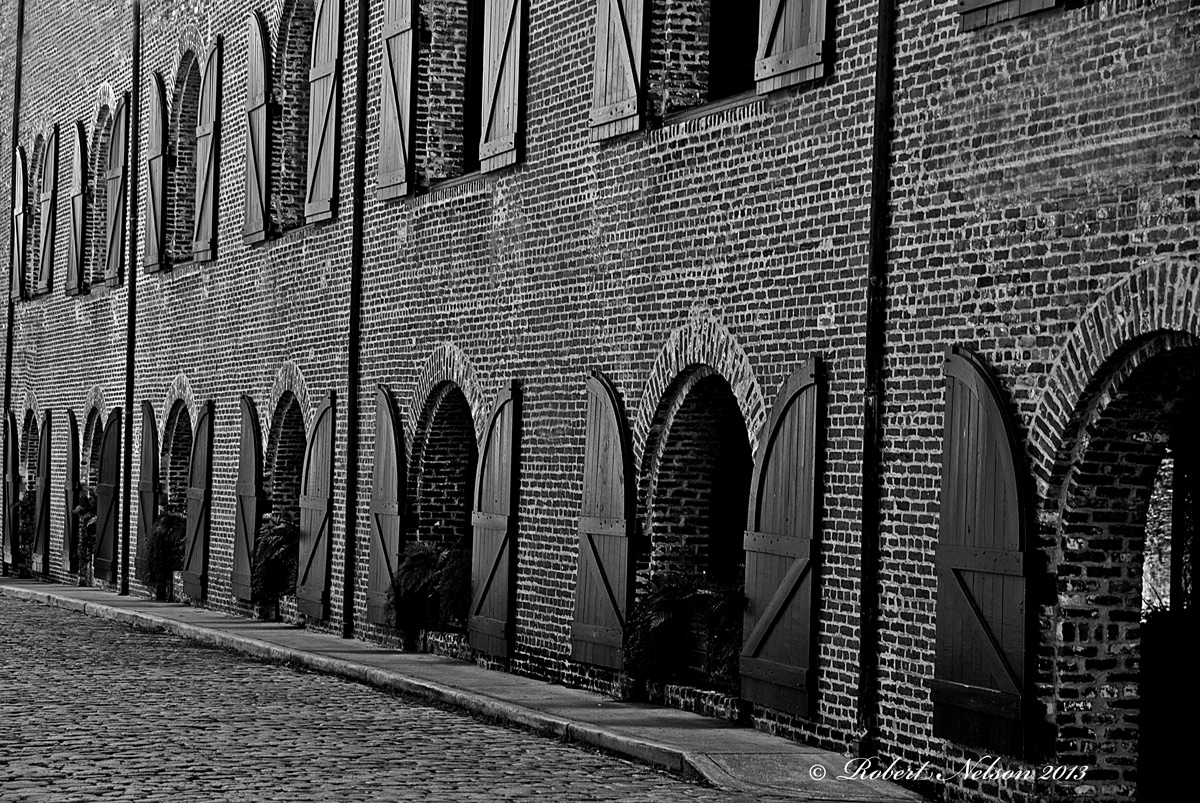
This was one of the side streets in Charleston SC.
D80, F22 @ 1/4 sec, ISO 1oo, hand held.
All comments and critique welcome. Thanks
Bob
Comments
3 comments
Comment posted by John Clulow on April 15, 2013 at 10:58 AM
I like this a lot in terms of the geometric repetion and the general diagonal.
I tried out a three changes in Photoshop that I think help it, but these things are always subjective. If you care to experiment, what I did was first to use a "perspective crop". That is a crop with the "perspective" box checked at the top of the screen.
Then I moved the bottom right corner left to get the strong verticals to line up there, and then I did the same thing at the top left corner. This straightened up the verticals which provides a frame of reference against which the mind can then more easily assimilate the interesting diagonals. This is the most important one.
Secondly, I did a levels adjustment in which I simply moved the right, highlight slider over to the right edge of the histogram. This gives better contrast and dynamic range, I think.
Finally, and this may be surprising in its effect, I did a horizontal flip using Image>Image Rotation>Horizontal flip. This makes it flow from left to right instead of right to left And this makes it much much easier for my brain to process.
Registered on November 1, 2012, 155 Posts, 1079 Comments
Comment posted by Kent Staubus on April 16, 2013 at 8:30 AM
I looked at it for awhile, trying to figure out if I wanted it leveled or not. I think it works both ways. As presented, it makes it more abstract.
Kent in SD
Registered on November 11, 2003, 121 Posts, 2098 Comments
Comment posted by Scott Fricke on April 23, 2013 at 1:43 PM
Great patterns and texture throughout. The shadows in the arch and plants inside the arches seem to be too dark and losing detail, I'd suggest lightening those areas up if possible.
Registered on January 19, 2007, 133 Posts, 1448 Comments


Comments
3 commentsI tried out a three changes in Photoshop that I think help it, but these things are always subjective. If you care to experiment, what I did was first to use a "perspective crop". That is a crop with the "perspective" box checked at the top of the screen.
Then I moved the bottom right corner left to get the strong verticals to line up there, and then I did the same thing at the top left corner. This straightened up the verticals which provides a frame of reference against which the mind can then more easily assimilate the interesting diagonals. This is the most important one.
Secondly, I did a levels adjustment in which I simply moved the right, highlight slider over to the right edge of the histogram. This gives better contrast and dynamic range, I think.
Finally, and this may be surprising in its effect, I did a horizontal flip using Image>Image Rotation>Horizontal flip. This makes it flow from left to right instead of right to left And this makes it much much easier for my brain to process.
Kent in SD