Gallery: AvianPosted May 31, 2013107 views7 comments
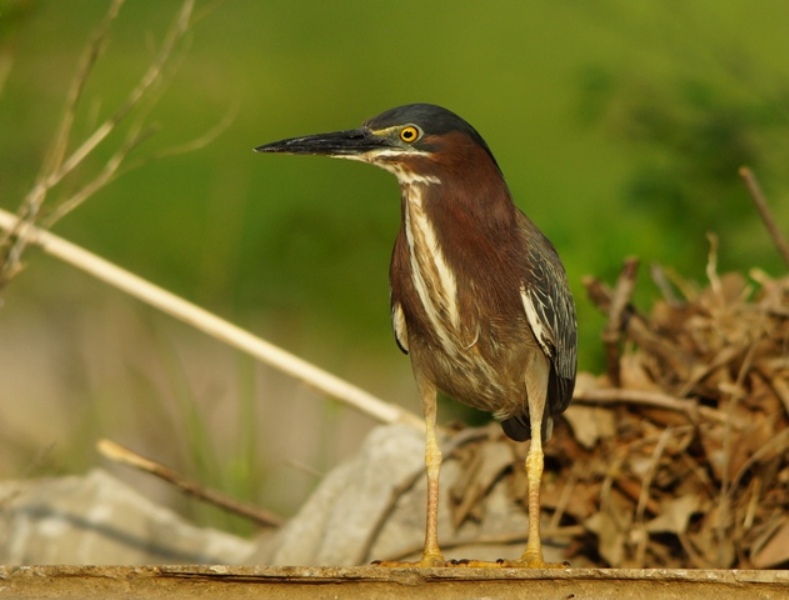
Green Heron
Sony A77
Sigma bigma 500mm focal length
1/200
ISO 200
Hand held
Comments
7 comments
Comment posted by Jeff Lewis on May 31, 2013 at 3:47 PM
Hey Joel, I'm pretty new here as well, and so my specific per-photo advice is going to be less useful than many others', but in case no one has said it yet, there's no way around the fact that you pretty much have to do post-processing to get the most from your images. You mention in another post that you're doing none, just grabbing from the camera and uploading here.
Even if you don't do anything more than grab the free Picasa program and use that for some adjustments and resizing, your images will end up better. Or use whatever software your camera shipped with. I've also found it interesting that playing with my images in post processing has led me to take better pictures to begin with, because it becomes more clear when I've gotten the exposure wrong, or the white balance, etc., so I can look at working with my camera to address those issues at capture time. Having some software you use will also make it easier to standardize on a way to resize to 1200 pixels to post as your "View Larger" size, as commenters have mentioned is really necessary for us to be able to best C&C your images.
Are you shooting in JPEG?
I believe this image minimally needs a white balance adjustment, some lightening, and sharpening. If you try that you can just post a comment here including your modified image and you'll get feedback on your processing as well.
Registered on January 29, 2013, 9 Posts, 89 Comments
Comment posted by Joel Thomas on May 31, 2013 at 4:01 PM
Duly noted and thank you!
This would mean more time at the computer and less time in the field Hmmm let me think about that one LOL...
Yes I am shooting JPEG as I really have never messed with processing images.
Thank you very much for your advice, much appreciated Jeff.
Registered on April 2, 2013, 17 Posts, 19 Comments
Comment posted by Richard Ditch on May 31, 2013 at 6:43 PM
Jeff has covered most of the basics here and I agree completely that post processing is essential to get the most out of your image. If you don't do that then you are wasting a large part of your effort in the field. Photoshop Elements is reasonably priced - you get a lot of the tools you'll need to work on your images and you can start out in simple mode and grow into more advanced options.
The basic image here has some good points - you managed to get close enough for a good view of the heron and you were low for an eye level viewpoint. The head turn is good and the unobstructed view of the heron's legs.
Less desirable is the strong bright line behind the heron - obviously some man-made structure and rather distracting to the composition.
Registered on November 1, 2003, 1031 Posts, 12705 Comments
Comment posted by Sharon Hallowell on May 31, 2013 at 7:18 PM
Jeff and Richard have both given you wonderfully done critiques. I would like to add a "good job" on getting close to this heron, and a good exposure and pose. I find I enjoy working on my images almost as much as being in the field....it passes the time while my husband watches all those fishing and hunting shows. Sharon
Registered on November 1, 2003, 392 Posts, 4810 Comments
Comment posted by Ken Watkins on June 1, 2013 at 2:57 AM
Joel,
I can only agree with the comments of everybody else, processing really needs to be done. Images straight from the camera are never as good as they could be, the adjustments you can make in many programmes are infinite, but a simple process can bring them up to a much improved state. I am not familiar with PS elements but I am sure just using the auto adjustments would bring vast improvements.
Sharpening is a must because of the manner in which most digital cameras capture images will never be as sharp as film.
Most importantly always shoot in RAW.
Registered on December 15, 2010, 1537 Posts, 4877 Comments
Comment posted by Joel Thomas on June 1, 2013 at 3:02 PM
Thank you to all, seems I will be post editing
Registered on April 2, 2013, 17 Posts, 19 Comments
Comment posted by Catherine Reilly on June 2, 2013 at 6:27 PM
I'll throw in another encouragement for post-processing. This image has lots of potential. Even a simple, straightforward process yields results that are quite exciting, once you compare the processing image with the one out of the camera.
I like the pose of the heron. It makes the stare, and that beak, look formidable. I'd hate to get nailed with it! Proximity to your subject was a plus for sure.
Don't be uneasy about commenting on others' work. It's another good way to learn what you like and don't like in images. That translates into better shots of your own, and in due time to the development of your unique style or vision.
Registered on August 16, 2006, 603 Posts, 9192 Comments

Comments
7 commentsEven if you don't do anything more than grab the free Picasa program and use that for some adjustments and resizing, your images will end up better. Or use whatever software your camera shipped with. I've also found it interesting that playing with my images in post processing has led me to take better pictures to begin with, because it becomes more clear when I've gotten the exposure wrong, or the white balance, etc., so I can look at working with my camera to address those issues at capture time. Having some software you use will also make it easier to standardize on a way to resize to 1200 pixels to post as your "View Larger" size, as commenters have mentioned is really necessary for us to be able to best C&C your images.
Are you shooting in JPEG?
I believe this image minimally needs a white balance adjustment, some lightening, and sharpening. If you try that you can just post a comment here including your modified image and you'll get feedback on your processing as well.
This would mean more time at the computer
Yes I am shooting JPEG as I really have never messed with processing images.
Thank you very much for your advice, much appreciated Jeff.
The basic image here has some good points - you managed to get close enough for a good view of the heron and you were low for an eye level viewpoint. The head turn is good and the unobstructed view of the heron's legs.
Less desirable is the strong bright line behind the heron - obviously some man-made structure and rather distracting to the composition.
I can only agree with the comments of everybody else, processing really needs to be done. Images straight from the camera are never as good as they could be, the adjustments you can make in many programmes are infinite, but a simple process can bring them up to a much improved state. I am not familiar with PS elements but I am sure just using the auto adjustments would bring vast improvements.
Sharpening is a must because of the manner in which most digital cameras capture images will never be as sharp as film.
Most importantly always shoot in RAW.
I like the pose of the heron. It makes the stare, and that beak, look formidable. I'd hate to get nailed with it! Proximity to your subject was a plus for sure.
Don't be uneasy about commenting on others' work. It's another good way to learn what you like and don't like in images. That translates into better shots of your own, and in due time to the development of your unique style or vision.