Nature Photographers Network
This is the preserved archive of the original Nature Photographers Network. The community continues at naturephotographers.network.
Water Hyacinth + Repost
‹ PreviousFlora GalleryNext ›

Water Hyacinth + Repost

by Sandy Scott

Gallery: FloraPosted December 7, 201332 views10 comments
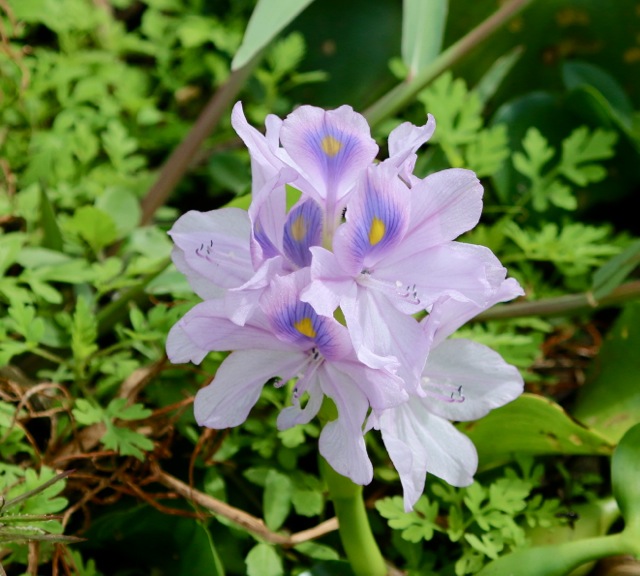
I have pretty much dedicated my photography so far to photographing creatures and I was at Myakka River State Park recently photographing birds. Out on the bird walk, I happened to notice these beautiful water hyacinths. One of the rangers happened by and pointed out that these are actually an invasive species. It's difficult to believe that the waterways can be invaded by something of such beauty.

I agonized over which shot I should post. I have another one in which the lighting is not as good, the background probably is too much in focus, but I was amused by it in that there was a bee on it and the bee came out with great clarity. I decided to go with the one sans bee! I hope to get around to doing more flora work, but again, at the moment my primary focus (no pun intended) is with wildlife.

Comments

10 comments
Comment posted by Bill Fach on December 8, 2013 at 12:02 AM
Sandy: Really nice capture of a beautiful bloom. The BG here really is non-contributory, especially the tangled brown stuff in the LLC. I think all this really needs to excel is to crop much tighter around the flower. Nice find and a solid shot. >=))>
Registered on November 1, 2003, 1805 Posts, 26981 Comments
Comment posted by Sandy Scott on December 8, 2013 at 8:17 AM
Thanks so much Bill - I am amazed at how many pointers this newbie has picked up just in a couple of days of membership! Here is a cropped version - I think this works much better!
Registered on December 6, 2013, 85 Posts, 345 Comments
Comment posted by Ian Wolfenden on December 8, 2013 at 4:35 PM
The cropped version is certainly better, Sandy - the flowers are beautifully lit and the colours handled really well. Great to have spotted these lovely blooms.
Registered on May 18, 2007, 1108 Posts, 7647 Comments
Comment posted by Sandy Scott on December 8, 2013 at 4:59 PM
Thanks Ian, I had never tried any floral shooting, but this one was so beautiful, it was simply irresistible! :smile:
Registered on December 6, 2013, 85 Posts, 345 Comments
Comment posted by Ramamohan Pai on December 8, 2013 at 8:38 PM
Sandy - The crop suggestion is excellent and your repost is perfect. With all your learnings, soon, you should be able to compose without having to crop.

These are nice tropical plants (though invasive) - wish I had some access to these in the US.

Registered on November 1, 2003, 550 Posts, 9037 Comments
Comment posted by Sandy Scott on December 8, 2013 at 9:25 PM
Thanks Ram, In a couple of days, I have learned so much through postings and comments. I remember a hundred years ago when I was doing film work, I was meticulous with my in camera composition, etc. The DSLR and programs like PSE tend to make one lazy. I know I have to personally fight that tendency and make believe that I am going to have to pay to get each shot developed and have no ability to do PP!
Registered on December 6, 2013, 85 Posts, 345 Comments
Comment posted by Bill Fach on December 9, 2013 at 8:58 AM
Sandy: Nice work on the repost. I edited your title to reflect that you posted one. You can do that yourself by clicking on the edit link on your thumbnail. Its a good idea to indicate the repost in your title so folks will revisit.

I grew up with film as well and honed my capture skills there. I'm not so sure digital capture is all that much different except that there is no punishment of the wallet from mistakes. I still consider myself a capture guy because I much more enjoy the challenge of getting my shot in camera over processing. With that said, I do think digital capture has opened aspects of photography that most of us would have never pursued. I would never have considered doing my own processing or printing with film but love that I can control the entire process myself. I personally just don't like spending a lot of time on a computer. But check out some of the work by Phil Hodgkins and Mark Seaver who do some phenomenal things with stacking. These guys are wizards with software and constantly amaze me with their offerings.

One final thing; consider posting a larger version of your shots. You can post a version up to 1200 pixels on the long side and as large as 500KB. If you process your image at that size and upload it using the larger image link the site software will automatically downsize the shot for the regular posting. Again, great to have you aboard and looking forward to more.

I'm glad you've found NPN to be a good resource. The Flora gallery in particular has a lot of folks who genuinely enjoy sharing their experience. Being associated with NPN has far and away been the biggest reason for my growth and success. I hope you find it the same. >=))>
Registered on November 1, 2003, 1805 Posts, 26981 Comments
Comment posted by Sandy Scott on December 9, 2013 at 9:08 AM
Bill, thanks so much for the wealth of information. I saw the fact that one could post a larger size, but I was a bit unclear about it. I guess I am still not totally clear. I presume that I cannot simply upload a full-sized picture and then have the forum software deal with it. What I have done, is email myself a copy of the photo from iPhoto choosing the small size option, and then upload that file. I guess I have been a bit spoiled by simply dragging a photo to my desktop and uploading it whatever size it might be. I was not aware that you could edit the title. The allotted space seems a bit small, but I guess there is room for the "+ repost" addition. I do try to do the work in the camera, but I guess where I really get off track is shooting wildlife in frenzied action where I tend to fire away and hope for the best! :smile: Incredible resource here and it is wonderful to find caring moderators like you to counsel, coax, teach and encourage us - especially those of us new or returning to the hobby after long layoffs.

Registered on December 6, 2013, 85 Posts, 345 Comments
Comment posted by scott lanz on December 9, 2013 at 7:33 PM
"I presume that I cannot simply upload a full-sized picture and then have the forum software deal with it."

Actually, Sandy, this is precisely what you can do. When you post, you have the option of posting both a large version, up to 1200 pixels on the long side and up to 500kb, as well as the regular version up to 720/300. For your convenience, if you just want to just prepare and post a larger version, the site will automatically reduce it and post it in the smaller (regular) size version. When it posts, it will then show a larger version is available to view. I think this is what most posters do. I typically just upload a version which is 1000 pixels on the long size in the "larger size" upload link on the file posting page and let the smaller size post automatically. :wavey:
Registered on November 14, 2003, 840 Posts, 12902 Comments
Comment posted by Sandy Scott on December 9, 2013 at 7:37 PM
Thanks for the clairification Scott, that certainly simplifies matters.
Registered on December 6, 2013, 85 Posts, 345 Comments