Gallery: LandscapePosted March 9, 2014378 views14 comments
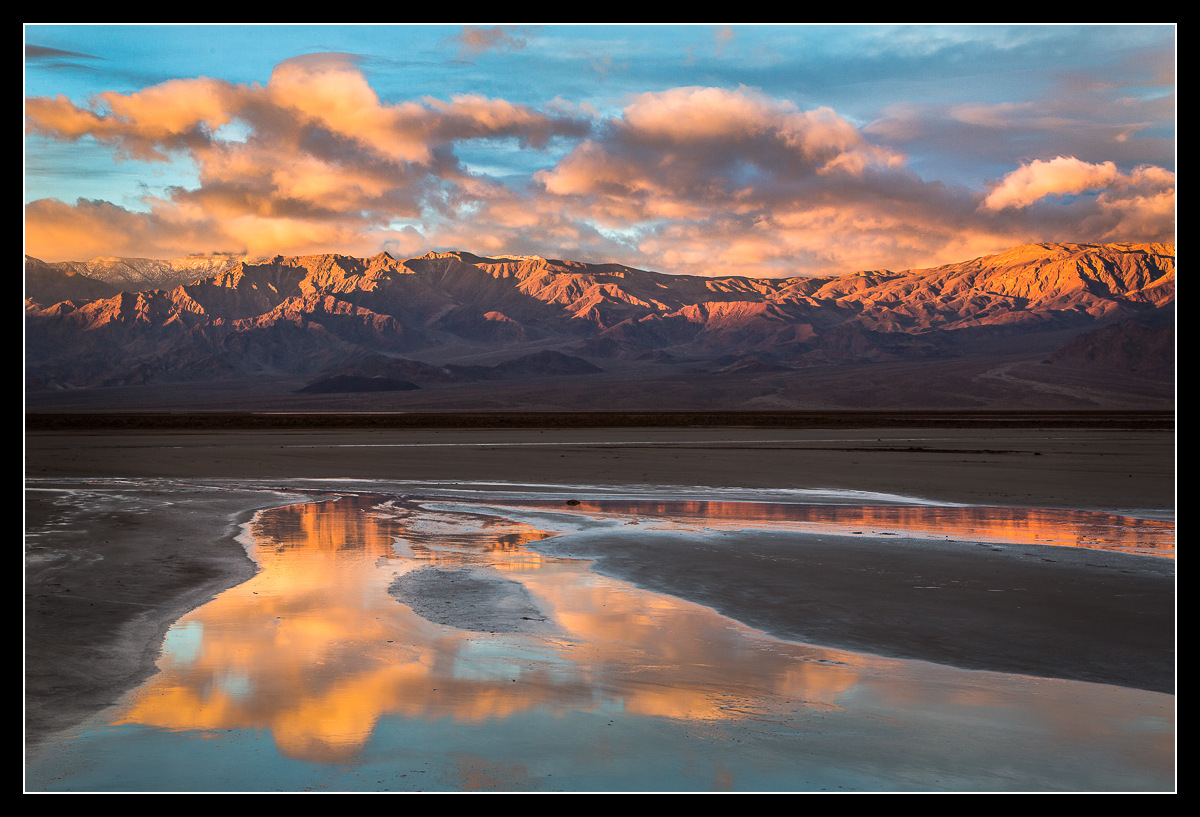
The sun rises on the Panamint range. Welcoming any nits, large or small, particularly on the processing.
2 image blend for dynamic range. 55mm, f/13, 1/25 sec, ISO 200.
Comments
14 comments
Comment posted by Nick Bristol on March 10, 2014 at 8:20 AM
Jared, Such a pretty scene this is. You really caught some wonderful reflections in the pool of water and the light on the mountains is very nice. Some great looking clouds too. This picture has a very nice feel.
Nick Bristol
Lone Rock, WI
Registered on February 1, 2004, 752 Posts, 14140 Comments
Comment posted by Bill Reid on March 10, 2014 at 9:54 AM
Very pretty scene Jared with a great reflection and nice light on the mountains. On my monitor the sky looks an odd color and I'm not sure but maybe too cyan. See if anyone says anything as it could be my monitor, calibrated though. Great image though.
Registered on January 27, 2013, 65 Posts, 2460 Comments
Comment posted by Jared Warren on March 10, 2014 at 10:56 AM
I'm with you, Bill. My sky feels off and I don't really know how to make it look good. In this repost I desaturated the cyan, slightly increased saturation of blue, but increased the lightness. I feel like the cloud color isn't quite right either (I feel like it's too "orangey"), but not sure how to make it better. I'm open to suggestions on steps to make it right. Thanks!
Registered on May 11, 2012, 84 Posts, 931 Comments
Comment posted by Doug Roane on March 10, 2014 at 11:23 AM
Nice light on the mountains and that reflection is a nice bonus. The reflected clouds and ice draw you into the image. As far as the processing goes, for me, I would play with the sky colors some to tone down the cyan color a bit.
Registered on December 12, 2008, 213 Posts, 2226 Comments
Comment posted by Mark Seaver on March 10, 2014 at 12:19 PM
Beautiful light on the mtns and a great reflection to add lots of depth. I was thinking the sky was a touch too cyan and then I saw the repost. There, the sky looks good but you seem to have lost some "clarity" in the reflections. That's probably just another way of saying that there's less color contrast between the cloud and sky reflections. Since it sounds like you're using PS, I'd suggest a hue/saturation layer and then mask it to adjust where and how much the color(s) get desaturated. The orange in the clouds looks like a combination of real plus PS increasing saturation as it darkens so you may be able to reduce it as well with hue/saturation or a selective color layer and masking.
Registered on January 23, 2011, 1103 Posts, 17270 Comments
Comment posted by Nancy Lea Sandy on March 10, 2014 at 12:33 PM
Beautiful composition. I can't really comment on the quality of the color as my lap top is not calibrated but it looks nicely balanced and the light is wonderful
Registered on January 24, 2011, 576 Posts, 6942 Comments
Comment posted by gary phillips on March 10, 2014 at 1:26 PM
Very nice take on the Panamints, Jared. I think the repost, with the cyan toned down looks fine on my monitor. The orange are strong, but they are also exploding in the scene. Great reflected color and sweet comp.
Registered on October 24, 2013, 185 Posts, 4136 Comments
Comment posted by Harley Goldman on March 10, 2014 at 6:10 PM
Beautiful take on DV. The repost definitely loses some pop. I like Mark's suggestions.
Registered on November 19, 2003, 586 Posts, 11271 Comments
Comment posted by John Mumaw on March 10, 2014 at 7:26 PM
Lovely light and composition! You were blessed on this morning, Jared.
I have a better idea for a fix. Layer->New Adjustment Layer->Selective Color.
Choose 'Cyans' and then move the cyan slider and the yellow slider left to taste (-50 or so). This will fix the skies/reflections while leaving the rest of the image untouched. Then choose 'Yellows' and move the magenta slider right to taste. This will adjust the clouds and sunlit mountains/reflections while leaving the rest of the image untouched. Selective Color rocks, and so does this image!
Registered on September 9, 2005, 62 Posts, 2289 Comments
Comment posted by Dan Kearl on March 11, 2014 at 10:06 PM
Beautiful light and color. The repost has a better sky.
Registered on September 2, 2013, 209 Posts, 1514 Comments
Comment posted by Jared Warren on March 12, 2014 at 12:27 AM
And one more repost for good measure. John (aka "Master"), as always, YOU rock! Thanks for the Selective Color tip. It helped with this image, as well as another one I'm currently working on. How can this apprentice show his appreciation?
Registered on May 11, 2012, 84 Posts, 931 Comments
Comment posted by Tim Mulholland on March 13, 2014 at 4:38 PM
I think that you've nailed it with the last post! :)
Tim!
Registered on April 24, 2006, 14 Posts, 139 Comments
Comment posted by Vance Gese on March 13, 2014 at 7:53 PM
Beautiful reflection. Love that light on the mountains, and how it bring out the textures and forms of the mountains. Your last post using John's suggestions looks super.
Registered on November 13, 2008, 298 Posts, 6629 Comments
Comment posted by Genny K. on March 14, 2014 at 9:43 PM
Nice one! Brings back very fond memories of Death Valley.
I can't comment on the color as I'm on our laptop, but the contrast and lighting is great, and the clouds really give this depth. The reflection in the FG really brings out the colors and shapes in the rest of the image. The processing looks good to me, and yes, Selective Color works great.
Registered on June 5, 2006, 132 Posts, 2001 Comments

Comments
14 commentsNick Bristol
Lone Rock, WI
I have a better idea for a fix. Layer->New Adjustment Layer->Selective Color.
Choose 'Cyans' and then move the cyan slider and the yellow slider left to taste (-50 or so). This will fix the skies/reflections while leaving the rest of the image untouched. Then choose 'Yellows' and move the magenta slider right to taste. This will adjust the clouds and sunlit mountains/reflections while leaving the rest of the image untouched. Selective Color rocks, and so does this image!
Tim!
I can't comment on the color as I'm on our laptop, but the contrast and lighting is great, and the clouds really give this depth. The reflection in the FG really brings out the colors and shapes in the rest of the image. The processing looks good to me, and yes, Selective Color works great.