Gallery: AvianPosted July 26, 2014138 views7 comments
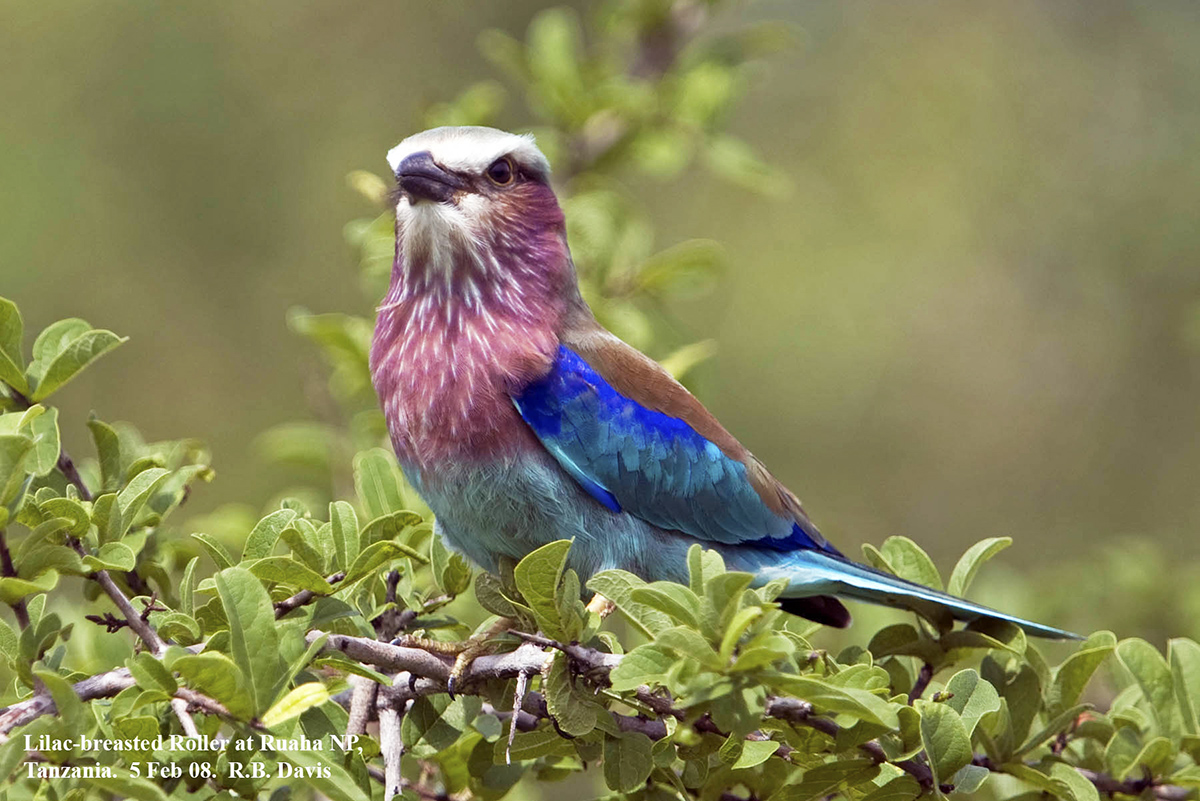
5Feb2008 at Ruaha National Park, Tanzania.
Canon EOS 40D
EF300mm f/2.8L IS USM + 1.4x at 420mm
1/800; f/4.0; ISO 100
Aperture priority; Evaluative metering
Comments
7 comments
Comment posted by SandyRichardsBrown on July 26, 2014 at 8:17 PM
Very nice overall image!
The whites above the beak are blown; and all definition is lost here. Easily corrected.
The bird is also dead-center, so leaving more room on the left would move him into a more interesting spot.
Nice catch!
Sandy
Registered on November 24, 2003, 3937 Posts, 12909 Comments
Comment posted by Dennis Plank on July 26, 2014 at 11:25 PM
Nice job on the focus and detail, Ronald. I like the pose and the composition works for me. I'm not sure if the whites on the forehead are blown or not, but they do seem to be lacking detail. If they're not blown, some work with the shadows/highlights tool might bring out some detail. Very nice image.
Registered on January 28, 2008, 1767 Posts, 23192 Comments
Comment posted by Ken Watkins on July 27, 2014 at 12:47 AM
Ronald,
I must confess to being puzzled as to why the whits are so blown on this, and I think it would be very difficult to extract detail or "dull" them down. This is a great pity as the remaining colours are very good and unlike lost not "electrified".
Nice to see someone else visiting Ruaha
Registered on December 15, 2010, 1537 Posts, 4877 Comments
Comment posted by Ronald Davis on July 27, 2014 at 5:52 AM
Here is a reedited image in response to comments. Further comments?
Registered on July 4, 2014, 38 Posts, 48 Comments
Comment posted by Keith Bauer on July 27, 2014 at 9:11 AM
Hi Ron: Very nice frame. Composition doesn't really bother me. Yeah, the whites are a bit over exposed. Your repost didn't help the image. It is beginning to look like a grunge HDR effect. If you want to tackle the whites, I'd go back to the original RAW file and work with the Whites slider in the Basic Exposure panel in ACR or Lightroom.
Registered on November 20, 2003, 458 Posts, 4836 Comments
Comment posted by SandyRichardsBrown on July 27, 2014 at 2:52 PM
For everyone: The Viveza software is exceptional for reclaiming detail and darkening white areas without losing definition, along with many other things. http://www.google.com/nikcollection/products/viveza/
Free trial available.
KILLER program.
Sandy
Registered on November 24, 2003, 3937 Posts, 12909 Comments
Comment posted by Patrick O'Healy on July 27, 2014 at 3:33 PM
Ron,
You have gotten a lot of good advice from Keith and Sandy. I love the colors and like the second better, but I am not giving you the refined photographer eye, but simply my visceral reaction.
Registered on March 13, 2011, 326 Posts, 1679 Comments

Comments
7 commentsThe whites above the beak are blown; and all definition is lost here. Easily corrected.
The bird is also dead-center, so leaving more room on the left would move him into a more interesting spot.
Nice catch!
Sandy
I must confess to being puzzled as to why the whits are so blown on this, and I think it would be very difficult to extract detail or "dull" them down. This is a great pity as the remaining colours are very good and unlike lost not "electrified".
Nice to see someone else visiting Ruaha
Free trial available.
KILLER program.
Sandy
You have gotten a lot of good advice from Keith and Sandy. I love the colors and like the second better, but I am not giving you the refined photographer eye, but simply my visceral reaction.