Nature Photographers Network
This is the preserved archive of the original Nature Photographers Network. The community continues at naturephotographers.network.
Pelican
‹ PreviousAvian GalleryNext ›

Pelican

by Greg Morris

Gallery: AvianPosted January 31, 201580 views7 comments
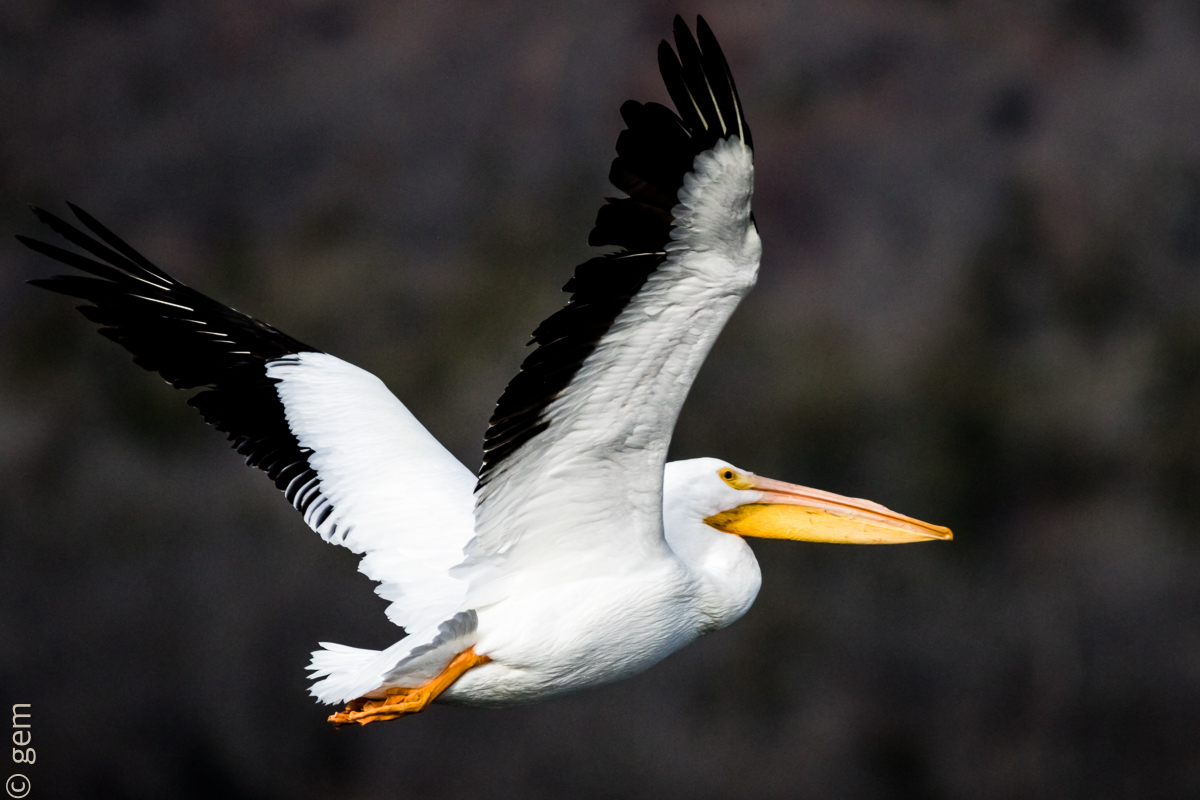
I appreciate the comments on my last post and decided to photograph something that was a little slower in flight than the Hawk I first presented. We have a lot of American White Pelicans on one of our local lakes and I have taken hundreds of pictures over the last two weeks.

I chose this one because of the b/g and hopefully a little sharper image of the Pelican than I had on the Hawk. I like the overall colors of the scene and you can tell some detail in the all white feathers.

I dislike the crop. I don't like things so tight, but this bird turned on me at the last second and I just barely got the right wing in the top of the picture. I cropped on the left and bottom to center the subject better in the frame. I realize also that the subject is flying away and there is a bit of a shadow across the head and eye. But, like I said, this was one of the best shots of the day for sharpness (as far as I can tell anyway). I did some post processing in LR5.

All comments and critiques are most welcome.

Thanks,
Greg

Canon 7D MkII, Tamron 150-600, 1/6400, 6.3, 600mm, ISO 1000, no flash

Comments

7 comments
Comment posted by Philip Hodgkins on January 31, 2015 at 3:01 PM
Greg, your self-critique covers most of my observations. This is still somewhat soft, typical of what others have noted about the 150-600 at full extension. I think some further processing can bring out better sharpness and detail. Since you are using Lightroom, the quickest fix on detail in the blacks and whites is to use your highlight/shadow sliders. Keep an eye on your histogram as you do so and watch for the point they come into gamut. You probably won't get much more out of the blacks, but I feel there is more detail that can be pulled out of the whites, which are pushing the edge of gamut, especially the left wing, which is in full sunlight. Finally, if you are using Photoshop, you can do better sharpening there than LR supplies. You can also add canvas to the top, easy to do in Photoshop. :smile:
Registered on July 24, 2006, 2741 Posts, 12349 Comments
Comment posted by Brian Gatlin on January 31, 2015 at 6:11 PM
Greg, it looks like you nailed this in terms of the sharpness--it looks much better than the hawk. This is definitely a difficult exposure, and you've lost some details in the brightest whites and darkest blacks. It looks like you can definitely get more out of the whites with some shadow/highlight tool. If you're shooting raw, you can probably get a lot more out of this. If you aren't shooting raw--start now! It gives you much more control over your final image. And of course shooting early or late in the day when the sun is lower will give you a better chance of keeping both lights and darks in check.

looks like it wouldn't be too hard to add a bit of canvas if you wanted.
Registered on March 21, 2009, 202 Posts, 4187 Comments
Comment posted by Keith Bauer on January 31, 2015 at 9:36 PM
Hi Greg:

I think you've done pretty well with this image. Better sharpness, a more pleasing background. It would be nice if the bird was not flying away at quite the angle it was, but I still think you've done well with this. A couple of tonal issues with very dark blacks in the wing tips and the sunlit part of the back wing being a bit bright, but still not too bad. I'm with you on the space around the bird. With the zoom if you could have pulled back quick enough it would have been a bit better, but that is always a very tough thing to do in the spur of the moment.

I'm providing a version with more room at the top, left and right sides. Worked some of the tonal issues and softened up the background a bit. Pulled a bit more detail out of the whites in the bird. This was all done in Photoshop. Working from the RAW in LR would have provided a stronger starting point. Keep those images coming!!

Registered on November 20, 2003, 458 Posts, 4836 Comments
Comment posted by Greg Morris on January 31, 2015 at 10:10 PM
Phil, Brian and Keith thanks a lot for the critiques and suggestions. I am shooting RAW, but I have very limited abilities with LR as you can tell. I don't have Photoshop yet, but after seeing what Keith did with my picture, I will have it soon.

Keith, thanks for reworking the picture. It looks 10 times better than the original!
Registered on January 23, 2015, 38 Posts, 104 Comments
Comment posted by Jim DeWitt on February 1, 2015 at 1:12 AM
A very good effort at a pretty difficult shot. A big bird, making it challenging to get the whole think sharp at 600mm; and jet blacks and pure whites to make the exposure tough. I don't know how well the 5D MkII does at higher ISOs, but another f-stop would have helped our depth of field a lot. You focus points appears to have been the underwing; you'll get better results if you can make your focus point the eye. Keith's work-over gives you everything else I could add.
Registered on August 28, 2006, 1240 Posts, 8506 Comments
Comment posted by Jerry Austin on February 1, 2015 at 9:21 AM
I think most everything has been covered. I really like what Keith did in the repost. My piece of advice, and I learned it the hard way, is to have your camera set on an intermediate focal length to make sure you are ready for situations that you described. Also, since your particular lens is not tack sharp at 600mm, you might just decide not to have your lens preset there. I also find it much more difficult to acquire a flying bird at the len's maximum focal distance.
Registered on January 6, 2012, 651 Posts, 3448 Comments
Comment posted by Greg Morris on February 1, 2015 at 9:29 AM
Thanks Jim, at this point I'm lucky to get focused on any part of the bird, but I will "shoot" for the eye in the future. I will back off on the focal length as Jerry said and concentrate on the eye and see what happens.

Thanks for your comments gentlemen.
Registered on January 23, 2015, 38 Posts, 104 Comments