Black Bear
by Cindy Mulvihill
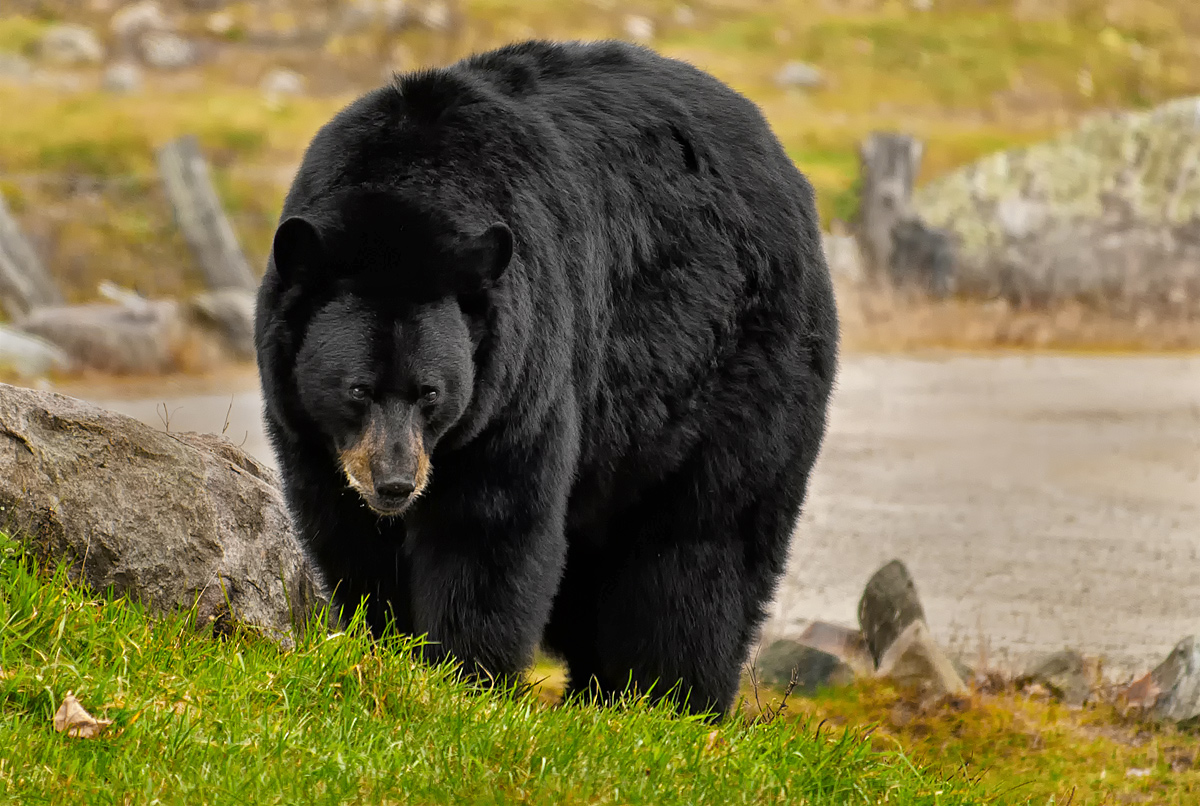
This photo of a big black bear was taken at Omega Park, Quebec. They have a wide area to roam in their natural habitat. This photo was taken hand held, because you are in a car. I did crop the photo to eliminate some of the background. Canon ESO SL1, f5.6, 1/125, ISO 500, IS on. My ISO was up because it was very cloudy and the bear was moving slowly towards me. Thanks for the comments on my previous posts, I obviously have a lot to learn. Comments and suggestions are greatly appreciated.

Comments
7 commentsanother nice image from you with very rich colors. The placement of the ebar in the frame is very good, meaning not centered and leaving some room in the direction it is looking in. The pose and concentrated stare are also great and one has very good eye contact to the main subject.
Technically the sharpness is very fine and all over the exposure is correct. The fur has some areas ( top of the head ) that do not show any detail and making a exposure correction of about 0.5 - 1 stpos may have helped to get a bit more detail. Anyhow you made a good job for a dificult ot exposure dark subject
I like the lowered head "I mean business" look! As Cay-Uwe said, I like the positioning of the bear in the frame. Moreover, I like the depth-of-field (DoF) here...for me images with subject and foreground in focus and only the background out-of-focus (OOF) work well. In terms of the exposure - some of the dark-on-dark detail here is lost. If you are shooting raw images the best way to prevent this is to increase the exposure (longer exposure OR a larger aperture) of the entire image during image capture, then - during image processing - darken all the non-black areas of the scene using selective exposure adjustments. I don't know if you are currently shooting raw or using image-processing software that would permit this...but that's the general concept!
Cheers...
Brad
PS: Don't hesitate to jump in and comment on the images of others - surprisingly putting the thought into writing a critique can help your own photographic thought processes (i.e., help your OWN photography!).
Nice "Roly-Poly" black bear captured with that I'm in charge look. I like how you used the Dof to emphasize the subject and foreground in the scene. Comp is good. If you shot this as a raw file, you can play around with the shadows in Lightroom to get it just right. Another method that I really like to use for editing select zones of lightness or darkness is Tony Kuyper's Luminosity Masks ( http://goodlight.us/writing/luminositymasks/luminositymasks-1.html ). He has versions that will work on Photoshop and Elements and you might be able to pull out the details in those shadows. I learn a lot from studying his methods as well as from the work of other photographers on this web-site. Look at the large version of my ring-billed gull image that I posted recently. The eye was lifeless, black, and in deep shadow in the raw file. I used a curve adjustment for a dark luminosity mask to bring up some highlights in the eye without clipping the lights. And you can do some very subtle adjustments by adjusting the opacity of the luminosity mask in Photoshop. Thanks for posting
Thanks for sharing.