Nature Photographers Network
This is the preserved archive of the original Nature Photographers Network. The community continues at naturephotographers.network.
2015 HD Deep Dive 7
‹ PreviousFlora GalleryNext ›

2015 HD Deep Dive 7

by Nathan Buck

Gallery: FloraPosted February 1, 20161,542 views9 comments
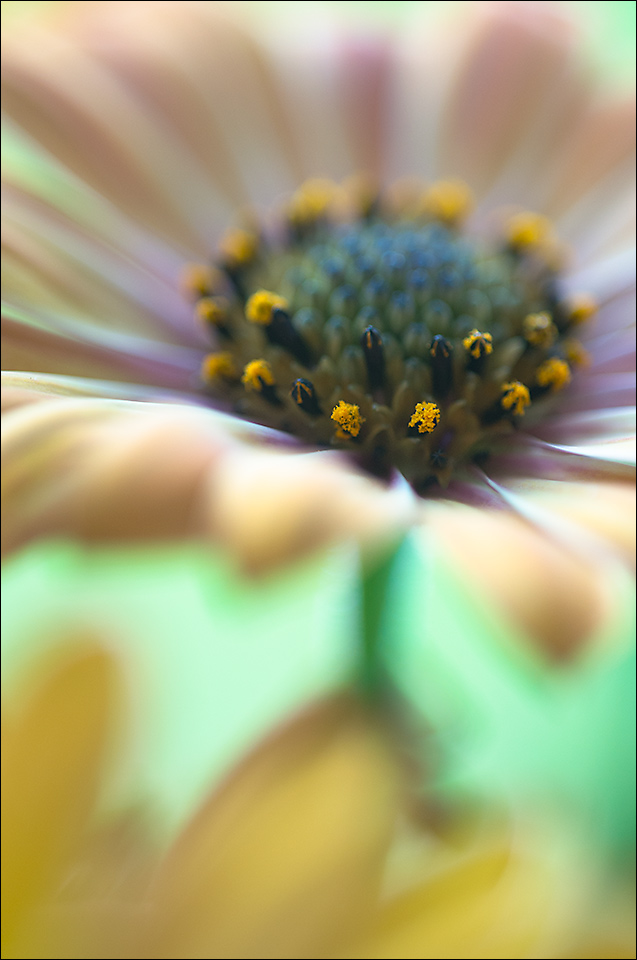
This is a 'Dehaze' example from Lightroom.  This is the image with the 'Dehaze' tool utilized, where the original is in the comments.  Thoughts on this?  Does it still look natural?

Thanks in advance!

Nathan

Nikon D7000, Sigma 180 macro, tripod, ISO 400, f4, dehaze in Lightroom

Comments

9 comments
Comment posted by Nathan Buck on February 1, 2016 at 5:49 PM
This is the original.

Nathan
Registered on November 1, 2003, 1101 Posts, 13589 Comments
Comment posted by scott lanz on February 1, 2016 at 7:27 PM
It looks natural to me, Nathan, except for the green color of the stem and bg, which looks looks somewhat unnatural (but it even looks a little "minty" green in the original). Going back and forth between the two versions, I prefer the "dehazed" version except for the bg green color which draws attention. I like the comp including the yellow leaves at the bottom and the pof/dof management.  
Registered on November 14, 2003, 840 Posts, 12902 Comments
Comment posted by Michael Lowe on February 2, 2016 at 2:29 PM
Nathan, I like the original better. The FG green is a little too strong for me in the "dehaze" one.
Registered on February 11, 2004, 777 Posts, 5252 Comments
Comment posted by Philip Hodgkins on February 2, 2016 at 3:39 PM
Nathan, I occasionally use the dehaze tool. Taking it to the right like this too far gives a definite color shift. My thoughts are to use it, if at all, very gingerly. Adobe touts it as this great new tool, but it is very easy to go over the top with it, either adding haze or reducing it. I think a good indication of how far you want to go is to keep a close eye on the color shifts. Speaking to your image specifically, the softness is one of the good features of this image. However, if you wanted to dehaze just the center of the flower, that might be worth trying. BUT— if it ain't broke, don't fix it!cool
Registered on July 24, 2006, 2741 Posts, 12349 Comments
Comment posted by Bill Fach on February 3, 2016 at 1:01 PM
Nathan: I do prefer the unmanipulated original. The stronger green in the FG and the more defined yellow petals pulled my eye even in the thumbnail. I agree with Phil regarding the dehaze filter. It can be very useful and is certainly innovative but IMO too easy to overuse. >=))>
Registered on November 1, 2003, 1805 Posts, 26981 Comments
Comment posted by Nathan Buck on February 3, 2016 at 4:32 PM
Thanks for the honest thoughts everyone!  I certainly appreciate them!

Nathan
Registered on November 1, 2003, 1101 Posts, 13589 Comments
Comment posted by Ian Wolfenden on February 3, 2016 at 5:51 PM
A very interesting perspective, Nathan, which works best for me in the original version ( I prefer the less vibrant colour ).  The comp gives a sense of real depth with a dynamic play in the fg which I am growing to appreciate.
Registered on May 18, 2007, 1108 Posts, 7647 Comments
Comment posted by Giuseppe Guadagno on February 3, 2016 at 6:06 PM
It still looks natural as the vital center of the Osteospermum is often so beautiful. I love the selective focus but I like less the petals of the second flower that does not seem to add anything at the image, for me of course.
Registered on February 3, 2007, 827 Posts, 5052 Comments
Comment posted by Dennis Plank on February 5, 2016 at 6:41 PM
I prefer the original without the "dehaze" filter, Nathan.  While it looks natural enough with the filter, the bright blue-green band is just too much for my taste.

devil
Registered on January 28, 2008, 1767 Posts, 23192 Comments