Couldn't resist the title!

Been trying to find some time to get back, post some comments and more images. Been busy, but did manage an overnight trip to Yosemite this last weekend with perfect timing on snow in the valley. Some images later.
Ok, more aspens. If you recall an image I
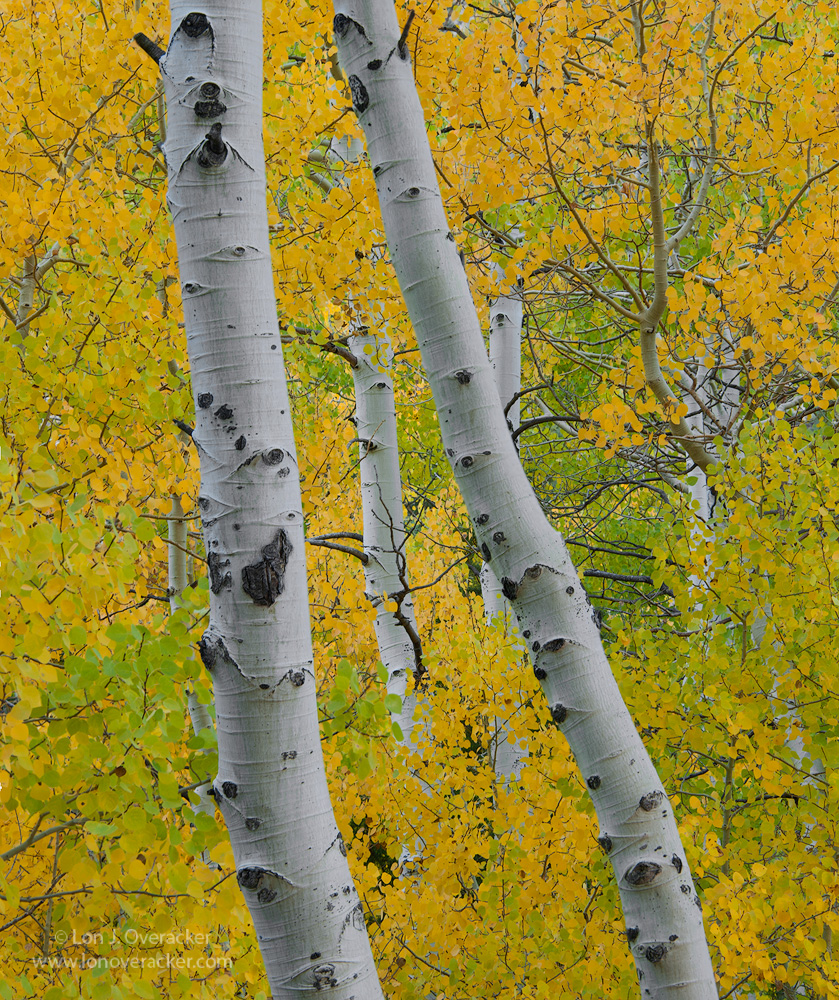
posted in M&N a while back, these are the same aspen trunks/boles as the 2 trunks on the left in the other image. In order to avoid the hand of man and the carvings in the trees, I looked upwards and captured this one. Given the comments on the previous image (thank you!) I'm not convinced I'm done processing this one, so I would love to get your feedback and suggestions.
This is a 2-image focus stack which has given good front-to-back depth and sharpness. I'm just wondering though if this is a situation where the bg should go soft? Hard to tell in these final web versions, but Photoshop didn't do a very good job with the blend.
Your comments, critiques and suggestions always welcome,
NIkon D700
Nikon 28-300 @112mm
2-image focus stack @ f/11
Thanks!
GO BRONCOS!
EDIT: I've noticed with at least my last two images, that what gets displayed after uploading does NOT look the same as when I'm viewing in PS. I can understand the previous comments about lacking "punch." I'm guessing this image might get the same reaction, because this looks "flatter" in this post, then when I see it in PS. Putting them side by side makes it clear. I have no idea if it's me, or something is happening to the image. Has anyone else noticed or compared?

Comments
23 commentsThanks!
I like the simple composition and detail. I think the blend works for greater depth of field because the detail in the leaves adds a lot. The small version does look flat, and the large version does, as well, but less so. I would like to see the contrast punched up a bit and the yellow leaves brighter--more luminous.
I can't say why the image in PS looks flatter than the the posted version. More than once, though, my image as it appears in Save for the Web looks flatter and darker than in PS, so I have had to use a curves layer to fix it and then try Save for the Web again. I use TK's Web Sharpening action. Like you, I convert to sRGB and embed that profile.
Question: Do you convert from 16-bit to 8-bit prior to converting the color profile? Just a SWAG, but it may be that the gallery software converts a 16-bit image to 8-bit on the fly, thus causing a loss in fidelity. That's just a SWAG on my part and could be off the mark.
--P
Nick Bristol
Lone Rock, WI
Another excellent aspen tree capture. Nice comp. - I like the way you have centered the background trunk between the two prominent foreground trunks. Agree with Roel that the background needs to be sharp, as rendered, in this composition. I don't think an OOF background would work nearly as well as there would not be enough to hold interest. I suggest to bump up the white point to brighten the leaves, trunks and increase the contrast.
I have had weirdness in posting images to the web and then them not looking quite like the same image in PS. I am not sure what it is. I see it most with B&W.
Nice image.
A thought on what you are seeing and why I don't post images anymore.
In the past my images were labeled dark without detail in shadows, where on my monitor they were fine and detail in the shadows was visible. The pictures printed perfectly.
It may be time for everyone to comment less on the technicals, color, contrast etc... and more on the feeling the images give. This is especially true when software changes everything when being posted online.
Just my thoughts.
This image has a wonderful sense od being up in the aspen canopy. The composition really highlights the beauty of the trunks and the glowing yellow leaves. I like the dapples of green leaves as they help to move the eye and they frame up the two prominent Aspen trunk. R very beautifully intimate capture.
As for the color issues, the image is a bit flat, and if you want I can give it a try on my computer and see if I get the same results. I am posting what I have checked in my save as web preview.
I'm perplexed because this should be a WYSIWYG situation. If I've already converted/saved the image on my computer as a jpg, sRGB, 8bit, etc. and I'm sitting here looking at it, and the very same image is uploaded and displayed here and it looks different.... then I don't see how it can be anything on my end, because I haven't made any changes, only uploaded.
Also, I shouldn't have to process my image beyond what I think looks good, anticipating my image is going to be "dumbed down" to look like I want it. It's the same when making prints. In a properly calibrated system, you should be able to process a file to your liking and expect to print it without having to jack the colors up or change your file so it prints correctly.
The issue is not consistent with all images either, so that doesn't help me figure things out. I appreciate your thoughts on this. I also did the same experiment with this latest image. There was a difference to my eye, but it was much less apparent. I'm going to look back at some others.
Color still scares me as far as posting goes. Even though I have everything calibrated, it seems like it's a crap shoot to get things to post they way they look in PS. I even go as far as posting images, both b/w and color, check them when they're up on a couple of different screens, pull them back down and adjust them accordingly. How's that for an efficient work flow?
Go Broncos!
It definitely is harder to the difference between the two images, so they look better.
Yes, the image on the right I used the Save for Web dialogue, The image on the left is the SAME IMAGE, the only different, or additional steps was that it was uploaded here.
One thing I'm thinking of is the transparent gif. Remember, the feature of overlaying a transparent gif was implemented as a clever way to help prevent image theft. In other words, you right click an image and all you get is a blank gif file. Theoretically, a 100% transparent gif overlay shouldn't have any effect on the posted image. But then, that is a least one of the things that's different.
Apologies, don't mean to run up the comments here, I should take this to a discussion forum.
Thanks again for the thoughts.
Anyway, the name here works well with the aspen boles. The vertical view seems to fit the arrangement of the two primary boles quite fittingly. I do like the scene being filled entirely with boles and leaves, looks really good as being presented there.
Thinking back on the overall look or quantity of ideas around the "punch aspect" does the color seem OK? I've not been reviewing too many images as of late so maybe I'm off in my thoughts. Does there seem to be a mixture of cyan here and there causing the flat look? I know I get that with my images at times. Anyway, just joining in on the SWAG approach as I did not see any thoughts posted on that issue at all. Good luck with working things out.
Ed
Glad you're all here though!
Agreed. I didn't bring it up because the discussion was mainly about a flat image.