Nature Photographers Network
This is the preserved archive of the original Nature Photographers Network. The community continues at naturephotographers.network.
Painted Abstract + Re
‹ PreviousLandscape GalleryNext ›

Painted Abstract + Re

by Marylynne Diggs

Gallery: LandscapePosted January 9, 20182,651 views15 comments
Hi Everyone,
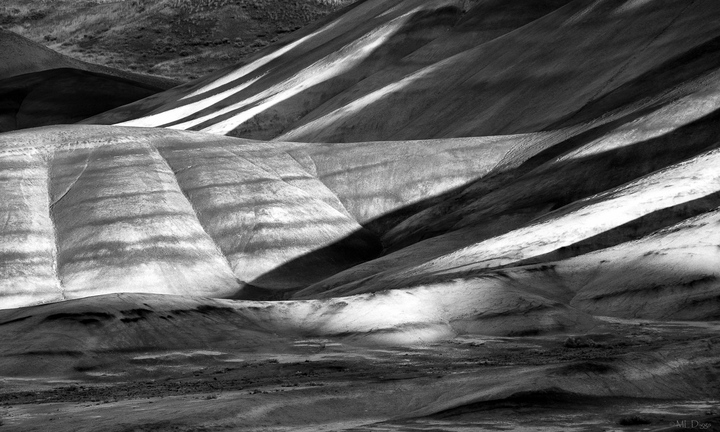
Ed McGuirk mentioned a possible abstract from my preceding BW image of the Painted HIlls with setting moon.  This is a totally different frame, and what I was drawn to initially, while the moon was still high in the sky. 

I took a different approach to the conversion this time, relying entirely on LR and not using an Nik Silver Efex.  I fear Nik will disappear, so I'm weaning myself now.  Given this different process, I'm especially curious about the tonal contrasts and whether I need to further darken shadow areas.  I like Nik's zone tool, and I felt its loss in LR even though the histo indicates basically the same thing.

Let me know what you all think. I rely heavily on your constructive criticism, feedback, suggestions and yes, yawns of ennui when that's what an image evokes.  I appreciate all of it.  Don't hold back.
ML

Comments

15 comments
Comment posted by Ed McGuirk on January 9, 2018 at 5:51 PM
Marylynne, this is exactly the type of abstract composition that I had in mind when I made my comment about your previous image. These wonderful overlapping diagonal lines of the Painted Hills make for a very dynamic and compelling subject. I really like how you composed this to emphasize  the repetition of this various hills, but also that they alternate direction right/left/ right etc. And they also alternate dark/light/dark as well. I really lke this composition a lot, and I hope you have some other compositions you extracted as well, this subject appears to offer many possibilities

In terms of the processing, the shadows and blacks look fine on my monitor, with good detail in the shadow areas. But relative to the processing in your previous image (which was great, once you burned a few select areas), some of the very brightest highlights in this LR processed image appear to be too hot and losing detail (whereas your highlights in Nik looked pretty good). In Lightroom try moving the Whites and /or Highlights sliders to the left  to try to recover some of the highlight detail.

If you like Nik's "Zone System' tool, you may want to investigate Tony Kuyper's Luminosity Masks action panel for photoshop. It offers a lot of control over exposure and contrast in various tonalities, including something somewhat similar to the familiar AA Zones. Tony's LM's require photoshop, and has a learning curve of how to use them, but they provide the ultimate in control over tonality.
Registered on November 29, 2017, 19 Posts, 260 Comments
Comment posted by Harley Goldman on January 9, 2018 at 7:00 PM
Love the lines and rich tones. My kind of image and I like it a lot. I would not mind a bigger post to get more detail and enjoy it even more, but that is not a nit! sad I can see what Ed is saying about the hot areas, but that is not bothering me at all. Nice work. 
Registered on November 19, 2003, 586 Posts, 11271 Comments
Comment posted by Marylynne Diggs on January 9, 2018 at 8:01 PM
Thanks Ed and Harley.  I noticed the hotness on the histo, but wanted to see what folks thought.  I don't think it would print well, so I dialed it back a bit in a couple of places and increased the clarity in the foreground horizontal hill just a tish. 
Ed: I will check out Kuypers LM, but my PS skills are so weak, I doubt it will be helpful at this stage of my development devil.  Every time I use Photoshop, I marvel at how many more steps everything takes!  Some day, in retirement no doubt, I will get a handle on PS.  For now, it's LR (nondestructive editing with a simple interface).

Harley: I thought I did the larger version in the original, but I see I clicked the wrong "browse" button.  This is 1600x960, but it appears there are no arrows for expanded view in repost. 

ML
Registered on December 14, 2010, 122 Posts, 1034 Comments
Comment posted by Dan Kearl on January 9, 2018 at 8:37 PM
I like this one much better as a B & W. The first onw I wanted to also see in color.
This works better for me as it is just about shadow and light. I enjoy the diagonal streaks.
Registered on September 2, 2013, 209 Posts, 1514 Comments
Comment posted by Aaron Feinberg on January 10, 2018 at 3:03 AM
Nik was bought by DXO and is being relaunched  ;)

https://nikcollection.dxo.com/

Also nice shot!

aF
Registered on October 26, 2009, 399 Posts, 2789 Comments
Comment posted by Harry Lichtman on January 10, 2018 at 9:02 AM
I think the contrast is fine, wouldn't go any darker on the shadows.  Looks like you used all of the zones for this, very nice.
Registered on September 17, 2010, 304 Posts, 3507 Comments
Comment posted by Ed McGuirk on January 10, 2018 at 9:07 AM
Marylynne, the repost looks much better with the changes to the highlights. I understand what you are saying about the time investment to learn photoshop. One of the things I liked best about Nik Silver Efex was the ability to make precise local adjustments with control points, which are much more powerful and easier to use than the local adjustment tools available in Lightroom. Like you, I am nervous that Silver Efex as we know it may not be around much longer. If you get to the point in your processing growth where you find yourself wanting to make more precise local tonality adjustments, then my advice is to look beyond Lightroom to Luminosity Masks. Tony Kuyper sells a good package with excellent how-to videos by Sean Bagshaw. Tony's LM action panel also automates many photoshop commands and actions into simple one button clicks. But the investment of time and money to do this is only worth it if you consistently want to make lots of local adjustments that are hard to do in Lighroom.
Registered on November 29, 2017, 19 Posts, 260 Comments
Comment posted by Mark Seaver on January 10, 2018 at 2:14 PM
A terrific abstract, Marylynne, with it's mix of strong triangles and rounded ridges.  I could possible see a bit of dodging in the lower right to continue the strong upper left to lower right diagonal.  Possibly due to your toning down the highlights, that lrc looks better in the repost (clicking on the repost shows the larger view).  In the repost, I like the toning down of the bright areas coming in from the right edge, but like how the brightness of the distant slopes pulls my eyes all the way along the valley in the original post and how the brightness of the rounded ridge coming in from the left adds emphasis.  The major difference between PS and Lightroom is the ability to make highly localized changes.  Dodging and burning through luminosity masks allows for some finely detailed tonal adjustments.  Luminosity masks are pretty easy to create in PS on your own with a few clicks in the channels panel, and if you like them automating the ones you like to use regularly is also "moderately" easy.  (There's lots of web advice, including Tony's, on how to create and use luminosity masks.)
Registered on January 23, 2011, 1103 Posts, 17270 Comments
Comment posted by Igor Doncov on January 10, 2018 at 2:41 PM
The growth of this image has been interesting to watch. I like all of it but the top left wedge of brush to me seems the weakest part of the image. Nobody has mentioned it so perhaps it's just me. I would dodge it and add contrast to separate it from the other adjoining shapes. 
Registered on November 22, 2014, 189 Posts, 2733 Comments
Comment posted by Lon Overacker on January 10, 2018 at 4:15 PM
ML - can I call you ML?  (I'm lazy...) ;-)

At first glance, this is almost complicated, busy.  But upon closer and longer examination, I believe this to be oustanding! And yes, on the heals of Harley's dune image, I draw some comparisons - namely the layering.  The layers, which are fascinating to explore here.  The more I've looked at this, the more I love it.  

The repost takes care of the hot areas beautifully.  I'm just amazed at the light and shadow play, the lines, the angles, the variety of light, shadow... the list goes on.  And then, to have that patch of hill up top with the vegetation... it's like, where did that come from? It's yet another visual layer that adds to the overall impact of this image.

Can't say enough about this, or describe it better.  Fantastic vision on this - and the processing too.

Lon
Registered on November 24, 2006, 521 Posts, 19147 Comments
Comment posted by Marylynne Diggs on January 10, 2018 at 7:17 PM
Hi Everyone,
Thanks a million for all of the feedback and words of encouragement.  I am posting one more, with a little more highlight returned to the distant ridgelines and with the scrubby hill beyond burned a bit.  If any of that was a mistake, I'll readjust but spare everyone the repost.

Igor: That scruffy hill bothered me too.  It's one of those things that just can't be avoided given restrictions on where one walks, and I always obey such rules.  I would love to shoot these from down low, but it just can't be done. I did a little burning there as well as overall darkening.  I'm torn about whether that is an improvement.

Mark: I agreed on the highlights and reduced my overcorrection on those distant ridges.

Lon: Feel free to call me ML anytime.  I too find Marylynne to be a very long name to type, and I don't even have to doublecheck the spelling as others do.  Notice that I did make adjustments to the hill with vegetation in the distance.  Let me know if, in darkening that, the image has less pull as a result. 

Thanks as always for everyone's feedback, advice, and suggestions.  My images are always improved by your input.
ML


Registered on December 14, 2010, 122 Posts, 1034 Comments
Comment posted by Lon Overacker on January 11, 2018 at 2:16 AM
Marylynne, ML, :-)  Personally, I like the edits of your first repost.  The good news is that this is all personal choice, and Igor's thoughts on that upper patch are no less valid than mine.  Despite that upper patch being different in regards to the presence of vegetation, and it's just different texture, etc., I thought the tonal values were more consistent and appropriate in your original and repost; where the midtones are consistent with the rest of the image.  Just my .02

You have an extremely strong image and your edits are just a matter of degree....

Lon
Registered on November 24, 2006, 521 Posts, 19147 Comments
Comment posted by Igor Doncov on January 11, 2018 at 3:17 AM
Marilynn, I think you misread my comment.  I suggested to dodge the area, not burn it in.
Registered on November 22, 2014, 189 Posts, 2733 Comments
Comment posted by Marylynne Diggs on January 11, 2018 at 11:36 AM
Thanks Lon and Igor. I see my error now.  I think I burned to make it go away since it didn’t add much.  I will delete that adjustment brush, but not repost.  I have one more image from this day to share in a new thread, so I will move on.

Thanks a mil all!
ML
Registered on December 14, 2010, 122 Posts, 1034 Comments
Comment posted by Igor Doncov on January 11, 2018 at 12:51 PM
Actually I'm starting to understand better now where you're coming from on that wedge. Rather than accentuate that shape you went the other route and blend it in with the other shapes around it. I think it's a viable option. It certainly does put more emphasis on the sunlit areas below. 
Registered on November 22, 2014, 189 Posts, 2733 Comments