Nature Photographers Network
This is the preserved archive of the original Nature Photographers Network. The community continues at naturephotographers.network.
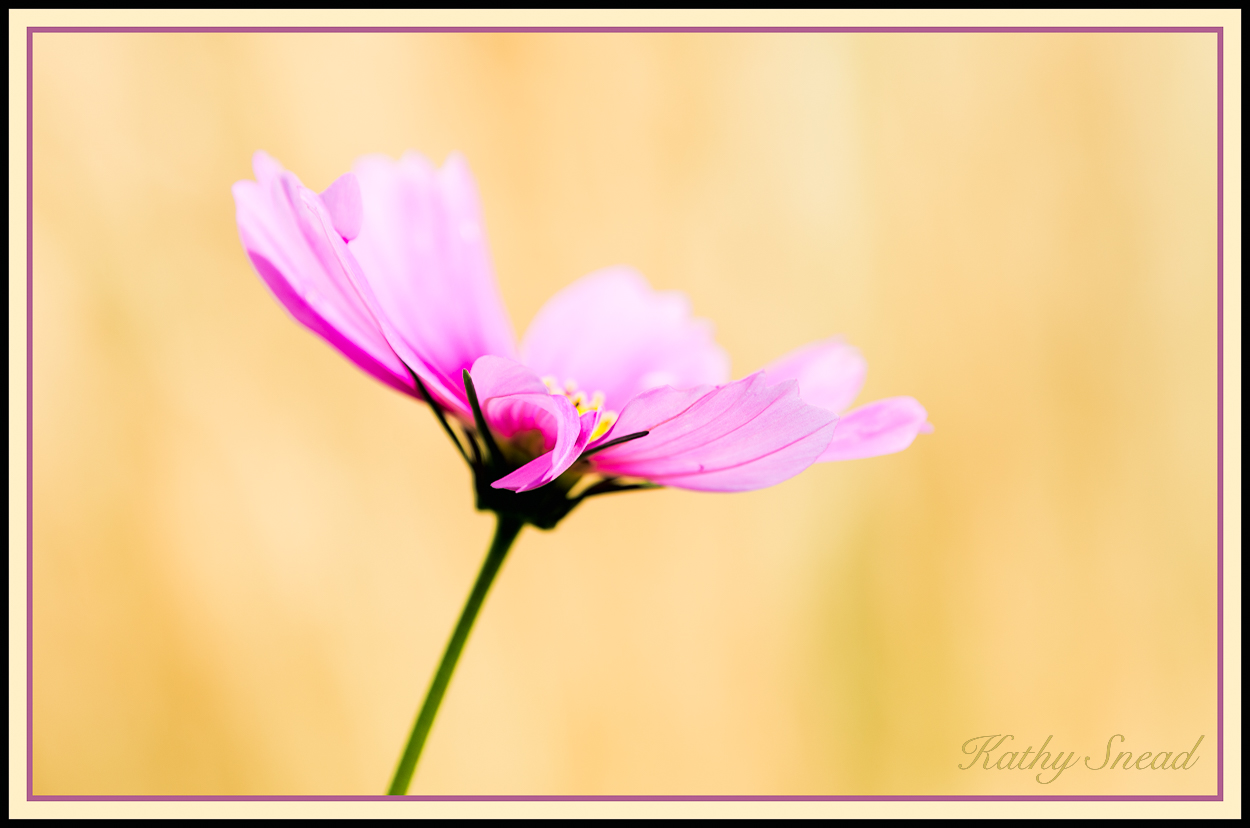
Pink Cosmos & reposts!
‹ PreviousFlora GalleryNext ›

Pink Cosmos & reposts!

by Kathy Snead

Gallery: FloraPosted July 31, 20181,410 views10 comments
Have taken many flora shots this summer - finding time to work on them has been another story.  Here is one of the "crams" .  

D800, 300 mm f4 at f5, ISO 125, 1/320 sec, handheld.

Comments and critiques welcome and appreciated.

Comments

10 comments
Comment posted by Craig Moreau on August 1, 2018 at 10:41 AM
Kathy, this is really nice. Love the subtle textures in that background and the framing. It looks a little over-saturated to me, but that is subjective of course.
Registered on April 21, 2015, 64 Posts, 584 Comments
Comment posted by scott lanz on August 1, 2018 at 1:05 PM
I love cosmos. Very graceful and photogenic flower, as evident here. You positioned it and photographed nicely against the great bg, Kathy. I like being able to see the hint of center.  Interesting decision to put the pof on the front petals vs. the center. Either would work, I think, but maybe you did both and this worked better.  Putting the focus on the front petals shows the nice lines in the petals. 

Edit: colors look good to me.  
Registered on November 14, 2003, 840 Posts, 12902 Comments
Comment posted by Philip Hodgkins on August 1, 2018 at 9:15 PM
I love the comp and POF. The BG is oversaturated, bleeding into the green blur of the stalk, giving it a dingy yellow halo, easily cured by dropping the yellow sat back a notch, or moving the lightness slider in the color tool up or down.
Registered on July 24, 2006, 2741 Posts, 12349 Comments
Comment posted by Kathy Snead on August 1, 2018 at 9:42 PM
Hi All
Thank you for the comments.  I saw that halo , but not sure I can fix it and preserve the look of the photo.  I am attaching the original with no adjustments (no border) .  You can see the halo there.  I am also attaching in a separate comment the version I worked on (has a border) with a -57 on the yellow sat.  You can see the greenish halo with a touch of yellow is still there but the background is kind of blah.  Not sure what to do in a case like this and I seem to encounter it a bit doing crams where the area is out of focus and there is a real difference in exposure values between subject and background.  In this case, the BG was a grass that had sunlight, while the flower was in shade.

Any other suggestions all???  
 
Registered on April 6, 2017, 104 Posts, 397 Comments
Comment posted by Kathy Snead on August 1, 2018 at 9:43 PM
Here is the corrected one with the yellow toned way down.  Thanks for the help!  Maybe the answer is to have just a little less halo so its only noticeable on very close inspection.  I that case, probably somewhere between the two extremes.  After pondering this and , at the risk of violating a rule against too many versions , I am posting another.
Registered on April 6, 2017, 104 Posts, 397 Comments
Comment posted by Kathy Snead on August 1, 2018 at 9:53 PM
All:  Here is my "in between" version.  I took the sat on the yellow down halfway from where I did it in the extreme version, but also took the green luminance way down.  That seemed to help.  Does this look better?
Registered on April 6, 2017, 104 Posts, 397 Comments
Comment posted by Philip Hodgkins on August 2, 2018 at 7:14 PM
Kathy, here is a method that will clean up most of the edges in the stalk and sepals. Create a brush for the saturation/desaturation tool of about 10 pixels wide at 10% hardness. Using the desaturation tool set at about 30%, click the brush at the beginning. Holding the shift key down, Go to the next spot in a straight path and very carefully click again in the path. this will desaturate everything in the path behind in a straight line. Continue holding down the shift key to the next spot. Carry on like this until the saturation in the path looks right to you. It will take you probably several times back and forth until you get a match. I suggest you create a duplicate layer for practice until you get a feel for this. I tried this on a copy of your large image. Works like a charm!
Registered on July 24, 2006, 2741 Posts, 12349 Comments
Comment posted by Bill Fach on August 3, 2018 at 4:29 PM
Kathy: I like the original and think the simple explanation for the halo is that the stem is slightly OOF due to the shallow DOF. I'm not bothered by it at all. Intriguing choice of POF that works for me. 2 thumbs up.>=))>
Registered on November 1, 2003, 1805 Posts, 26981 Comments
Comment posted by Kathy Snead on August 4, 2018 at 10:20 AM
Hi Phil

Thank you so much for taking the time to explain how to use a brush to desaturate.  I am not an expert photoshop user as I mainly hang out in Lightroom .  I plan to try this as soon as  I have time.  Facing some family/ other time crunches right now so not able to work on this for a bit! 

Best
Kathy
Registered on April 6, 2017, 104 Posts, 397 Comments
Comment posted by SandyRichardsBrown on August 13, 2018 at 7:51 PM
Congrats on a fine WP - you surely worked hard for it!  crying
Good to begin with, and great by the time you were done with it.
I also appreciate Phil's step-by-step instruction - 

Sandy
Registered on November 24, 2003, 3937 Posts, 12909 Comments