Nature Photographers Network
This is the preserved archive of the original Nature Photographers Network. The community continues at naturephotographers.network.
Lower South Falls
‹ PreviousLandscape GalleryNext ›

Lower South Falls

by Chad Delany

Gallery: LandscapePosted February 25, 2010400 views12 comments
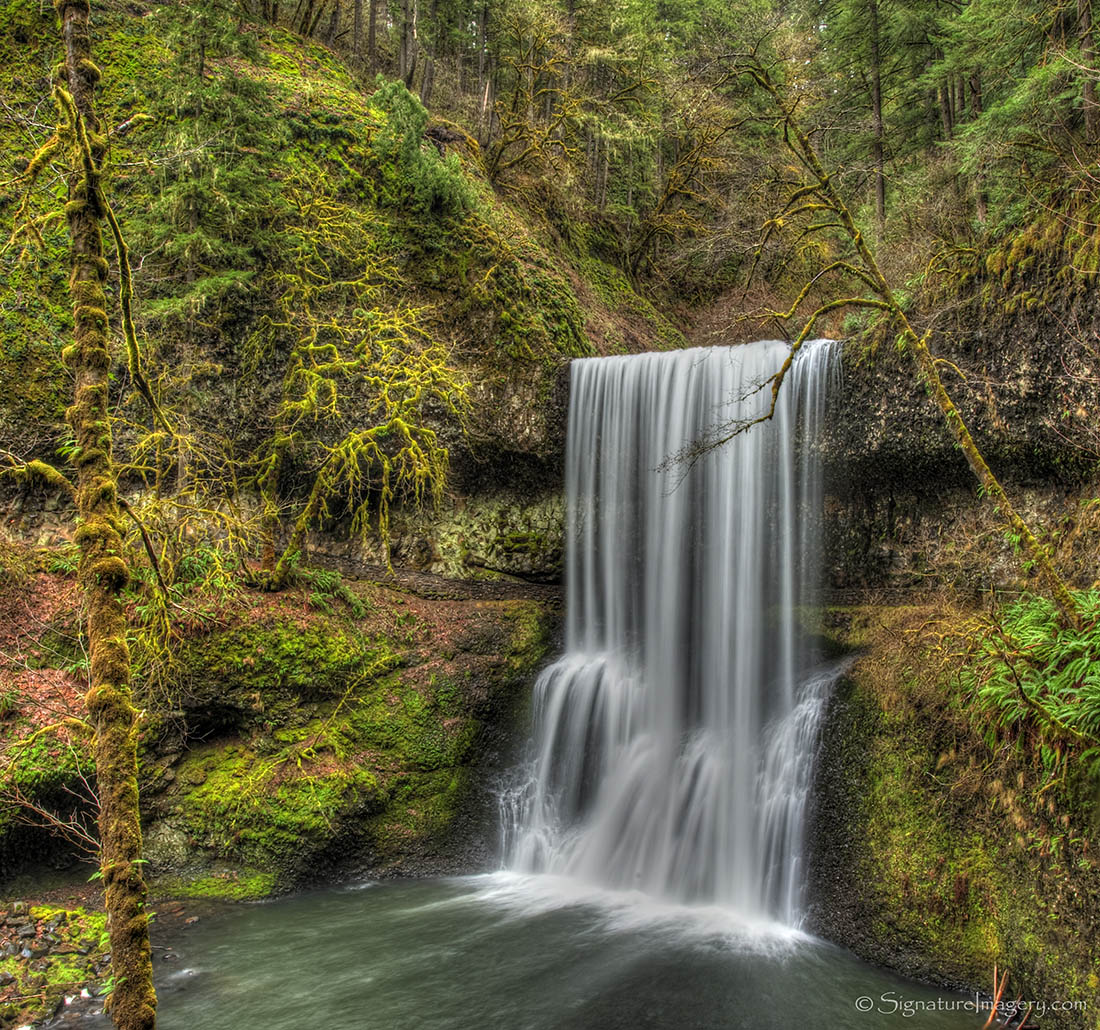
This is the Lower South Falls in Silver Creek State Park. It was overcast and raining.

The aperture was set at f/22 and the lens had a focal length of 24mm on a Nikkor 14-24mm f/2.8G AF-S lens. The camera is a Nikon D700 with the ISO set at 200, which is the default.

Comments

12 comments
Comment posted by Marc Adamus on February 25, 2010 at 3:50 PM
Nice, simple, pleasing composition. The processing immediately strikes me as having a bit of an HDR look to it, however, and distracts somewhat IMO.
Registered on September 17, 2005, 780 Posts, 8091 Comments
Comment posted by Arnab Banerjee on February 25, 2010 at 4:15 PM
a bit too HDR for my taste...but the centered comp is effective
Registered on January 3, 2007, 313 Posts, 2270 Comments
Comment posted by Chad Delany on February 25, 2010 at 6:02 PM
Here is the first result I had from post-processing. Less HDR-y. I'm still trying to figure out what I like and what is too much.
Registered on January 27, 2010, 17 Posts, 21 Comments
Comment posted by Jay Nielsen on February 25, 2010 at 7:04 PM
Beautiful falls and a great composition. You have lost some saturation and contrast in the second post. I think all of the foilage surrounding the falls needs to be darker and have more contrast to make the falls really jump out. Although if you are looking for more of an HDR look the first post is very nice, I think it is a personal preference type of thing.
Registered on October 6, 2008, 137 Posts, 720 Comments
Comment posted by Amy Lindsey on February 25, 2010 at 7:53 PM
I prefer the 1st one. Doesn't look abnormally HDR to me. Very beautiful image!
Registered on August 25, 2005, 14 Posts, 54 Comments
Comment posted by Neven Dries on February 25, 2010 at 8:01 PM
Great image. I like the first composition too.
Registered on February 24, 2006, 52 Posts, 160 Comments
Comment posted by Patti McKinnon on February 25, 2010 at 9:04 PM
I like all of the shades of green you captured. Very peaceful!
Registered on September 4, 2009, 6 Posts, 14 Comments
Comment posted by Marc Adamus on February 25, 2010 at 10:31 PM
Chad, the first thing I notice in both images is the HDR look and feel. The second post has less saturation, contrast and sharpness, but the same HDR look. I'd be interested to know how you're processing these.
Registered on September 17, 2005, 780 Posts, 8091 Comments
Comment posted by Chad Delany on February 26, 2010 at 2:36 PM
Thanks for all the comments. I might try a few other things to see if I can make the falls pop out more, although I do like the detail in the water as opposed to it just being white and blown out.

Marc,
I'm using Photomatix Pro to do the HDR processing. It is a bracket of 5 exposures at 1 EV steps. The key variable between the two images is what is called "smoothing" in Photomatix. As smoothing gets more negative, the image becomes more HDR-y. If you really push it, then the falls gets really dark and there is a halo around it. But it does make the moss and green ferns really glow, which is what I was trying to capture in this image. In real life, the moss really does glow when it is really overcast. For an example of a halo, you can look in the Fauna gallery at my "Elk in a Meadow". My first attempt at that pushed it too far and I got a halo around the elk. My second attempt looked more realistic.

http://www.naturephotographers.net/imagecritique/ic.cgi?a=vp&pr=141498&CGISESSID=def3e75e1c52e67c2d76f36428b3f7d6&u=28931

Cheers,
Chad
Registered on January 27, 2010, 17 Posts, 21 Comments
Comment posted by Bill Maile on February 26, 2010 at 3:10 PM
Beautiful falls, nice angle on the capture.
Registered on March 2, 2009, 984 Posts, 2518 Comments
Comment posted by Marc Adamus on February 27, 2010 at 11:53 AM
Chad,

What I suggest doing instead is skipping the Photomatrix steps entirely and going strait out of RAW with this. Once in CS4 you can add as much or as little glow as desired, and still retain natural looking tonal values throughout. I have experimented with many variations of the 'Orton' effect for scenes like this, because I too understand that dreamy 'glow' is REALLY how some people's eyes interpret scenes like this. I'm one of them.
I find the traditional Orton effects and most tutorials you'll find on the web are too strong though. I want results, but in a more subtle way, such as in THIS example where I applied my Orton-like layer at 10% opacity, selectively across the scene. Additionally, it can be applied precisely to the background, foreground, waterfall, or illuminated areas, such as HERE to increase the sensation of depth.
I like to take a layer and make it a lot brighter and more contrasty, maybe with more saturation too, and apply a gaussian blur at about 40 pixel radius to a 21MP image, then layer it over the base image at 5% or so to taste. It gives me excellent control and no unwanted tonal damage, which is the source of all those 'too HDRy' comments we hear a lot.
Registered on September 17, 2005, 780 Posts, 8091 Comments
Comment posted by Ian Cameron on February 27, 2010 at 7:09 PM
A lovely cascade at my favourite shutter speeds and beautiful soft light. I see the HDR look to it but don't find it much too exaggerated in this case.
Registered on August 6, 2004, 1125 Posts, 3318 Comments