Nature Photographers Network
This is the preserved archive of the original Nature Photographers Network. The community continues at naturephotographers.network.
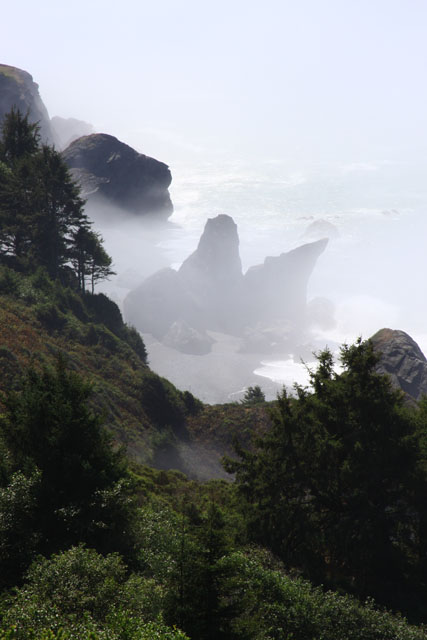
coastal fog
‹ PreviousLandscape GalleryNext ›

coastal fog

by BJ & Thomas Burget

Gallery: LandscapePosted June 30, 2010124 views3 comments
Canon EOS 400, lens 55-135 shot at 135mm, f18, 1/125, iso 200
I love the mood of this photo, but then, my husband says I stay in the fog most of the time anyway.
What I'm looking for in the critiques is the composition and lines, ect. We've been shooting for our own pleasure but we've recently sold several photos and now I need to learn how to improve technically. Thanks for any input. BJ

Comments

3 comments
Comment posted by Marc Adamus on June 30, 2010 at 1:34 PM
BJ, I really like the atmosphere back there - just what the Pacific coast is all about. The problem is, almost everything in the upper third appears really bright, almost lost. I'd start by going back to the RAW file and seeing if you can get any information out of there, and if you can, I'd make an appropriate curves adjustment, fill light adjustment or whatever else you need (such as the blending of two exposures) to show detail in both top and bottom parts of the image. In the future, make sure you focus on controlling those highlights first and foremost and let everything else fall where it may - you can bring it back out later using a variety of methods. Oh, and bracket your exposures without moving the camera, making sure you have all the info you need to blend if it comes down to that. You could also use a graduated ND filter in the field, ensuring you can get the proper exposure all in one shot. Good luck!
Registered on September 17, 2005, 780 Posts, 8091 Comments
Comment posted by Steve Sieren on June 30, 2010 at 3:42 PM
Looks like you caught this at the fogs breaking point, that really does create the mood here but yes the brightness on top could use some toning down.
Registered on January 2, 2008, 360 Posts, 5321 Comments
Comment posted by Lon Overacker on June 30, 2010 at 6:23 PM
BJ,

Marc provided some great information so I won't add to what he's already said. But I will say that I think because of the exposure issues, this also affected the composition. The bottom having lost some detail in the trees becomes "heavy" in the composition. I think having the light and exposure better balanced out would also improve the comp. I do like the little "u" shape of the foreground which allows the sea rocks to fit in nicely. Compositions along the coast like this are pretty difficult to start with; as with your image here, you end up with some empty space/sky in the upper right that isn't adding to the composition. I think a slight crop from both the top and bottom with some additional processing for the exposure might make some improvements.

Hope that helps.

Lon
Registered on November 24, 2006, 521 Posts, 19147 Comments