Nature Photographers Network
This is the preserved archive of the original Nature Photographers Network. The community continues at naturephotographers.network.
Edge of Darkness
‹ PreviousLandscape GalleryNext ›

Edge of Darkness

by Jeremy Kessler

Gallery: LandscapePosted November 29, 2010484 views19 comments
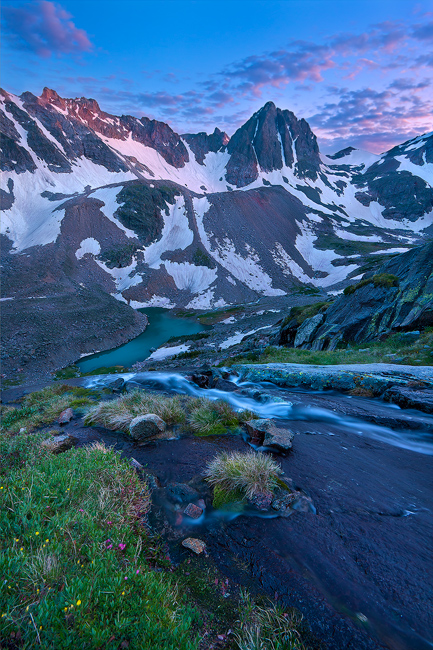
Taken just before dark on a summer backpacking trip.

I know some probably won't like the emptiness of the lrc, I have some comps without it but couldn't fill that space as well as show the bits of flowers in the left. I went with the flowers as the small splashes of color made up for it, at least for me.

Critiques greatly appreciated.

Comments

19 comments
Comment posted by Jeremy Kessler on November 29, 2010 at 7:07 PM
Hmm some major color shifting on this web version, anyone have any clue why?
Registered on September 13, 2007, 36 Posts, 1283 Comments
Comment posted by Brian Schrayer on November 29, 2010 at 7:28 PM
Let me start by saying you have a beautiful photograph here but here are a few of my thoughts. The first thing that I noticed is that I would like to see more contrast in the distant mountains. To be more specific there is not enough contrast between the shadow areas and the alpenglow--it just appears to be flat.

My second thought has to do with the foreground. As you mentioned you considered other comps, but I wonder what this would be like if you had focused either on the flowers to the left as the primary foreground element or the flow of the cascades as a leading element into the middle ground instead of trying to include both. As it is I think that both elements compete for the viewer's attention. But this is really a minor nit.

Having said all of that, this is still a fine photograph and with a boost in contrast it would be even better.
Registered on May 28, 2004, 114 Posts, 2890 Comments
Comment posted by Jeremy Kessler on November 29, 2010 at 7:34 PM
Thanks for the critique, this was a longerish exposure at a higher iso, the camera recorded a bit more light than was available with the eye, so I think that might be part of the reason for the low contrast. I'm not sure why but I can't get any of my web-versions to show up anything close to the original in PS, its kinda ruining the photo...
Registered on September 13, 2007, 36 Posts, 1283 Comments
Comment posted by Rudy Ruberti on November 29, 2010 at 7:35 PM
Great alpine scene and I like how the moraine on the left displaces the lake. I also think a slight crop off the bottom would be nice. As far as the color, did you convert to sRGB?
Registered on October 28, 2008, 179 Posts, 1875 Comments
Comment posted by Koveh Tavakkol on November 29, 2010 at 7:44 PM
Beautiful scene Jeremy, and I agree with some of the critique. As far as color goes, it looks a little on the cool side to me, so maybe play with the white balance a tad. I love those peaks though.
Registered on September 1, 2009, 41 Posts, 608 Comments
Comment posted by Brian Schrayer on November 29, 2010 at 7:49 PM
Jeremy, I originally viewed this with Safari. Out of curiosity I viewed this photo with Internet Explorer and there was a lot more contrast and it looked great. I bet this is due to the color profile that you used and I'm sure it would be great in a print. A few weeks ago, Tony Kuyper posted an image with a good write up of the impact of color profile when you are posting for the web. If you haven't already read that discussion you might find it helpful.
Registered on May 28, 2004, 114 Posts, 2890 Comments
Comment posted by Phil Pogledich on November 29, 2010 at 8:01 PM
I've never had much of a problem with web presentation . . . I simply resize and sharpen, convert to sRGB, convert to 8 bit, then use the "save for web" and call it a day. I've only seen significant color shifts or a loss of saturation a couple of times, and those were fixable by going back into PS and tweaking a bit. You might try that workflow if it's not what you're already using. Also, you don't mention whether you're on a Mac (I use a PC) but I wonder if the fix might be slightly different using that platform.

All that technical stuff aside, this look pretty good even with the "color shifting" you mention. I don't really want to nitpick the composition because it certainly works well in my opinion. It's a gorgeous scene and I really like the hints of color from the wildflowers, the flow of the stream, and the light on the peaks. Only wish I had been there!
Registered on August 24, 2009, 123 Posts, 3099 Comments
Comment posted by Lon Overacker on November 29, 2010 at 8:01 PM
Jeremy,

My very first impression was, whoah, looks like I'm gonna get pulled in and slide down this thing! I think the composition is quite dynamic and does a great job leading the viewer in to the landscape. I think this is a beautiful alpine landscape.

As far as color goes, I believe Brian is correct and on the right track. I too looked at this in FF and IE and they are two different images. this one is more purple, whereas the image on IE is bluer, in fact I would even say towards turquoise blue. Big difference and of course I can't say which way is the way you intended. Did you convert this to srgb? or assign any profile? FF is "profile or color aware" and if you left this in Adobe 1998 or some other color space, it will look different on FF compared to IE. Check the Digital forum as there have been some recent discussions on this topic.

Lon
Registered on November 24, 2006, 521 Posts, 19147 Comments
Comment posted by Harry Lichtman on November 29, 2010 at 8:07 PM
Jeremy - This reaaly looks good to me - Internet Explorer. Colors pop, contrast looks fine and believeable. Regarding the crop, I would probably compromise and take some off the bottom just below the pink flowers- thereby keep some off the flowers and reducing the large dark area. The rock on the far right edge would keep an element to hold interest. Not sure if you are OK witha more square format.

"Wish I were there" view.

Harry
Registered on September 17, 2010, 304 Posts, 3507 Comments
Comment posted by Jeremy Kessler on November 29, 2010 at 8:34 PM
Thanks for all the help regarding the color shifting, I did convert to sRGB and then use save for web but it's still not looking like the original, I'll have to check in some other browsers. I'll check out the digital forum as well as some additional reading and try to update later tonight. Thanks again for the help, really appreciate it. I just got a new computer and monitor all setup, thought I had things figured out but I guess not.
Registered on September 13, 2007, 36 Posts, 1283 Comments
Comment posted by Nicolaus Wegner on November 29, 2010 at 9:44 PM
Very cool Jeremy. LRC works just fine for me. There are flowers, which are enough in my opinion. Looks like a beautiful area.
Registered on February 21, 2010, 133 Posts, 1509 Comments
Comment posted by Tyson Fisher on November 29, 2010 at 10:02 PM
Awesome shot! It has a beautiful flow to it. It see what you're saying about the lrc. It doesn't really bother me that much. The grass and flowers are an important part of the scene for me. Well done.
Registered on September 17, 2008, 44 Posts, 623 Comments
Comment posted by Anne K. Rusk on November 29, 2010 at 10:46 PM
I totally wish I was there! Although, I'm with Lon...I normally end up falling down into beautiful landscapes like this :biggrin:
Regardless of color issues, you have a great image here. I like the comp with the flowers. :toast:
Registered on October 10, 2010, 65 Posts, 904 Comments
Comment posted by Floris van Breugel on November 29, 2010 at 11:37 PM
Looks like some beautiful mountain country, Jeremy! The flowers make for nice little accents, thought I'd also be interested in seeing a composition that features the rapids more strongly in the foreground.
Registered on December 19, 2008, 306 Posts, 4840 Comments
Comment posted by Eva McDermott on November 30, 2010 at 12:06 AM
This works for me Jeremy and I am viewing in IE. Beautiful sky, beautiful light on the mountains, and an interesting foreground especially the flowers. Beautiful work.
Registered on January 4, 2009, 1015 Posts, 13229 Comments
Comment posted by dean hebert on November 30, 2010 at 2:53 AM
What a beautiful scene. Great use of lines and light. :toast:
Registered on August 4, 2010, 70 Posts, 1132 Comments
Comment posted by Nick Bristol on November 30, 2010 at 9:11 AM
Very nice, Jeremy. Looks good to me also..internet explorer. The comp really takes you in to this scene. Nice light and I like the touch of wildflowers.

Nick Bristol
Lone Rock, WI.
Registered on February 1, 2004, 752 Posts, 14140 Comments
Comment posted by Kah Kit Yoong on November 30, 2010 at 12:13 PM
Can't help you with the colour shift which just looks like white balance is off but I'm loving the composition and super light.
Registered on September 27, 2006, 636 Posts, 10682 Comments
Comment posted by Michael J Greene, on November 30, 2010 at 1:08 PM
Images like this are the reason why you are one of my favorite photographers out there Jeremy. Lovely sky and composition. You might add a bit of vignetting at all four corners to focus the attention. Spectacular work!

Michael
Registered on June 18, 2009, 86 Posts, 2317 Comments