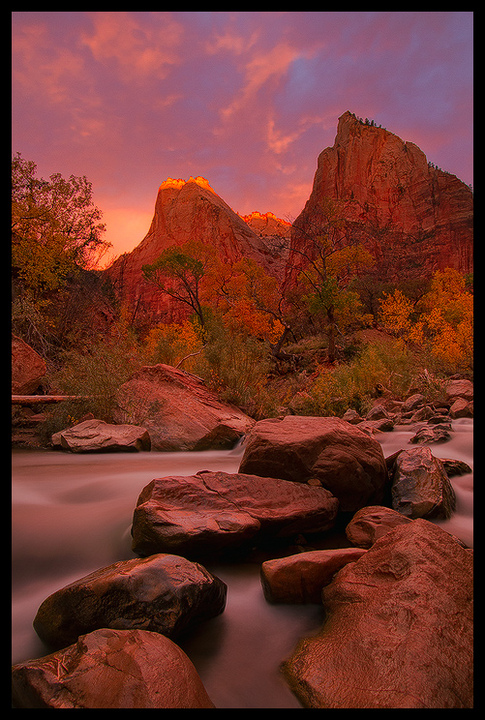
Zion's Patriarchs
by Justin Reznick
This is from the stunning sunrise in Zion this fall. I had the pleasure of hanging out with Chris Moore during the light show.
The big question - too much magenta or orange?
I actually took a lot of magenta out during the processing, it's hard to convey just how brilliant the magenta cast was. It was extremely dark as well, hence the longer exposure on the water. I would normally blend in a later exposure with more action in the water, but I didn't want to lose the magic of the moment.
Thanks for the critiques in advance!

Comments
26 commentsEDIT:
I saw this tip the other day on another forum and thought I'd post it here. The tip came from Charles Glatzer. This is very easy to learn, and takes the subjectivity out of removing casts. The only "addition" I might add would be to experiment with the final step (#6). Don't just automatically go to 50%, but play around a little with it.
1. Duplicate the background layer (Ctrl J)
2. Select the duplicate bkgd layer
3. Filter > Blur > Average (produces a solid color matching the color cast)
4. Open Levels Adjustment Layer, click duplicate bkgd layer image w/ middle (gray set) eyedropper.
5. deselect layer visibility icon (eyeball) of duplicate bkgd layer
6. tweak adjustment levels layer opacity to suit taste (50% is norm)
Regarding the repost, I'd go even further with it but it's heading the right direction.
Coffee in hand marc? Was it a 70-200 mug? hahaha.
For the image...there looks to be intense CA/fringing on the top peaks esp the left one. Think it will be hard to remove casts but cameras are only tools. Do what you feel works for the scene. But damn...color! ha
aF
Thanks for sharing
- Dan.
BTW, last version looks very good.
I'm on a good and calibrated monitor right now and, yes too much warmth on the bottom. I would do a gradient from bottom to top, then on that layer go to "Image/Adjustments/Color Balance" in PS and cool/neutralize the bottom portion a lot more.
Chris