Buckskin Curves & Colors
by Tony Kuyper
NOTE: Repost below.
I had an email conversation recently with Lon Overacker about the merits of making proof prints to provide feedback to help guide Photoshop processing. I routinely use them to assist me in deciding where to go with an image in terms of digital development. Sometimes the changes are only incremental, but sometimes substantial too. Lon says he's essentially able to complete the developing process on the monitor and is generally satisfied with the prints that result.
I'm curious what other folks here do. Are proof prints part of your development process, or is a calibrated monitor sufficient to do the necessary edits? Also, for those who just use the monitor for developing your images, when you do print them (for sale, for example), are they as good as you expected based on what you saw on your monitor? For folks who find proof prints useful in the developing process (although, maybe I'm the only one), how many proofs do you make until you're satisfied with the results? (It's generally 2-6 for me.) Lastly, curious to know whether or not you think prints are a useful learning tool for improving photography skills?
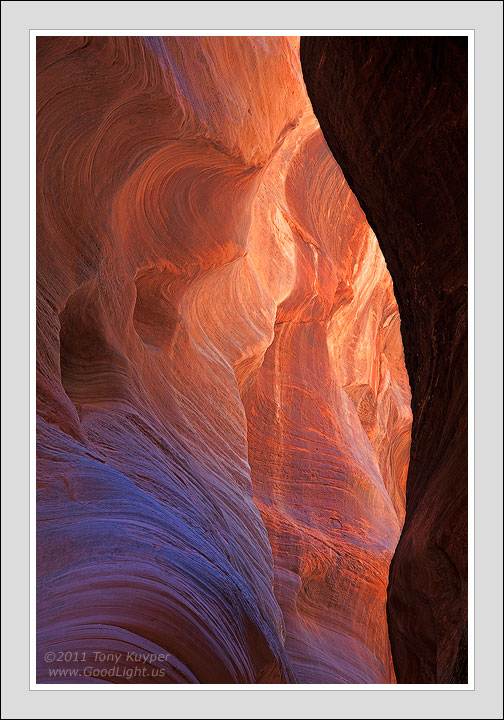
The image is another from the hike to Buckskin Gulch. This is a monitor-only image, one I haven't had time to print yet. So, of course, would be curious about your thoughts on it?
5D2, 28-200@86mm, f/14, 1/4sec

Comments
32 commentsTo answer your other question, Zenfolio, where my site is hosted, just started offering free print test service with their highest level option and I am serious considering upgrading just for that feature as a check against my monitor calibration. I am still trying to calibrate myself to my new computer with a wide gamut monitor. Even if I do not upgrade, I think I am going to order some test prints since there are so many variables with color calibration. I started using ProPhoto RGB as my color space and do not know how that will translate into prints. Previously, I have been happy with the prints I have ordered from my Zenfolio account but every thing looks different now with my new computer. I found even web browsers have a big impact on just viewing quality.
lines, and shapes. Also great detail.
I do most of my own printing up to 24" wide and proof prints are a big part of my process. I quite often make 3,4 or 5 trying to get the final print. It is usually small adjustments in color, contrast, sharpness and stuff like that. For me it is getting what I like on the monitor and then start the printing process and adjust. Seems to be the way that it works for me.
I think prints do help improve your photography. Probably in seeing how important what you do in the field really reflects (shows up) in a large print. I think you really pay more attention to what is in the frame and how it is placed. I like to think about a large print when I make the image. It seems to help me fine tune everything a bit more.
I don't usually make proof prints since I find the printer/paper gamut limiting at times. I generally prefer to have the image look "right" on screen, then figure out how to best convert it to print rather than the other way around.
Guy
The range in tone in this image is great from almost black to a bright orangish white, the deposition lines lead well out of view into the slot. As to proof prints, especially when you print your own I believe them necessary. What you see on the monitor is not necessarily what comes off the printer despite "perfect" calibration. A monitor due to luminosity is more like a projected "slide" and therefore brighter and a little more saturated ie colorful. I always find when I print a difference, but that could be a lack of a professional quality printer as well. I'd say if proof prints "assist" in making that great print from a great image then that's they way to go. I would say that those who work up a "print" on the monitor don't hit it exactly every time the first time and go back tweak and re-print. However they probably learn the differences between the "print" and monitor and compensate as well. Just observations on my part and of course IMHO.
I process on the monitor until I think I have it right and then print a 8.5 x 11 proof. Sometimes I'm dead on but usually the image needs some slight adjustments, most often in contrast and/or saturation if it's a color image. I've worked with my monitor/printer set-up long enough now that I usually get it right in no more than 3 proofs and usually only 1 or 2.
I only proof print if I am struggling with the on-screen version. I think the proof print is quite useful and I will run one (or several) before printing anything large. But I don't do large prints of most of my images, unless I sell one or I am getting one ready for a show.
Peter
Please excuse my long response and reply to your question(s), but I am VERY passionate about the subject matter presented here (print making). I simply love making prints and trying to "master" the process.
I am now doing this (photoshop/photo editing/print services) full time as a service to fine art photographers (mainly landscape, but not limited to) as well as my own work.
I currently have a variety of landscape gallery photographer clients (some of whom are in galleries and some of whom are attempting to get into galleries) to which I have been entrusted to develop their work from scratch (either the raw files or the scanned film - I love and do both). I am working with a wide variety of print labs depending on the needs of the client. Also in the last 3 or so years I have dumped countless thousands of dollars (and hours) into my own product development (and more of my clients) with the goal always to "master" the print. My personal definition of "master" is when every small step from capture, all the way to print is done in the very best way (with the equipment used) and produces exactly (or as close as possible) what my eye (or clients eye) wants to obtain. If there is even the slightest issue in the print (more so with my own work) we keep re working it until it can not be improved (and obviously some files get ditched because of overall quality issues like lack of mega pixels, camera shake, bad f/stop choice...). With clients who pay me an hourly wage, this extreme attention to detail can be obtained to the same degree if they are OK with paying for the time involved. Most often we find a middle ground and put limits on the amount of time to master a file (as an example, my current main client wants the file mastered in an average of 4 hours or less). With my own work, I have the privilege and ability to work on the image (often starting from scratch many times) over and over until "perfected". In the last 3 months I have prepared about 40 enlargement (of 50 inches and bigger) pieces for Vegas gallery (1 or 2 files of which are my own) to which will be open in a few weeks. Sometimes a client will give you a sub par file but we still have to bring it to its best potential for the clients taste and eye.
Having said all that, this is what I find best for certain situations. If you are going to use a narrow print method for your work (like I only use FujiFlex printed with the Oce Lightjet, the Durst Lambda or the ZBE Chromira) and you have a lab that will allow you to control everything on your end, these may be some useful tips:
Work everything to as close to perfection in RAW. I use ACR 6.3. I don't let the file leave RAW until every slider is touched and worked to its complete quality limit there. This is to get as clean/loss-less of a file as possible (although I do leave a bit of room for contrast and saturation, protecting end points and channel clipping). We can not use machine specific profiles in ACR (or soft proof) yet so a couple educated guesses can get you a little closer to your goal in raw, with less fine tuning needed in PS.
1. Make the image a tad brighter than you think (prints are darker than our crazy bright monitors and when you soft proof in PS the image is going to get darker).
2. Give the image a tad more pop (when you profile to a print - or soft proof - the image will always lose contrast).
3. Lastly, competent "capture sharpening" in ACR in the detailed areas (only) goes a long way in helping your enlargements have nice detail. Resist the temptation to over do here.
Color space: we could argue all day about this (lets NOT
A quality, large monitor is a MUST and if you do not CALIBRATE your monitor competently with good, updated equipment then your foundation will suffer and you will always have additional problems trying to produce a critical print. Study color management!
Now here is where we run into different approaches:
1. Do you stay in your generic color space (Srgb, Adobe 1998, or ProPhoto) and fine tune your master image there (then later profile it)?
2. Do you stay in your generic color space, but soft proof in PS immediately using the labs custom profile they sent to you (or you have had made)?
3. Do you actually convert the image into the printers specific working space (and soft proof it in PS)?
There are good arguments for all three ideas. The answer is IT DEPENDS on your goals and specific work flow.
In my current work flow for my own work (not necessarily clients) I do the following (make note, I am extremely NARROW in the type of print I make - I currently only make FujiFlex prints off of one machine - I have been doing this work flow for about 3 1/2 years now):
Once entering PS I immediately soft proof (Photoshop SIMULATING what your specific print will look like) the image using a custom profile for my labs printer/paper combination. If I do not trust the printer profile (some companies use old equipment or not so good profiles) I get one made (there are several companies that can do this for you or for thousands of dollars you can buy the equipment to do it yourself - such as Colormunki). The reason is so that all the details I am splitting hairs about are being shown on my monitor in a REALISTIC way! Our monitors are very unrealistic and do not represent what the print can look like very well. Much more could be said about this but the main thing is, if I soft proof immediately I will be in a virtual space that is MUCH more REALISTIC to what the prints limitations are, and I will be working within the framework of those limitations. This is critical. If you work an image to perfection without soft proofing (as your master file) and then later want to profile it for a print often you CAN NOT produce the same look, contrast, or colors and you can feel quite disappointed by the results. By soft proofing immediately you will be within the parameters/limitations of print reality.
Now getting to your proof (hard proofing) question. Heck yeah!
Even with a wide color gamut, high end graphics monitor calibrated to perfection and using the best possible custom profile and using a printing lab that is masterful in what they do, the monitor and the print will always look different. If "good enough" is your goal, then no problem, but if the allusive "perfection" (or a master quality print) is your goal you will most likely end up making many test prints (hard proofs).
I do the following:
I make a 12x18 test print (proof). I scrutinize it with all the attention to detail I can muster. I make re-adjustments, fine tuning it and correcting all issues. I then do another 12x18 test print. I repeat this process until the 12x18 is "perfect" in every way (this is why I have so many images all over my office walls
Of course this is time consuming (A LOT OF FUN!) and expensive (product development) but when done right, it allows a person to often produce prints of such quality they might be able to better justify higher prices (if the images are good of course).
If you do not mind, here is a photo of a fairly recent limited edition print in my home office (and yes this is my home office and a real print).
As for the post, its not really working for me, which is shocking cause 99% of your posts usually do. I kind of like the nice lines on the left side, some cool curves/shapes. The blue is a bit strong but within bounds. I just find the dark urhc too blocky, and doesnt mesh well with the lhs.
To answer your last question, personally I feel that anything photography related can improve my skills...prints (if you can afford doing that all the time?), processing, forums like these, practice, different types of photography, books..all of it helps.
Kewl shot by the way. I like it. Just enough detail in the shadows on the right to to keep it realistic. Nice work Tony.
- Dan.
A beautiful image and I really like the visual and graphic contrast between the dark and light areas. I echo Guy's comment about some increased contrast on the light side - and you took care of that nicely in the repost. I too like the hint of detail in the dark side. My only suggestion beyond what you did with the repost is give us a little more hint of detail. I know you have ways to bring out the shadow detail. The balance between shadow and light in your previous two images was just exquisite. Of course this is a different image and perhaps you're going for a different result. OR - maybe you should proof print this?
Couldn't resist. You know my process and thoughts, but to expand a little maybe some things that have been brought up here that we haven't discussed. I think more of a practical response is that I don't want to or can't afford to print multiple copies. Also, there are many like Mark who are printing for their business and must ensure quality and proofs are simply a necessary part of the process.
Another reason that I've been thinking about is this. For me, I scrutinize what's on my screen. It's like my laboratory, my workroom, my playground, whatever. And like has been mentioned, the print is the final product. When I look at the final product I don't scrutinize it. I want to enjoy looking at. I hold a 13x19 at arms length to view it and either I like it or I don't. I may judge it for color balance, brightness or saturation, but in general it's a "big picture" view. All the details have been gone over on the monitor. I just want to enjoy the output.
To be fair though, I'm not pressured in to making the print perfect since I don't have the volume of print sales, art shows or galleries that many others might. So that brings the practicality of it all back in to play. There's no great need to make a proof.
Great topic Tony. I can appreciate your work flow and clearly the results and output you create can't be argued with.
Lon
The only time I print proofs is when I'm working on prints themselves, never for a monitor presentation.
As for this image, it's fabulous Tony! The darker right side has a pleasing curve, providing a nice natural border and works really well for me
I make a separate image for web (my sort of test run) than for the prints. I feel the two are so extremely different you can not really compare the two. I see them as two totally different entities.
Lovely image as usual here... if I had a minor nit, it would be to see if you can lighten up the right side...its fairly dark and makes the image right side heavy...
Since I don't have my own printer, I don't proof print. But I have done a couple of reduxs after getting a print back. Mostly, I'm not hyper critical, and am pretty happy with the results I get back just from monitor appearance. I imagine that might change if one of my prints were sitting next to one that had all the extra time and effort put into it.
Chris
Regarding proof prints, I rarely do them as it becomes expensive and also wasteful. Generally, I complete the image, then print as needed for sales. Sometimes, after the first print, I will make a revision and print again, but I rarely need to print it more than twice.
With regards to proofing, I do make at least one proof of images that I plan on including in my portfolio or for sale in my shows. Rarely however do I run into trouble between what the image looks like on the monitor and what I get in a print. My system is fully calibrated from my scanner to my printer. Early on my prints came out darker than the monitor but I have fixed that issue by calibrating my monitor at a lower brightness and the prints match perfectly.
I do everything myself and so do not rely on a lab anymore. When I did work with my local lab before they closed down, I would work with them very closely to make sure I had the latest profile for the printers they use. When I do need a print larger than I can handle I get the profiles for the output that I intend to use and make the conversions myself and send over a ready to print file. I have rarely been disappointed with any prints I get back or make. And in 11 years of making prints for sale, I have only run across 1 photo that did not translate well to print and took me over a year to work out the color issues I was having.
Just a beautiful image like all the ones you have posted here.
PS: I am a real fan of your masks which I use a lot of in floral work.
With regards to proofing, I do make at least one proof of images that I plan on including in my portfolio or for sale in my shows. Rarely however do I run into trouble between what the image looks like on the monitor and what I get in a print. My system is fully calibrated from my scanner to my printer. Early on my prints came out darker than the monitor but I have fixed that issue by calibrating my monitor at a lower brightness and the prints match perfectly.
I do everything myself and so do not rely on a lab anymore. When I did work with my local lab before they closed down, I would work with them very closely to make sure I had the latest profile for the printers they use. When I do need a print larger than I can handle I get the profiles for the output that I intend to use and make the conversions myself and send over a ready to print file. I have rarely been disappointed with any prints I get back or make. And in 11 years of making prints for sale, I have only run across 1 photo that did not translate well to print and took me over a year to work out the color issues I was having.