Gallery: AvianPosted April 23, 2011284 views9 comments
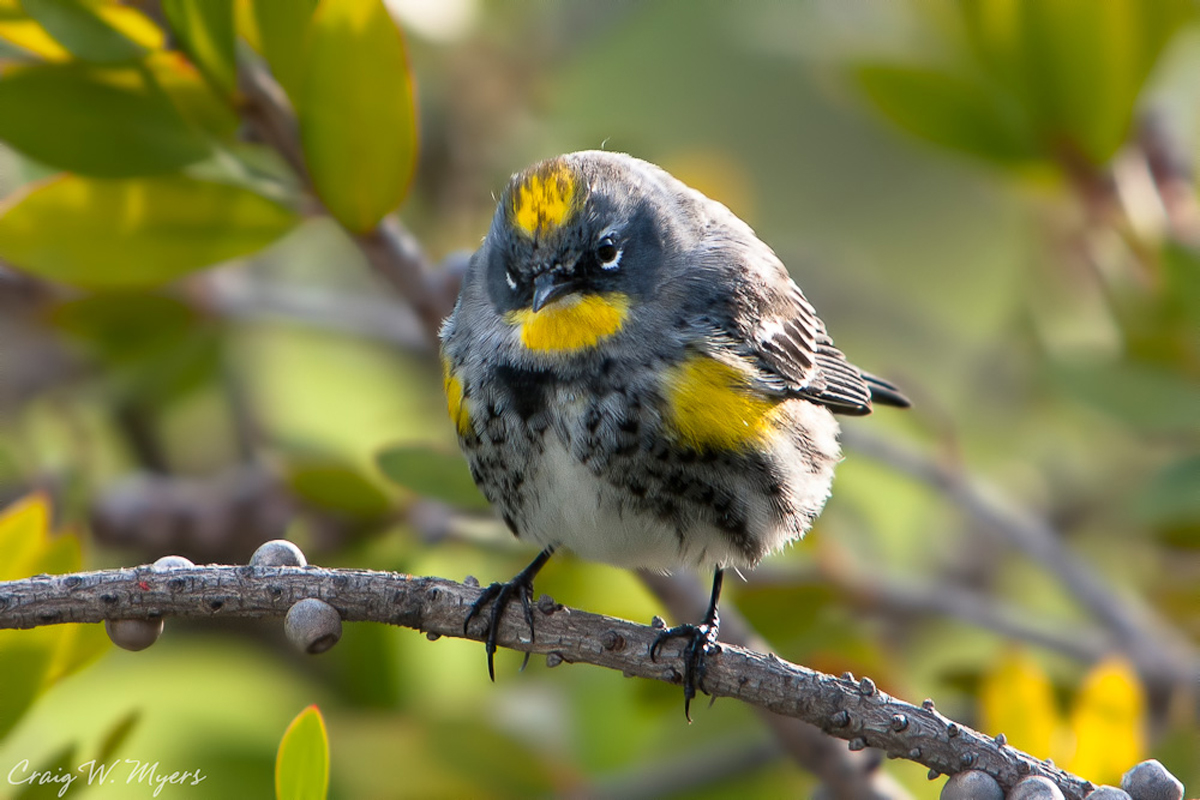
This little finch appears a bit peeved with the unlooked for attention from the photographer. Taken in early March in Escondido, CA.
Techs: Canon EOS 40D; 1/100 @ f/10; ISO 400; 400mm; 70-200 f/2.8L; 2xTC; tripod.
Comments
9 comments
Comment posted by Philip Hodgkins on April 23, 2011 at 6:54 AM
Cute little guy. I believe this is a yellow rumped warbler, in breeding plumage, probably male.
The detail looks good, and I like your choice of DOF. The light on the back and rump is harsh and could use some toning down. Ditto the overhead specular highlight. A crop on the right would get the subject out of dead center and remove the distracting bright OOF objects.
Registered on July 24, 2006, 2741 Posts, 12349 Comments
Comment posted by John Tobias on April 23, 2011 at 8:21 AM
Nice expression you caught on this one! Thanks for sharing.
Registered on September 12, 2009, 2120 Posts, 6455 Comments
Comment posted by richard remington on April 23, 2011 at 8:59 AM
I believe this is an Audubons Warbler subspecies of yellow rumped warbler. Most yellow rumps in the midwest do not have the yellow throat. The colors look great and you have nice detail. Thanks for sharing a great shot!
Rick
Registered on March 12, 2010, 105 Posts, 368 Comments
Comment posted by Ron Bielefeld on April 23, 2011 at 9:03 AM
Yes, indeed a warbler. Looks like you had some really harsh light coming in from the right side. Areas of the bird on that side are too bright as they are over 255. I like the setting a lot. Great curved perch branch and BG. I think I might have gone with a wider aperture and more shutter speed to help freeze any bird motion. To me the head of the bird is softish and it might be motion blur. It also would be helpful to know the percent of FF this image is as the lack the detail in the head may also be due to a large crop, or the use of the 2x TC.
Registered on December 6, 2008, 360 Posts, 7132 Comments
Comment posted by Wayne Willison on April 23, 2011 at 12:36 PM
What I'd like to know is, what did you say to pss him off so much.
Aside from any tech problems you may have here, the image itself is a good one, in fact a very interesting one. Good catch.
Registered on April 10, 2009, 292 Posts, 3967 Comments
Comment posted by Mia McPherson on April 23, 2011 at 2:08 PM
Craig,
I agree with the ID that this is an Audubon's Yellow-rumped Warbler. Like the pose and how the bird seems to be "giving you the eye". To my eye the head, bill and eyee appear soft, I think having the eye sharp in bird images is critical. That area might be soft because the bird moved its head slightly, your dof should have been enough to get them in focus. For me the bigger issue is the blown areas on the wing, head and flank of the bird. A touch of fill flash may have helped there but I don't use flash so I can't help with that.
Registered on June 25, 2007, 491 Posts, 12566 Comments
Comment posted by Craig Myers on April 23, 2011 at 4:43 PM
Thanks to all for the ID and your exacting eyes. I know, I know, what's this guy doing here who can't tell a finch from a warbler?It's not for lack of field guides.
Question: To what extent, if any, can/does resizing an image change its histogram? The reason I ask is that the LR3 histogram of the image from which I resized shows everything within the 0-255 range. I didn't recheck the NPN resized images before posting. But based on the comments about the blown highlights, I imported the resized images into LR. The 1200 pixel image still remained in the zone, but the smaller image was now considerably too bright. I've had images in the past lose brightness or vibrance when down-reziing and converting to jpg, but not the other way around. Is this something I should regularly consider before posting? (Or is it more a matter of my being better aware of the appearance of the highlights in the context of the image as a whole?) I'd appreciate your thoughts.
Craig
Registered on September 1, 2008, 85 Posts, 757 Comments
Comment posted by Richard Ditch on April 23, 2011 at 4:50 PM
To what extent, if any, can/does resizing an image change its histogram?
I would hope: not at all. But sharpening can/will change the histogram - sharpening is actually done by changing contrast between adjacent pixels so if your unsharpened image has pixels right at the end of the histogram then applying USM or Smart Sharpen can push those end pixels over. Since there are multiple choices in the Photoshop resizing panel it is possible that the built in sharpening of the method you use is to blame.
Registered on November 1, 2003, 1031 Posts, 12705 Comments
Comment posted by Craig Myers on April 23, 2011 at 8:49 PM
Richard,
Many thanks for the explanation. I had forgotten all about the sharpening built in to some resize algorithms. It certainly makes perfect sense.
Registered on September 1, 2008, 85 Posts, 757 Comments

Comments
9 commentsThe detail looks good, and I like your choice of DOF. The light on the back and rump is harsh and could use some toning down. Ditto the overhead specular highlight. A crop on the right would get the subject out of dead center and remove the distracting bright OOF objects.
Rick
Aside from any tech problems you may have here, the image itself is a good one, in fact a very interesting one. Good catch.
I agree with the ID that this is an Audubon's Yellow-rumped Warbler. Like the pose and how the bird seems to be "giving you the eye". To my eye the head, bill and eyee appear soft, I think having the eye sharp in bird images is critical. That area might be soft because the bird moved its head slightly, your dof should have been enough to get them in focus. For me the bigger issue is the blown areas on the wing, head and flank of the bird. A touch of fill flash may have helped there but I don't use flash so I can't help with that.
Question: To what extent, if any, can/does resizing an image change its histogram? The reason I ask is that the LR3 histogram of the image from which I resized shows everything within the 0-255 range. I didn't recheck the NPN resized images before posting. But based on the comments about the blown highlights, I imported the resized images into LR. The 1200 pixel image still remained in the zone, but the smaller image was now considerably too bright. I've had images in the past lose brightness or vibrance when down-reziing and converting to jpg, but not the other way around. Is this something I should regularly consider before posting? (Or is it more a matter of my being better aware of the appearance of the highlights in the context of the image as a whole?) I'd appreciate your thoughts.
Craig
I would hope: not at all. But sharpening can/will change the histogram - sharpening is actually done by changing contrast between adjacent pixels so if your unsharpened image has pixels right at the end of the histogram then applying USM or Smart Sharpen can push those end pixels over. Since there are multiple choices in the Photoshop resizing panel it is possible that the built in sharpening of the method you use is to blame.
Many thanks for the explanation. I had forgotten all about the sharpening built in to some resize algorithms. It certainly makes perfect sense.