Gallery: LandscapePosted April 28, 2011379 views7 comments
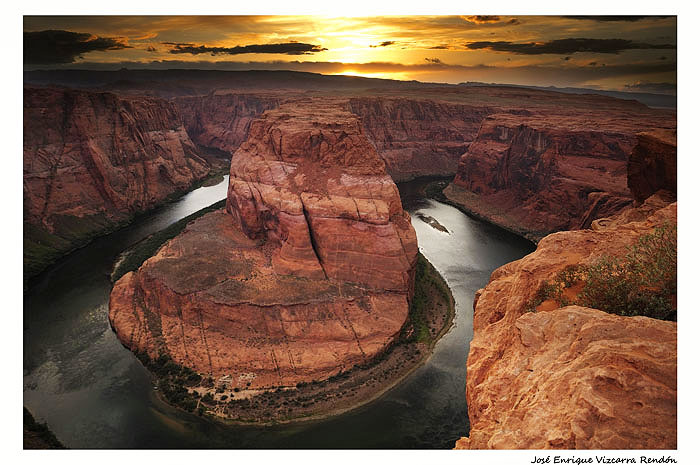
This is my version of HorseShoes
CC Welcomes !!!
Enrique Vizcarra
Comments
7 comments
Comment posted by Mark Metternich on April 28, 2011 at 11:19 PM
As a person who has spent more time than most here, I'd say I really like it! A unique perspective on it for sure.
My main issues on the image technically is that the horizon is tilted, the sky on the left is a little dark. A secondary issue, but more of a preference is that I might like to see the bottom left beach pulled out of the shot, maybe (warp or liquify in PS)...
I'm a bit of a technician, so please don't let my feedback discourage you. I give myself the same treatment. This image rocks.
Mark
Registered on June 19, 2009, 276 Posts, 6240 Comments
Comment posted by Tony Kuyper on April 28, 2011 at 11:40 PM
I was here this past weekend and didn't get anything remotely this good. Tilted horizon isn't an issue for me. The light and textures here are just incredible! Would love to hear more how you exposed and processed this.
Registered on November 1, 2003, 364 Posts, 22328 Comments
Comment posted by Enrique Vizcarra on April 29, 2011 at 12:23 AM
Mark Metternich
Not sure if it's because the horizon is a bit fallen to the right or is it a problem of my lens distortion
But if you look at the clouds on the horizon, they are straight, at least it seems to me
Thank you very much for your comments
Tony Kuyper
To select the best spot to take the picture, Michael Greene showed me two or three different points
Once I select the point that I found better, set the tripod, mount the camera and wait for the sunset
I did take 3 photos and then merge (bracketing)
The process used to merge the photos is completely manual, this means more work, but also better control
Once merged the photos, I do adjustments for areas and adjustments luminosity (Tony Kuyper's tutorials)
Finally, add a layer of Blank & White (PS5) and fused with the option to "multiply" to 12%.
NOTE: This last step is something I've been experiencing recently and it seems to me a very subtle increase in contrast of the image.
thank you very much for your comments
Enrique Vizcarra
Registered on September 10, 2009, 223 Posts, 393 Comments
Comment posted by Mark Metternich on April 29, 2011 at 1:04 AM
It prob is lens distortion, but easily corrected with PS "warp" using a linear guideline.
Registered on June 19, 2009, 276 Posts, 6240 Comments
Comment posted by Enrique Vizcarra on April 29, 2011 at 1:14 AM
Mark Metternich
seems good for me :), I will do,
Thank you
Registered on September 10, 2009, 223 Posts, 393 Comments
Comment posted by Nick Bristol on April 29, 2011 at 6:19 PM
Beautiful. This is a wonderful view of this location. Beautiful colors and a great sky. Really nice Enrique.
Nick Bristol
Lone Rock, WI
Registered on February 1, 2004, 752 Posts, 14140 Comments
Comment posted by Michael J Greene, on May 1, 2011 at 1:51 AM
Heck of a job processing Enrique. The sky looks beautiful. A few suggestions: 1) slightly darken the right side of the foreground rocks 2) lighten up the left hand corner of the background 3) personally, I would prefer a counter clockwise tilt adjustment to balance the horizon.
I hope this helps.
Michael
Registered on June 18, 2009, 86 Posts, 2317 Comments

Comments
7 commentsMy main issues on the image technically is that the horizon is tilted, the sky on the left is a little dark. A secondary issue, but more of a preference is that I might like to see the bottom left beach pulled out of the shot, maybe (warp or liquify in PS)...
I'm a bit of a technician, so please don't let my feedback discourage you. I give myself the same treatment. This image rocks.
Mark
Not sure if it's because the horizon is a bit fallen to the right or is it a problem of my lens distortion
But if you look at the clouds on the horizon, they are straight, at least it seems to me
Thank you very much for your comments
Tony Kuyper
To select the best spot to take the picture, Michael Greene showed me two or three different points
Once I select the point that I found better, set the tripod, mount the camera and wait for the sunset
I did take 3 photos and then merge (bracketing)
The process used to merge the photos is completely manual, this means more work, but also better control
Once merged the photos, I do adjustments for areas and adjustments luminosity (Tony Kuyper's tutorials)
Finally, add a layer of Blank & White (PS5) and fused with the option to "multiply" to 12%.
NOTE: This last step is something I've been experiencing recently and it seems to me a very subtle increase in contrast of the image.
thank you very much for your comments
Enrique Vizcarra
Mark Metternich
seems good for me :), I will do,
Thank you
Nick Bristol
Lone Rock, WI
I hope this helps.
Michael