Nature Photographers Network
This is the preserved archive of the original Nature Photographers Network. The community continues at naturephotographers.network.
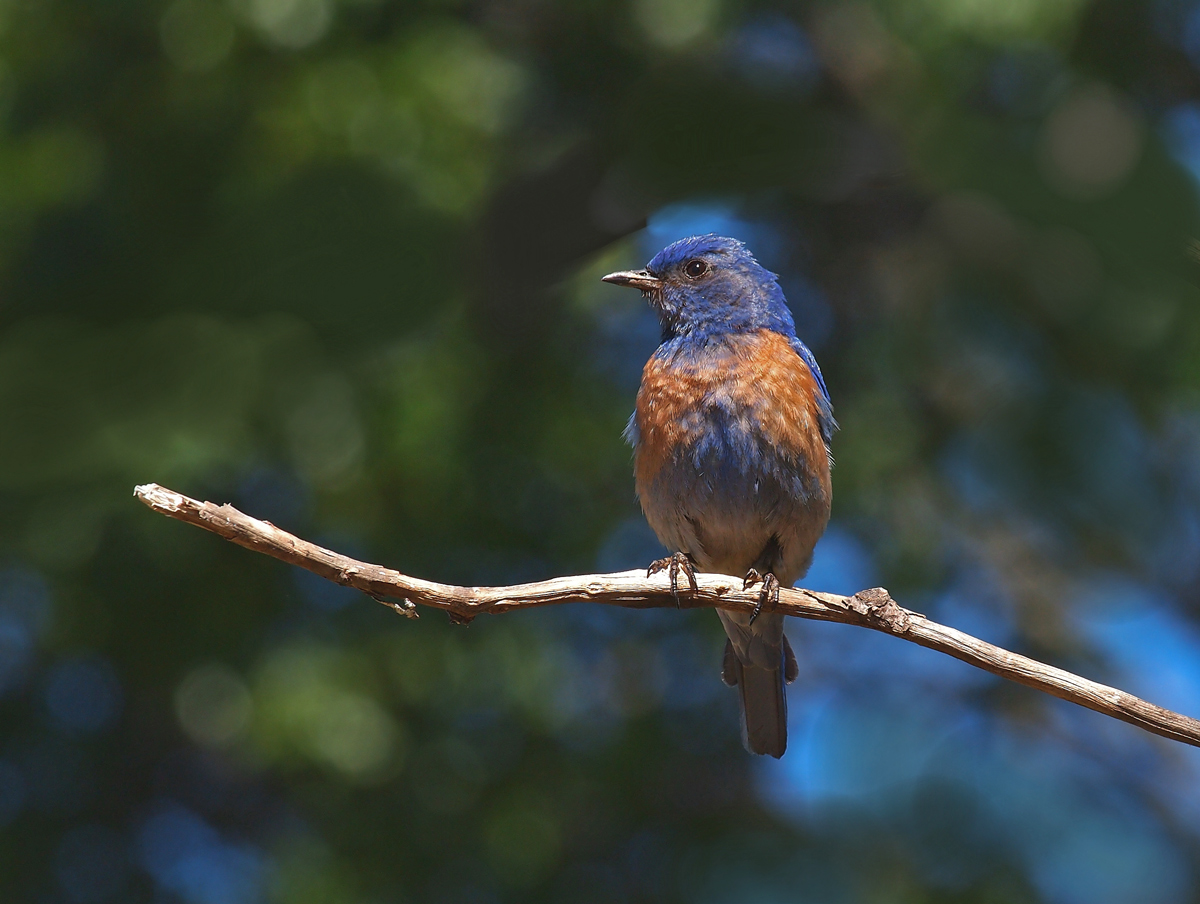
Western BB + Repost
‹ PreviousAvian GalleryNext ›

Western BB + Repost

by Charlie Baugh

Gallery: AvianPosted June 21, 201192 views13 comments
Anxious to here thoughts as to background. There was a branch almost exactly like the perch the bird is sitting upon and I cloned and airbrushed it out and feel is doesn't look quite right. This has happened to me before and I often wonder if it is because I know what it looked like before and don't trust my PP. The branch ran across just above the birds head and the light spot surrounding his head was tricky to deal with. Hit me with thoughts as to what else might help.

Olympus E-5
50-200mm F2.8-3.5
aperture priority 1/200sec @F10 -0.3 EV
flash off
spot metering
ISO 200
manual focus
2nd frame of sequential shooting.
tripod
cropped to about 60% remaining of original.


Large view provided

Thanks for suggestion and comments

Comments

13 comments
Comment posted by Richard Ditch on June 21, 2011 at 9:17 PM
The bluebird looks pretty good. But I agree about the clone work looking unnatural, and with some simple tools in Photoshop it becomes more obvious.

Personally I avoid cloning that makes such a major change to an image - I feel it is better to get the shot right at the time of capture and not to re-make the image in post processing.
Registered on November 1, 2003, 1031 Posts, 12705 Comments
Comment posted by Dennis Plank on June 21, 2011 at 9:50 PM
Excellent, Charlie. Very good detail and nice light. I like the composition and bg as well. I do see the remnants of the cloning, but to my eye, it's not obvious. Given the other bright spots in the bg, the one behind the head doesn't stick out. Sweet image.
:toast:
Registered on January 28, 2008, 1767 Posts, 23192 Comments
Comment posted by Peter Conway on June 21, 2011 at 10:18 PM
Very pretty bird! I agree with Richard that the best choice is to avoid having to clone but the tools in CS5 do make it easier to do a better job with it. Hope that helps. :smile:

Peter
Registered on June 25, 2007, 347 Posts, 3913 Comments
Comment posted by Jim DeWitt on June 22, 2011 at 12:17 AM
Very good photo; less good cloning efforts. A tough background to work on and what looks like a major chunk of change. There are some good books on PS for nature photographers that can help with major cloning efforts, but there are limits to what you can get away with doing.
Registered on August 28, 2006, 1240 Posts, 8506 Comments
Comment posted by Ashley Vincent on June 22, 2011 at 4:34 AM
Hi Charlie,

As you probably already know from some of the images I've posted up, I have no issue with cloning to create a compelling picture at all. Without seeing the original, personally I think it's very difficult to see which areas you might have altered with a mottled background such as this, so I wouldn't want to guess.

One thing I would have done directly after the clone work (that going by the grain I can see in the larger version it appears you didn't do) would have been to make a selection of the bird and the perch, invert the selection, and apply noise reduction (NR) on the background, as I find this often does a marvelous job of blending in residual effects caused by removal of elements that would otherwise be noticeable at higher magnification.

Something else I discovered is that often the best results can be achieved using not just one of the tools in PS but a combination of three: the Clone Stamp Tool, the Spot Removal Tool, as well as the Patch Tool.

On a side note, if this was mine I would likely have used the Burn tool to darken the highlights of the perch, which to my eye appear a little too bright and distracts my attention from the bird, which I hasten to add is a very attractive one at that :^)
Registered on March 1, 2011, 154 Posts, 2083 Comments
Comment posted by Charlie Baugh on June 22, 2011 at 10:14 AM
Thanks all for really helpful critiques and comments. As I improve perhaps I'll get to the place that I forsee and move to eliminate problems like this one. In the mean time in some instances as this one the subject is for me worth some effort to improve (my opinion) blemishes through PP.

I especially want to thank you, Ashley for your extensive, detailed suggestions. I will utilize this info.
Registered on April 18, 2011, 329 Posts, 1985 Comments
Comment posted by Charlie Baugh on June 22, 2011 at 2:30 PM
I did some additional cloning and darkening the perch a bit. What do you think of this? More? Less?
Registered on April 18, 2011, 329 Posts, 1985 Comments
Comment posted by Ron Bielefeld on June 22, 2011 at 4:04 PM
Charlie, I think the repost is better as the perch was a bit bright in some areas. As far as cloing goes, I have a hard time seeing what you did just by looking at the image, but I am a poor judge of cloning efforts because I don't do it much except for simple spot removal.
Registered on December 6, 2008, 360 Posts, 7132 Comments
Comment posted by Richard Ditch on June 22, 2011 at 4:20 PM
The toned down branch is an improvement. The BG is smoother than before, but doesn't look natural to me. Part of this is from the "milky" look that post processing blur gives to an area. Another part of the problem for me is way the blue sky occurs around the head of the bluebird - it makes it look like that part of the BG is unedited while all the rest has been manipulated.
Registered on November 1, 2003, 1031 Posts, 12705 Comments
Comment posted by Charlie Baugh on June 22, 2011 at 5:17 PM
Time I posted the original image so all can see what and where I did my dirty work. Richard the blue sky showing through the BG at the birds head is the precise place I am most unhappy with also.
Registered on April 18, 2011, 329 Posts, 1985 Comments
Comment posted by Ashley Vincent on June 22, 2011 at 11:29 PM
No worries Charlie, happy to share the things that I've picked up and learned along the way. The repost is a big improvement on the original you posted up, although I agree with Richard suggestion that smoothing out the background can sometimes make the appearance a little artificial, so (depending on how much time you want to spend on any one photo) you might want to try strengths of Blur or NR with each different image you work on to see which creates the most "realistic" effect.

Thanks for posting up the actual original, although unfortunately it's not loading on my screen, most likely due to a poor connection I'm experience this morning over here. I'll be back to check it though later today or tomorrow.
Registered on March 1, 2011, 154 Posts, 2083 Comments
Comment posted by Angela McCain on June 23, 2011 at 10:56 PM
But you have certainly done an excellent job of capturing the bird itself, with great details, light and colors.

When you clone a large area such as this, try clicking the aligned button as this will help you keep similar colors and textures near each other. After I do the full clone, sometimes I may go back and stamp a relatively large area and, reduce the opacity to 25-50% and "click around" to cover the edges of my prior clone. If you look in the area of your original, about 1/3 from the left, the limb is sticking up and behind it is some light yellow rounded areas. In you finished one, the area you cloned in is a flat green-this is the sort of thing that the aligned button helps to avoid.

Hope these suggestions are of help.
Registered on April 19, 2009, 367 Posts, 3589 Comments
Comment posted by Charlie Baugh on June 24, 2011 at 12:26 AM
Thanks Angela. All things suggested by someone with past experience at this helps. I do better than I did just a few months ago and your suggestion here will take me a bit further. A big thanks.

Charlie
Registered on April 18, 2011, 329 Posts, 1985 Comments