Gallery: WildlifePosted August 17, 2012192 views6 comments
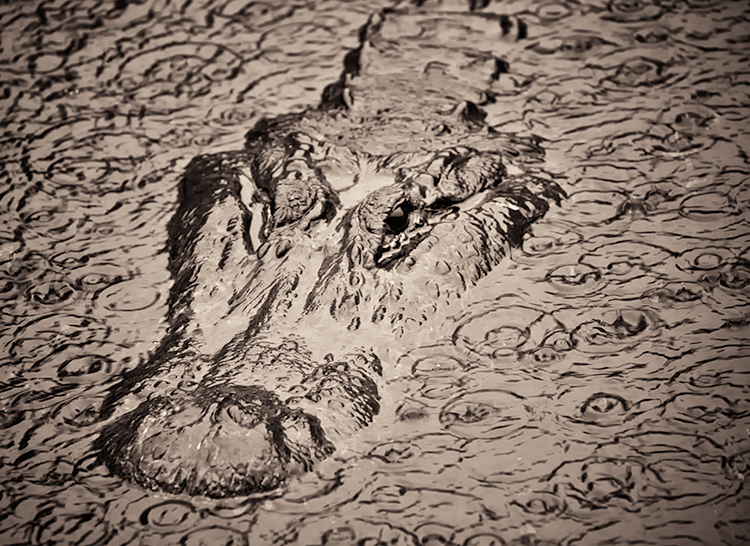
Canon 5DII, 400 5.6. I was photographing birds when it started to rain and then the alligator appeared. I normally don't think of alligators as photogenic but the rain helped. Oh yes...no mud. The alligator was in water.
Comments
6 comments
Comment posted by Wick Smith on August 17, 2012 at 3:24 PM
Wow - that's cool!
Registered on June 12, 2009, 91 Posts, 379 Comments
Comment posted by Lon Sharp on August 17, 2012 at 11:00 PM
The effects you have created here are visually interesting and I quite like the end result. It would have been helpful if you had told a little more about the situation and your processing. Are we looking at rain on water or on mud? Is this a filter effect? I mulled over whether this is best in wildlife gallery, as it appears that your processing uses some strong post processing to get this look. Posting guidelines say it is photo art if the image represents "obvious artistic renditions of nature." That said, I wasn't sure, so it is not so obvious!
Registered on December 9, 2007, 258 Posts, 9892 Comments
Comment posted by Karen Kane on August 18, 2012 at 12:55 AM
Bunn, I really like the feeling of this gator being almost "embossed" in its landscape. The texture of the rain-drops complements the texture of the gators' skin. Very cool!
Registered on August 4, 2012, 66 Posts, 726 Comments
Comment posted by Bunn Martin on August 18, 2012 at 7:52 AM
This shot was taken in the rain. The only processing involved was converting it to B&W in Nik Silver Effects with edge burning within CS6 Oh yes, the alligator was in the water...no mud...those are simply rain drops. No filter...I tend to never use filters.
Registered on September 17, 2011, 38 Posts, 167 Comments
Comment posted by Ed Williams on September 4, 2012 at 7:54 PM
Looks like you used the plastic wrap feature in Photoshop. This is really cool.
Registered on December 28, 2010, 636 Posts, 3499 Comments
Comment posted by Bunn Martin on September 4, 2012 at 8:31 PM
Ed
Not familiar with the plastic wrap feature but will check it out. All I did was convert to B&W in Nik Silver Effects and apply a Sepia tone.
Registered on September 17, 2011, 38 Posts, 167 Comments

Comments
6 commentsNot familiar with the plastic wrap feature but will check it out. All I did was convert to B&W in Nik Silver Effects and apply a Sepia tone.