Leopard! Leopard!
by Ajit Huilgol
"Leopard! Leopard!" That was my driver one early morning, as we were driving along in one of my favourite wildlife parks in the world - Kabini. You won't find the latter listed as a wildlife park anywhere, though! It is the name of the river that flows through one of the major tiger reserves in South India, called Nagarhole. The part of this tiger reserve that is close to the river is commonly referred to by the name of the river, while the part that is far away from the river is called Nagarhole National Park.
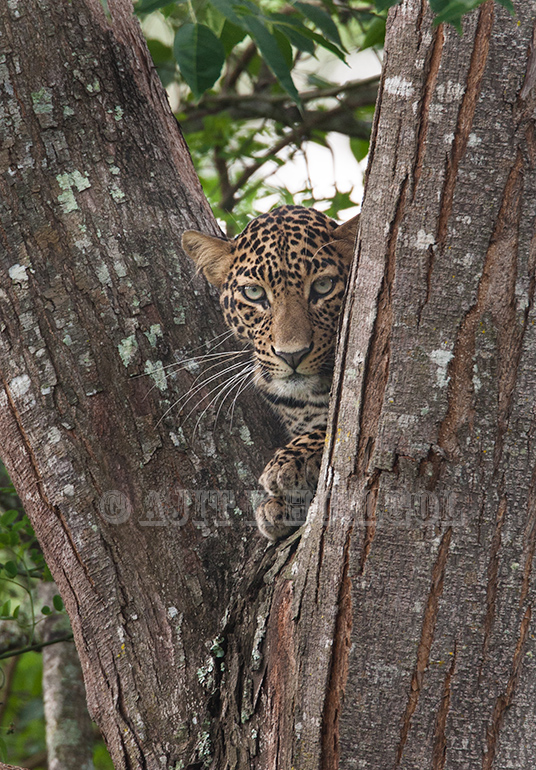
Ours (my wife and our sons) was the only vehicle, and the tree on which this young female leopard was sitting was only about 22 yards away (if you are a cricket fan, you'll refer to this as a 'cricket pitch distance' away!). Only her right eye was seen when we stopped. She looked nervous and seemed ready to flee. But, in spite of the excitement all around, we relaxed, and she relaxed, too. The driver slowly moved the vehicle forward, and now both eyes were visible.
What came next was a God-send, and I'll share those images with you soon. Let it be a suspense for now!
Equip: Canon 1D Mlll, Canon 500 f4 with 1.4 TC
Specs: ISO 500, f8, 1/160s, beanbag on vehicle.
Exp comp: -0.3, Aperture priority
Thank you for taking the time out to look, and for your comments/critiques.

Comments
10 commentsMay prefer to clone out the light patch, over the head.
Jagdeep Rajput
Awesome shot and composition.
The intriguing eyes and long whiskers are cherry on the cake
I agree with Mr. Jorne de Bruin that perhaps cropping off a small portion from top and the lower left corner to the tree will put emphasis on the leopard and thus adding more interesting compositional elements to this shot .
And definitely looking forward to your next post .
Regards
Saurabh Singh
Note that your larger image is not really larger
Regarding your comment about my 'larger' photo not being larger, I need to clarify: For the smaller image, the guidelines restrict the vertical side to 720 pixels, and so that is what it is. However, I save my files for the web in a 1024 x 768 pixels format; hence, for the larger photo, the vertical side is only 768 pixels tall. It is for this reason that the larger photo seems to be no larger than the smaller one. Whew! I hope I have myself clear. Sometimes, I'm not clear even to myself!
There are many ways to darken a bright area. One is to burn the highlights with a brush, another is to clone color, another to use a highlights luminosity curves layer and a few more. Ideally you revert back to the RAW file for best results. The cloning of the leaves is a bit too evident here, but it could work if done more carefully. Regarding your larger image: what is the point of including it if it is practically the same size?