Nature Photographers Network
This is the preserved archive of the original Nature Photographers Network. The community continues at naturephotographers.network.
Cantigney Park Caladium
‹ PreviousFlora GalleryNext ›

Cantigney Park Caladium

by John Clulow

Gallery: FloraPosted December 6, 201284 views13 comments
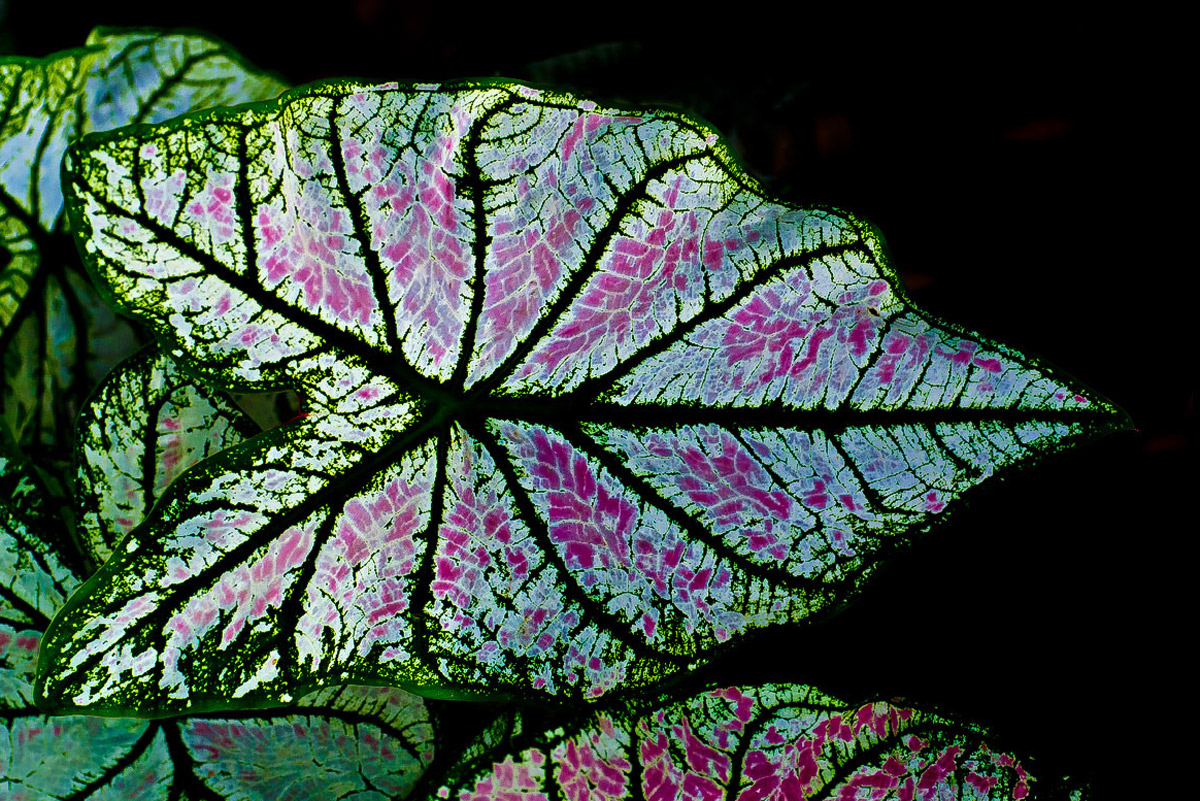
Took this during a club outing Sept 1. I liked how the backlight sort of made it look like a stained glass window. I used f/4.5 with Tamron 90mm f/1.8 macro to try to differentiate the leaves to the left of the subject leaf by reduction in sharpness. A little breeze going on so I used 1/400s with ISO 800 and a tripod.

I was also interested in the bilateral symmetry with the horizontal centerline and the visual flow of left to right. Any comments and recommendations for mods appreciated.

Comments

13 comments
Comment posted by Philip Hodgkins on December 6, 2012 at 5:51 PM
It's hard to know where to stop with something like this, but with the dominant leaf commanding the frame, lessening the brightness and focus of the others would be a good thing, either in camera or post processing. As is, the impact of the bilateral symmetry and the visual flow are impeded by the partial and competing leaves. On the plus side, the back lighting is a wonderful way to look at the caladium leaf.
Registered on July 24, 2006, 2741 Posts, 12349 Comments
Comment posted by Bill Fach on December 6, 2012 at 6:26 PM
John: I like what you've done here and see a ton of possibilities for frame filling macros. Nice job on how you handled the light. >=))>
Registered on November 1, 2003, 1805 Posts, 26981 Comments
Comment posted by John Clulow on December 6, 2012 at 7:20 PM
Thanks, Bill, and a question for Phil; Are you suggesting, as I believe you are, a PP manipulation? I just want to make sure I understand your comment. How would I have done that "in-camera"? This would be new territory for me and I look forward to your explication.
Registered on November 1, 2012, 155 Posts, 1079 Comments
Comment posted by scott lanz on December 6, 2012 at 9:54 PM
Striking image, John. Very creative and beautiful. I agree it does look like stained glass. The design of the caladium highlighted by the backlighting is terrific. My only very minor suggestion would be to try to dodge or lighten the darker areas of the main leaf.
Registered on November 14, 2003, 840 Posts, 12902 Comments
Comment posted by Mark Windom on December 7, 2012 at 12:14 AM
I agree with Phillip's suggestion re: concentrating more attn on the main leaf by decreasing the brighness anad/or sharpness of the surrounding leaves. Would be easy to do with the adjustment brush in LR or ACR. I think I would also like to see the main leaf running at a diagonal through the frame to make for a less static composition.
The backlighting and it's enhancement with the black BG are great....the patterns and colors in that leaf really jump out at you.
Registered on November 1, 2003, 176 Posts, 2302 Comments
Comment posted by Gary Yeoh on December 7, 2012 at 3:10 AM
John:
Wonderful image and sure looks like stain glass. You may want to rotate the image 90 deg clockwise to emphasize the symmetry.
Registered on September 1, 2009, 588 Posts, 8184 Comments
Comment posted by Mark Seaver on December 7, 2012 at 11:12 AM
It's a fine look at the main leaf. I think that the partial leaf on the bottom could be burned in so it attracts less attention. I don't find the leaves on the left that distracting because they are darker and don't have much of the purple/magenta.
Registered on January 23, 2011, 1103 Posts, 17270 Comments
Comment posted by John Clulow on December 7, 2012 at 1:13 PM
I do appreciate all the comments, and this is me taking a crack at Phil Hodgkins' suggestion, as I understand it. Let me know what you think.
Registered on November 1, 2012, 155 Posts, 1079 Comments
Comment posted by Bob&Charly Nelson on December 7, 2012 at 3:46 PM
I think there are a ton of suggestions and things to play with in this image, I might even try blacking out everything but the main leaf, but that is pure subjective. I love the back lighting, and think you had great vision to spot this.
Bob :wavey:
Registered on October 27, 2005, 289 Posts, 4202 Comments
Comment posted by John Clulow on December 8, 2012 at 7:32 AM
:wavey: Hi Bob, and thanks for your comments :smile:
Registered on November 1, 2012, 155 Posts, 1079 Comments
Comment posted by Russell Colletta on December 8, 2012 at 11:06 AM
Quite nice John, and the RP is really nice. Did you consider changing the orientation to a vertical? It seemed like a possibility to me.
Registered on October 31, 2009, 114 Posts, 1008 Comments
Comment posted by Philip Hodgkins on December 9, 2012 at 12:42 PM
Everyone has pretty much covered what I had suggested, in one way or another.

What I do in similar situations, and is a workable solution for emphasis and deemphasis, is to separate the subject from the background and other elements subordinate or distracting by selection and keeping the subject (here the main leaf) as the top layer.

I do this in PS with the "Refine Edge" command which can be set by default to promote the selection to a new layer. Thus, any treatment to one layer can be independent of the other layer.

This can be tricky if you are applying blur to the lower layer, but there are workarounds such as saving the initial selection and inverting, thus preventing the treatment to the duplicate of the top layer. If for example you apply a blur to the bottom area you will create a halo around the top (subject) layer, barring the duplicates exclusion by selection.
Registered on July 24, 2006, 2741 Posts, 12349 Comments
Comment posted by Morris McClung on December 11, 2012 at 3:28 PM
I really like the comp and orientation of the leaf. Great color and I like that you kept the blacks black. :toast:
Registered on May 7, 2007, 670 Posts, 19650 Comments