Upper Tahquamenon Falls
by Thomas Pettengill
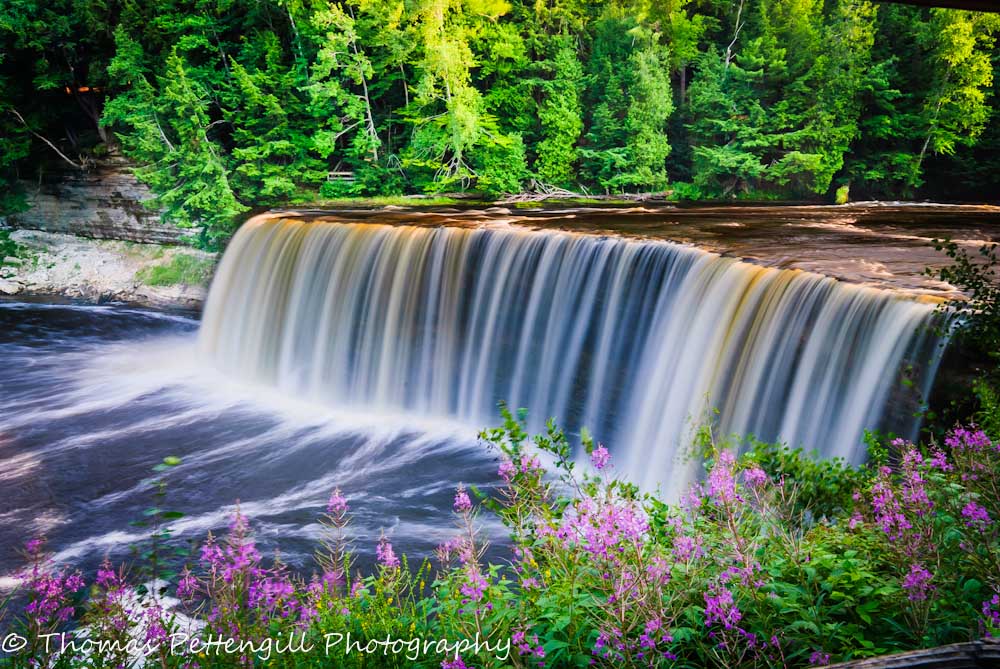
This photograph was taken with my Nikon D-7000 camera and Nikon 18 - 35 mm lens. The camera was mounted on a tripod. I used a circular polarizer and Graduated ND filter. ISO 100, f/22, 1.3 second exposure.
This is the Upper Tahquamenon River Falls in Michigan's Tahquamenon Falls State Park near Newberry, Michigan. I really liked the different colors of the water going over the falls and I thought the Fireweed in the foreground added to the scene.

Comments
7 commentsA very lovely scene. I too notice the varying color in the falls - that's very cool. The fireweed is also a nice addition as you mentioned.
Looks like you got the dimensions ok for the larger view, but this one here is still too small to give it a good critique. While I like the overall capture of the larger view, there are a few comments I have. It's soft in general which can be any number of things, but I see quite a lot of blowing leaves and such at the bottom. Not much to be done there except advanced focus stacking and playing with higher shutter speeds and/or film speeds. Jpg compression is hurting this as well. The greens in the forest bg are a bit too saturated for my taste, but interestingly the fireweed flowers and greens look pretty good at the bottom.
This is pretty close to borderline "Man & Nature" as well. I say that because it looks like you're capturing this from a walkway and there's a railing at the bottom and something intruding up top. Also some orange light in the bg left. All minor and picky, but even from a presentation point of view, the bottom rail or whatever it is and the dark branch in the URC are mildly distracting. Not a huge deal, but something think about for next time.
I just took a quick peek at your website and you have some excellent images. But I wanted to note that all the images look good in terms of color, sharpness, etc. In fact, looking at this image on your site - a world of difference compared to what you've posted here and even the larger view.
Don't know what your workflow is or how you're saving to present here, but here's a couple of thoughts. Never re-size and re-save your jpg's; always work from an original copy of your master PSD or TIF file. Resizing from say the image you post on your website to a smaller size, and resaving, you will certainly loose quality. Are you converting to the sRBG profile when saving? You need to do this to ensure it displays best in all browsers. (just checked and I see that you are, so not sure why this appears more saturated than the version on your website.
Anyway, hopefully you can get the images posted here that look as good as the ones on your website!
Thanks for posting.
Lon