Nature Photographers Network
This is the preserved archive of the original Nature Photographers Network. The community continues at naturephotographers.network.
New Navajo Bridge
‹ PreviousMan & Nature GalleryNext ›

New Navajo Bridge

by Tony Kuyper

Gallery: Man & NaturePosted July 27, 20133,098 views8 comments
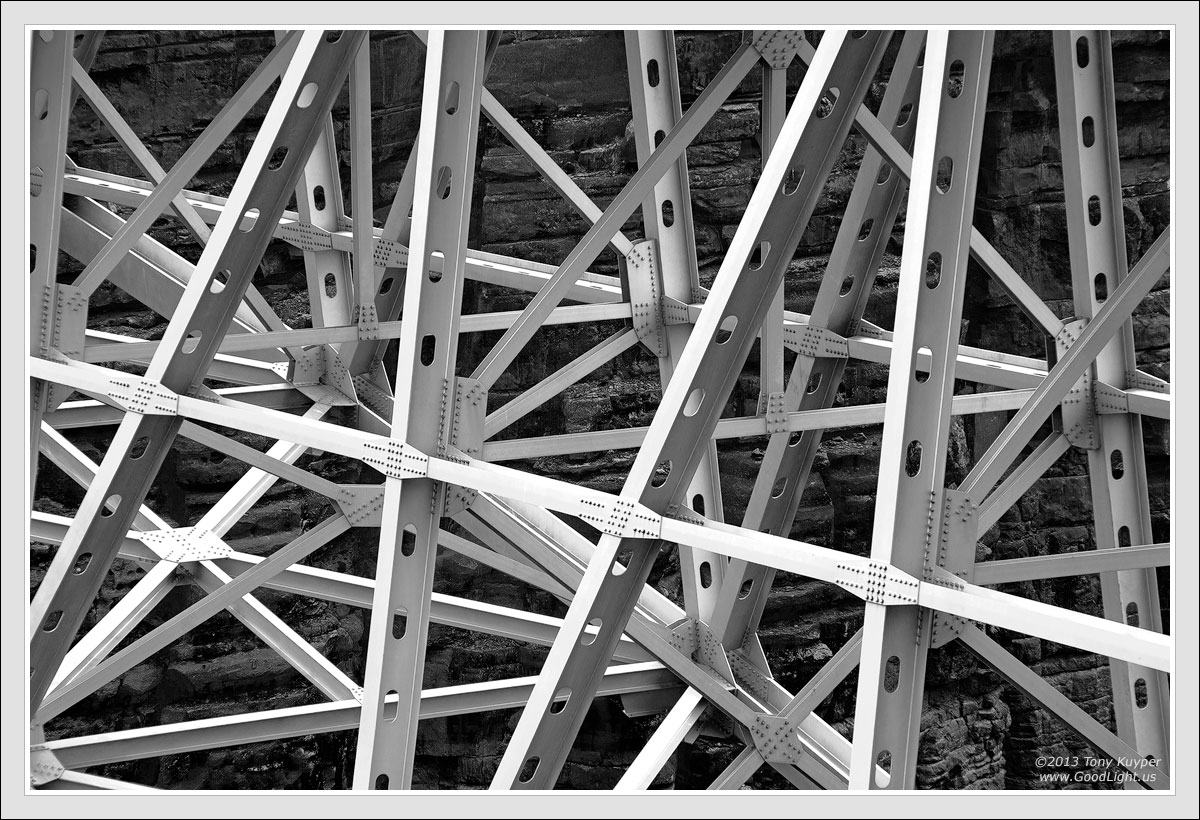
The new Navajo Bridge was completed in 1995. It spans the Colorado River Canyon (which soon becomes Grand Canyon) on Highway 89A just south of Lees Ferry. The arch of the bridge spans 720 feet. The river is 470 feet below. More information about the bridge can be found here. While I took several versions of the bridge, I liked this tight shot best as it shows the complex structure needed to make the overall elegant bridge possible.

There is an interpretive center on the west side of the bridge where both the old and new bridges can be viewed. This image was taken from there in January this year. An inversion layer had formed with clouds hanging just above the area around Lees Ferry. The lack of harsh shadows created a soft light that allowed the natural and man-made elements to be distinct without harsh shadows.

I do so little black and white that I'm sure I wasn't consciously thinking about it when I took the picture, but the ACR work indicated there were possibilities. Still (because I do so little black and white) I was unsure how to proceed. Fortunately I had a copy of Guy Tal's Creative B&W Processing Techniques. I read it today. It's an excellent guide for thinking about B&W and then processing to achieve specific goals. It absolutely made this image possible. My biggest hurdle before I read the book was getting past the original colors. The somewhat light-toned, warm-colored sandstone had to be dark to provide better contrast with the bridge's girders. The simplified steps to do this as described in the book are:

1) A colored RAW conversion that ended up being slightly yellow-green.
2) A B&W adjustment layer (in this case coupled with an intervening Exposure adjustment layer) to create a slightly flat black and white conversion.
3) Photoshop processing to provide the finishing touches.

The book helped me understand how any color can be converted to any tone (light or dark), and once this concept sank in, the actual Photoshopping went pretty quickly.

Your thoughts and recommendations, would, as always, be helpful.

5D2, 28-300 @ 200, f/16, 1/125 sec. Five images focus-blended in Helicon Focus. Complete Photoshopping is at the bottom of this page.

Comments

8 comments
Comment posted by Philip Hodgkins on July 27, 2013 at 9:53 PM
Nice. The explanation is appreciated. Learning this as a technique would be helpful.
Registered on July 24, 2006, 2741 Posts, 12349 Comments
Comment posted by Stan Rose on July 28, 2013 at 1:57 PM
Cool. I haven't read Guy's book, but when i first started converting shots his advice in OP to always start with color (then envision the tonality) was spot on and ive run with that idea. I have a love-hate relationship with bridges, some can be 'elegant' but some (like the Salt River Bridge that i passed over last week) enable thoughtless people to trash the natural landscape (hence the mounds of garbage and used toilet paper at every pullout...) But i digress...
This is a pretty darn good shot, but since i know you're a perfectionist ill offer you one nit: the extreme left side is a little tense since ideally you need a bit more on the lhs to balance the girder on the extreme rhs. Since i'm assuming that extra real estate doesn't exist, my advice would be to crop somewhere between the '2' and the 'T' in your copyright and that gets rid of the unnecessary tension IMO.
Registered on September 15, 2005, 836 Posts, 17099 Comments
Comment posted by Morris McClung on July 28, 2013 at 10:06 PM
That is a very cool shot. I love your conversion and it's very shiny metallic appearance. Thanks for all of the info on your pp work going into it. I don't think there is anyone as generous with sharing his methods, Tony. :toast:
Registered on May 7, 2007, 670 Posts, 19650 Comments
Comment posted by Harley Goldman on July 31, 2013 at 12:24 PM
Excellent Tony! Love the glow to the silvers in the image. Great conversion. The lines and tones make a wonderful semi-abstract.
Registered on November 19, 2003, 586 Posts, 11271 Comments
Comment posted by Scott Smorra on August 1, 2013 at 12:51 AM
I really like this one Tony. The geometric shapes are excellent and like how you framed the image. This looks great in b/w.
Registered on November 2, 2009, 161 Posts, 2143 Comments
Comment posted by Nick Bristol on August 3, 2013 at 10:58 PM
Hi Tony! This is very cool and the complex structure is really interesting to see. Your b&w conversion looks great! Thanks for posting this and all the info! :toast:

Nick Bristol
Lone Rock, WI
Registered on February 1, 2004, 752 Posts, 14140 Comments
Comment posted by Bill Reid on August 4, 2013 at 10:39 AM
Beautiful geometric patterns and silver tones in this Tony. Great processing for the B&W. Thanks also for all the info you share with us. Well done. :toast:
Registered on January 27, 2013, 65 Posts, 2460 Comments
Comment posted by Paul Breitkreuz on August 5, 2013 at 12:58 PM
Tony, like you I hardly ever work in B&W, in fact I did my first conversion only recently two weeks ago. This cature and processing is super. I really like seeing such fine detail in the girders. Thanks for your comments on the subject of B&W conversion as well as the link to the bridge history. It was a fine read on the subject as well.

:smile:
Registered on February 25, 2006, 525 Posts, 8448 Comments