Nature Photographers Network
This is the preserved archive of the original Nature Photographers Network. The community continues at naturephotographers.network.
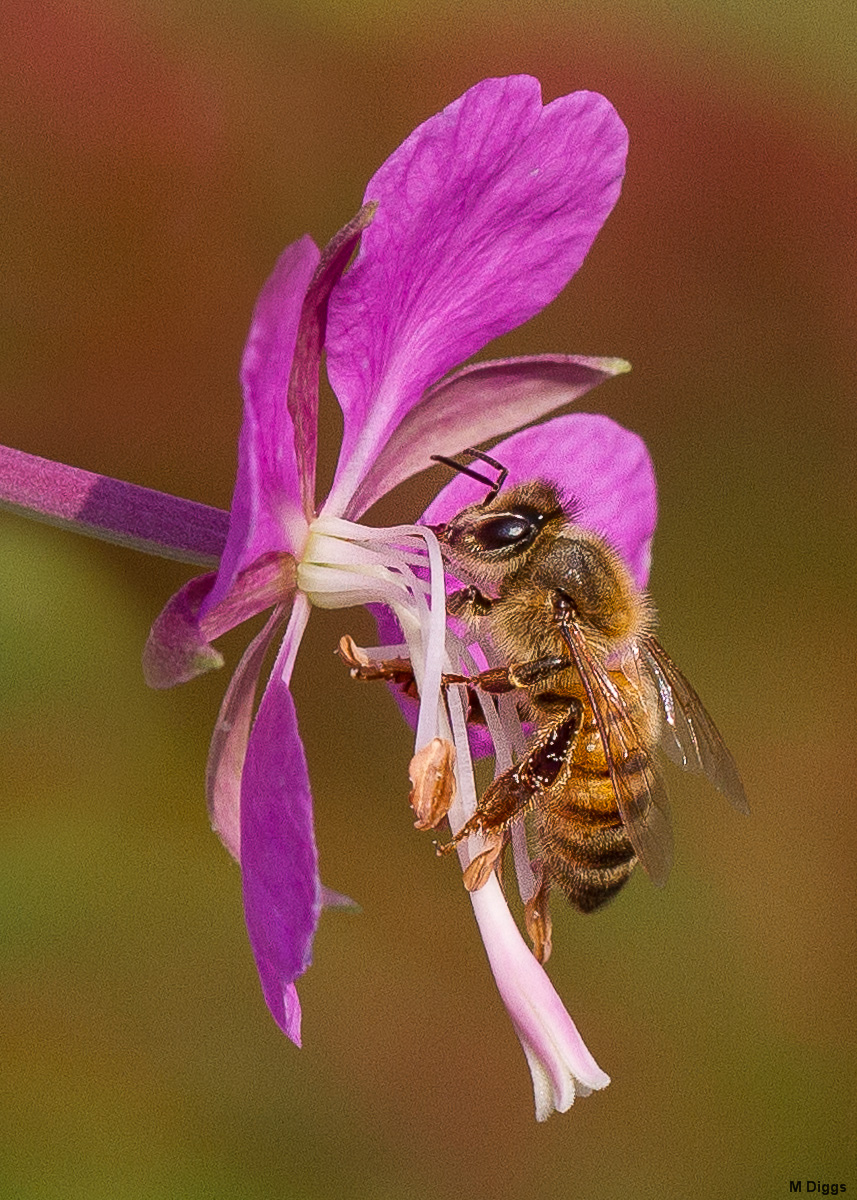
Fireweed with Bee + Reduced Noise Repost
‹ PreviousMacro & Close-up GalleryNext ›

Fireweed with Bee + Reduced Noise Repost

by Marylynne Diggs

Gallery: Macro & Close-upPosted August 22, 2013107 views8 comments
It's been a while since I've shot anything but landscapes, but it was calm and overcast today, so I went bee hunting. I believe this is a honeybee, but my bee/hoverfly/wasp identification isn't very good.

Anyway, feedback appreciated. This is a significant crop, so I can recompose pretty wildly if necessary.

7D w/ 100mm
ISO 200, f/6.3, 1/800s

Comments

8 comments
Comment posted by scott lanz on August 22, 2013 at 9:54 PM
Perfectly composed as is, Marylynne. The flower is pretty, the bg is beautiful, and the bee has superb detail. Very good job isolating the bee and flower from the bg. I really like flower and bee images that are artistically composed, as this one is. My only issue is with the grain or noise (more noticeable in the larger version) which may be from the significant crop, or from being over sharpened, and/or maybe from compression. Thanks for sharing this very enjoyable bee/flower image. :toast: :wavey:
Registered on November 14, 2003, 840 Posts, 12902 Comments
Comment posted by Marylynne Diggs on August 23, 2013 at 12:02 AM
Thanks, Scott. I always struggle to compose well with these kinds of situations, so I'm glad this one is pleasing.I'll try some noise reduction on the bg and see how it looks in the tiff as well as jpeg.
Registered on December 14, 2010, 122 Posts, 1034 Comments
Comment posted by Marylynne Diggs on August 23, 2013 at 3:11 PM
Here is a version with NR applied. I don't think I can repost with a larger one, but this certainly looks cleaner on my monitor. I think it was a combination of sharpening without masking in LR and cropping a good 50-60%. Clearly not one to print large ;-).
Registered on December 14, 2010, 122 Posts, 1034 Comments
Comment posted by scott lanz on August 24, 2013 at 7:10 AM
Repost looks even better, Marylynne.
Registered on November 14, 2003, 840 Posts, 12902 Comments
Comment posted by Mark Seaver on August 24, 2013 at 12:06 PM
I like your comp. choice here and the detailed look at the flower and bee. It does seem oversharpened to me. The repost is significantly better.
Registered on January 23, 2011, 1103 Posts, 17270 Comments
Comment posted by Marylynne Diggs on August 24, 2013 at 12:25 PM
Thanks. I did nr and reduced the sharpening a tish, especially on the bee. I think I have my export sharpening set to "high" and "for screen" and that combined with the sharpening within LR's Develop module created the problem. I used to only use export sharpening, and since I've experimented with more sharpening in the Develop pane, I haven't quite found the right balance.

Feedback is mucho appreciado.
Registered on December 14, 2010, 122 Posts, 1034 Comments
Comment posted by Philip Hodgkins on August 24, 2013 at 8:24 PM
You should have no noise to reduce at ISO 200, unless you were badly underexposed and corrected, or over-sharpened, one. The large image is heavily sharpened and the source of the grain IMO. If I might suggest, instead of relying on LR and export sharpening, try not sharpening, or only minimally sharpening in LR. Save your sharpening for the final resize to 1200 pixels and use smart sharpening on a layer, where you can delete or adjust the layer before merging. I have used USM and various sharpening schemes in the past, but have found smart sharpen far and away the best tool.
Registered on July 24, 2006, 2741 Posts, 12349 Comments
Comment posted by Marylynne Diggs on August 24, 2013 at 9:28 PM
Thanks Phil. You may always suggest. That's why I post :toast:

I am shocked at the noise on a big crop at 200 ISO with the 7d. My camera copy is not all it's cracked up to be in the noise dept, unfortunately. I rarely push ISO beyond 400 for that reason.

When you say you typically save sharpening for resize and smart sharpen on a layer, I think you are talking about Photoshop processes I don't really use. I export to a sized jpeg from within LR. I have PSE, but not the full version and generally don't use PSE at all unless I'm completely changing out a background or sky or something like that. Are the algorithms so much more sophisticated that I should use smart sharpen and USM? I wonder of the process is replicable in LR somehow?
Registered on December 14, 2010, 122 Posts, 1034 Comments