Nature Photographers Network
This is the preserved archive of the original Nature Photographers Network. The community continues at naturephotographers.network.
Yes Mom version 2
‹ PreviousWildlife GalleryNext ›

Yes Mom version 2

by Andrew Sentipal

Gallery: WildlifePosted March 29, 2014270 views7 comments
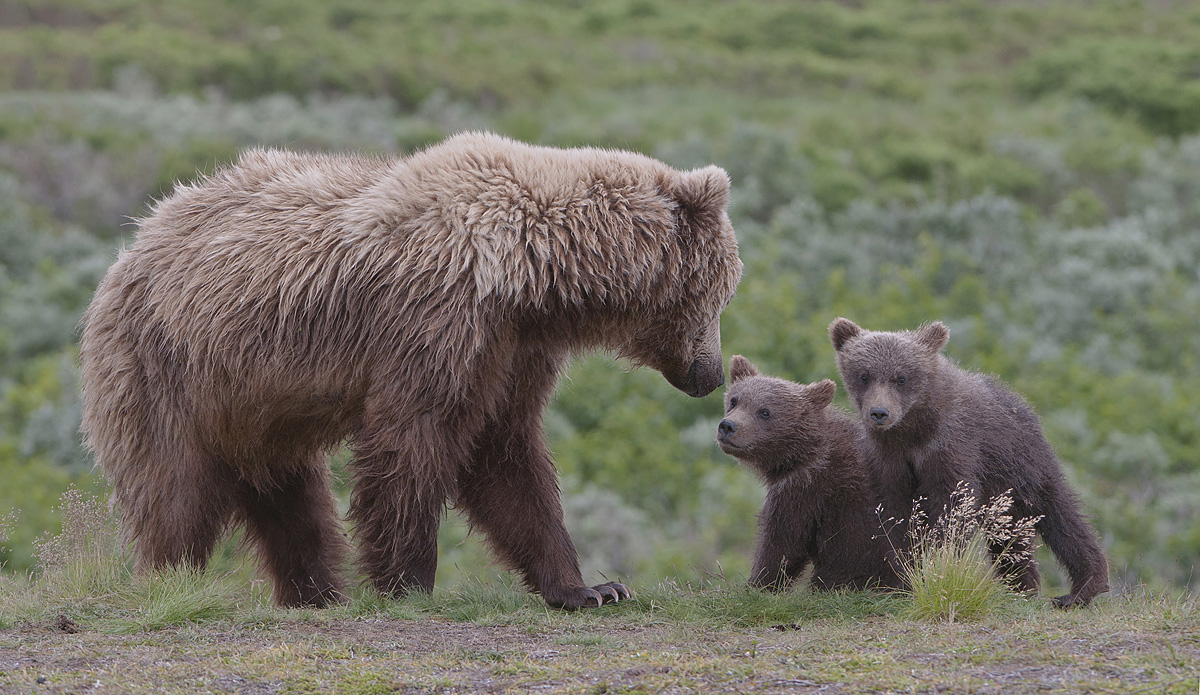
Here is a second version taken a split second after the first I posted on 3-24-14. You know these interactions are quick plus being in a field with a Mom and two cubs gets the heart beating. Reviewing all comments from the earlier post this version has : a break between Mom and the cub (no snout covering the cub) , selective sharpening on the cubs and the image has a little more contrast. I did use curves in Photoshop, then added a little more saturation and then a little contrast boost .Not sure what linear contrast is ? Still look flat ?

Nikon D300 F8 1/200 ISO 400 with Nikon 200-400.
Comments and critiques please. Any better ?

Comments

7 comments
Comment posted by Mark Seaver on March 29, 2014 at 3:57 PM
It's a good interaction shot, but even with the overcast sky, this seems flat. If you're using linear contrast, you should try medium contrast in your raw processor. That uses a gentle "S" curve for the relationship between the input image and the output image and usually adds some nice "pop". Since you don't seem to know about contrast curves, I strongly recommend that you do some homework, I'm sure there are discussions on the web. I haven't seen the earlier image, but I'll get there shortly.

Got there. This is definitely sharper, which is a big improvement, with the cubs and the grass clump nicely sharp here.

The repost is a good improvement.
Registered on January 23, 2011, 1103 Posts, 17270 Comments
Comment posted by Gary Gulash on March 29, 2014 at 5:59 PM
I much prefer this photo with the enhancements that you have made over the first offering. There is just a slight sharpening halo, most apparent on the adult, just under the chin for example. I agree with Mark that the contrast could be increased a bit; simple darkening the darks might be all it would require at this point.
Registered on January 28, 2005, 879 Posts, 12098 Comments
Comment posted by Andrew Sentipal on March 29, 2014 at 6:15 PM
Everything darkened a bit. Better ?
Registered on February 16, 2008, 200 Posts, 317 Comments
Comment posted by Ken Watkins on March 30, 2014 at 3:39 AM
Andrew,
This is a far nicer post than your first image.
Advice on processing is always difficult, and of course judging colour on files as small as these are is very subjective. Furthermore the monitor you are using and your internet browser can have a major effect.
Always use a browser that has colour management such as Google Chrome.
Back to the image, I have never seen a Brown Bear so comments on colour might be wrong.
This looks to have a slight magenta cast.
I do not know what you are using to process your raw images so it is difficult to recommend a method,
I have Adobe PS 6, and this is the method I have tried.
To reduce the slight Magenta cast I use the color balance tool and moved the slider in both shadows and midtones slightly to the left, this also has the advantage of making the grass slightly greener.
Linear Contrast is another of the adjustment functions in PS which to my eye is great for tweaking contrast which also seems to me to sharpen slightly.
Finally a tad more sharpen using the smart sharpen filter, I use this very lightly set to lens blur at 50% at 0.1 px if necessary repeating.
I hope you do not mind but here is a repost.

There are so many ways to "improve" images it would be impossible to give you a "correct" way to process.
Registered on December 15, 2010, 1537 Posts, 4877 Comments
Comment posted by William Bickle on March 30, 2014 at 5:14 PM
Hello Andrew

Like the positioning of all three much better. When posting an image I try to relate to my memory from that experience and the colourization at the time as well the tonal quality and shadows etc... You need to ask yourself How did I see this at that time?

Enjoy your posting

Bill
Registered on June 13, 2011, 183 Posts, 1702 Comments
Comment posted by Rick Cloran on March 31, 2014 at 4:17 PM
Andrew, yes, this is stronger than the first with better contrast. It is sharper as well. I agree with Ken that there seems to be a slight color cast. Were you using auto white balance? Mark mentioned it, but the "Linear" curve is just one of the presets that is selectable from the drop down on a Curves adjustment layer in Photoshop. it is a very gentle curve and generally does the trick if your image is looking a little flat. Good job on using the prior comments to guide the processing on the new image. Both the pose and the processing are on the plus side.
Registered on April 6, 2004, 119 Posts, 1989 Comments
Comment posted by Alan LaFaver on April 1, 2014 at 8:29 AM
Definitely better. I see that the focus here on both mother and cubs is better. Her coat looks great and you can see cubs better with more detail.

Looks great to me!
Al
Registered on February 28, 2014, 18 Posts, 147 Comments