Pocket Full of Stars (+)
by Jared Warren
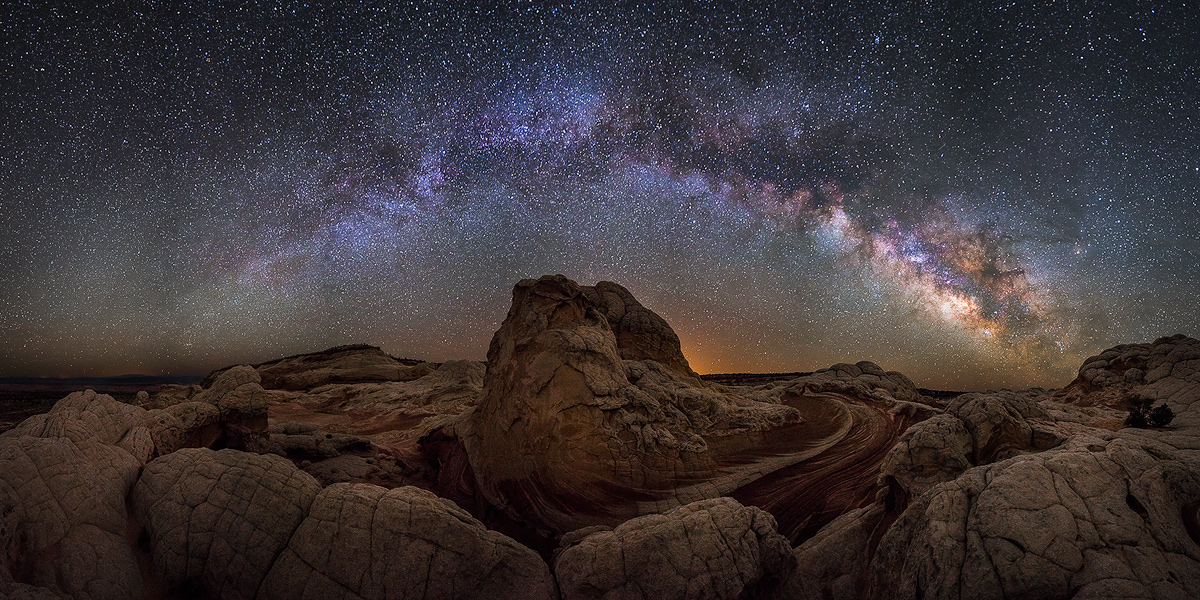
From the same night of the White Pocket milky way photo I posted earlier this month, this 180(+) degree pano is stitched from 12 images. I had never tried a MW pano like this before, so what the heck.
It bothers me a little that it doesn't seem balanced (with more "action" on the right), but maybe that's unavoidable with a milky way pano image. I'll post a cropped version and solicit your opinions on which one works better. Any other C&C would be much appreciated as well.

Comments
22 commentsI prefer the cropped version but they're both fantastic for my tastes.
pat
I don't mind the balance or the light pollution. I like how it's a little behind the taller rock formation.
Wish you had some tech info as I'm intrigued by this process.
Also, don't know if it was possible or if it would even look good, but I'd like to see a little light painting on the FG rocks, maybe a nice orange glow, just as an experiment.
Regardless, great shot!
Nick Bristol
Lone Rock, WI
Without the specs, it appears you got a lot of light with a short exposure, judging from the pinprick stars.
About a perfect "star" photo….
I like both versions, the cropped is a bit more dynamic.
As to the specs: The 6 sky exposures were at f/2.8, 25 seconds, ISO 5000; 6 terrain exposures at f/2.8, 30 seconds, ISO 8000. In hindsight I should have used a longer exposure with lower ISO for the terrain, but my 5D3 has handled that level of noise relatively well as long as the shadows aren't pushed too much. Stitching done in Photoshop. Applied some global contrast, clarity, and other adjustments in Lightroom, then played around with TK luminosity masks, curves, and minor selective color adjustments in PS. Bumped the final image 1/3 stop for online viewing on white background.
It is noisy when viewed at 100%, but the file is over 14000px wide, so reducing for web viewing and most printing sizes yields a fairly clean image. I'm still learning, but overall I'm happy about the image and it's been fun to work on.
Seriously, this is stunning.
I think both versions have their merit. The pano is more "epic", the crop has a more dynamic feel. Really only a matter of taste, both are killer images.
I meant to comment earlier, but I have been out of the country. This is very well done, especially the planning. Of the two crops presented, I would choose one in between: make the left edge where the Milky Way meets the horizon. To the left of that point is uninteresting and this would slightly break the symmetry.
Regarding processing, you've got nice natural colors in the core of the Milky Way on the right, and the green airglow near the horizon (the middle third of the image is trying to come out, just suppressed a little by the blue color balance. The Milky Way star clouds at the top of its arch around the image center are unnaturally blue, though I understand this is popular these days. The one distracting thing for me is the vertical dark seams between your exposures. In raw conversion did you use the lens profile correction for light fall-off? If so, then the image should have gone together better without these showing.
The stars lack color, most likely due to the high ISO. I would have used ISO 1600 on the camera, then I've found that pulling a stop or so in raw conversion really helps maintain star colors, without a loss of low level details (output 16-bit tiffs). Then in post processing, use curves, not levels to boost low level information. Remember, changing ISO does not change light sensitivity.
Overall well done, and with a change in post processing could push this image over the top. I like the intensity of the land, but it too may be a little blue.
Roger
Gary.